EN
50
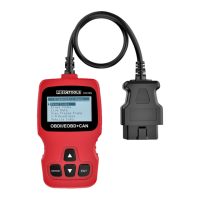
2. 128 x 64 pixels with adjustable contrast to show test
results.
3. Up arrow – to browse up through menu and submenu
items in menu mode. If more than one display image
is active the button is used to browse from the display
image shown to the previous display image.
4. ENTER button – to acknowledge selection or steps in
menus.
5. EXIT button – to cancel selection or steps in menus,
or return to previous menu. The button is also used to
exit the fault code display image.
6. Down arrow – to browse down through menu and
submenu items in menu mode. If more than one display
image is active the button is used to browse from the
display image shown to the next display image.
FIG. 1
HOW TO USE
LANGUAGE
Go to main menu, browse to Language with the arrow
buttons and press the ENTER button to conrm.
– Main Menu
– Diagnostics
– Language
– Contrast
– Unit of Measure
FIG. 2


 To Next Page