3
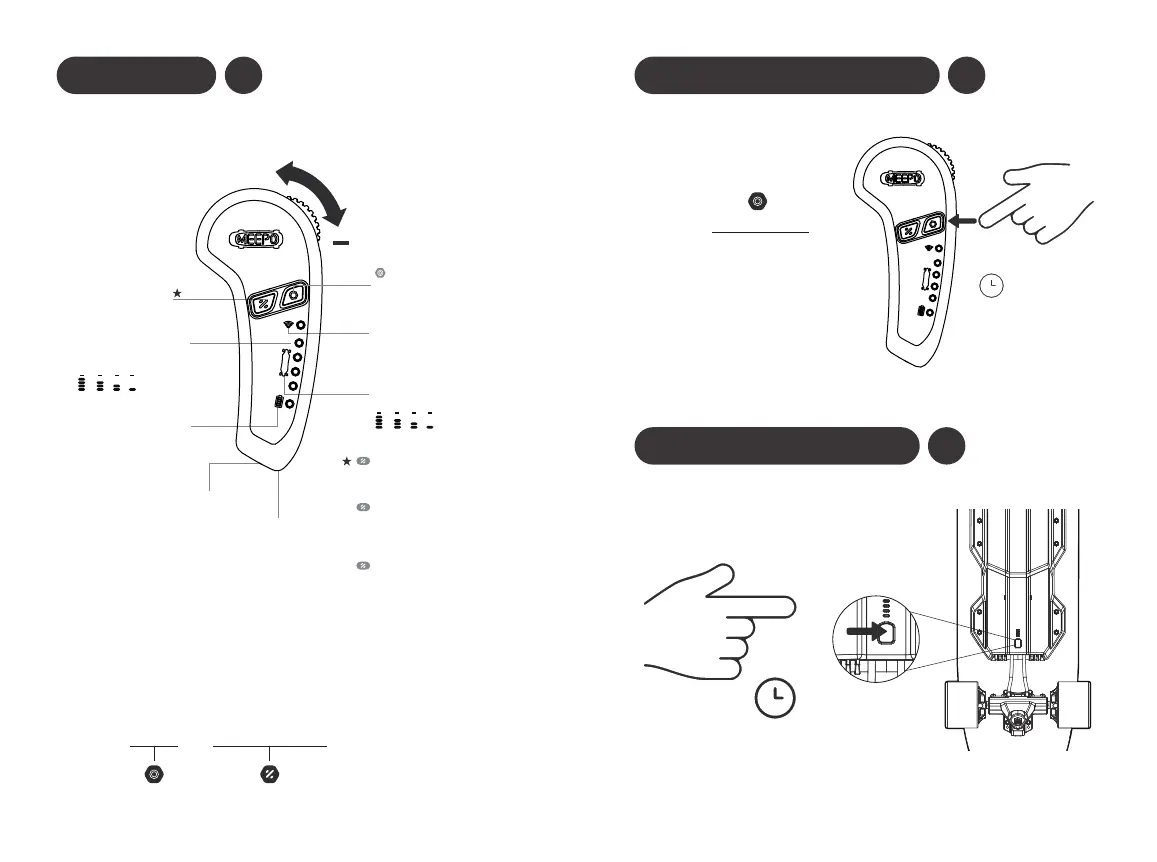
M5 Remote
+
Pairing the Remote and Board
1. Turn on Meepo board, then long press the switch for 7 seconds.
2. Press the power button on the remote for 3 seconds to turn it on.
3. Press the power and function-button on the remote at the same
time.
After pairing, double press
to change 'forward' and 'backward'
Function 2.
Hold the throttle down and stay at
the brake position, press ‘‘function’
button to change brake mode.
Function 3.
Before pairing, press and hold
'power' and 'function' button at the
same time to change the speed units
between 'kph' and 'mph' .
Function 1.
Single press to change speed mode
from'LO' to 'MI', 'HI', and 'PRO'.
Brake
Acceleration
Power Button
Speed Mode
Skateboard
Battery Remaining
Remote Control
Battery Remaining
Lanyard
Type-c
Charging Port
5V/ 1A
Function Button
Connected
(Flashing green light)
Disconnected
(Green light)
Backward Mode
(Flashing red light)
100% 75% 50% 25%
PRO HI MI LO
(When the remote’s power on)
Flashing red light (Under 15%)
4
Power On/Off the Remote
5
Power On/Off the Board
Press the power-button
for 2 seconds
Press the power button once
or push-start the board.
2S
2S


 To Next Page