Operating the Board with the Remote
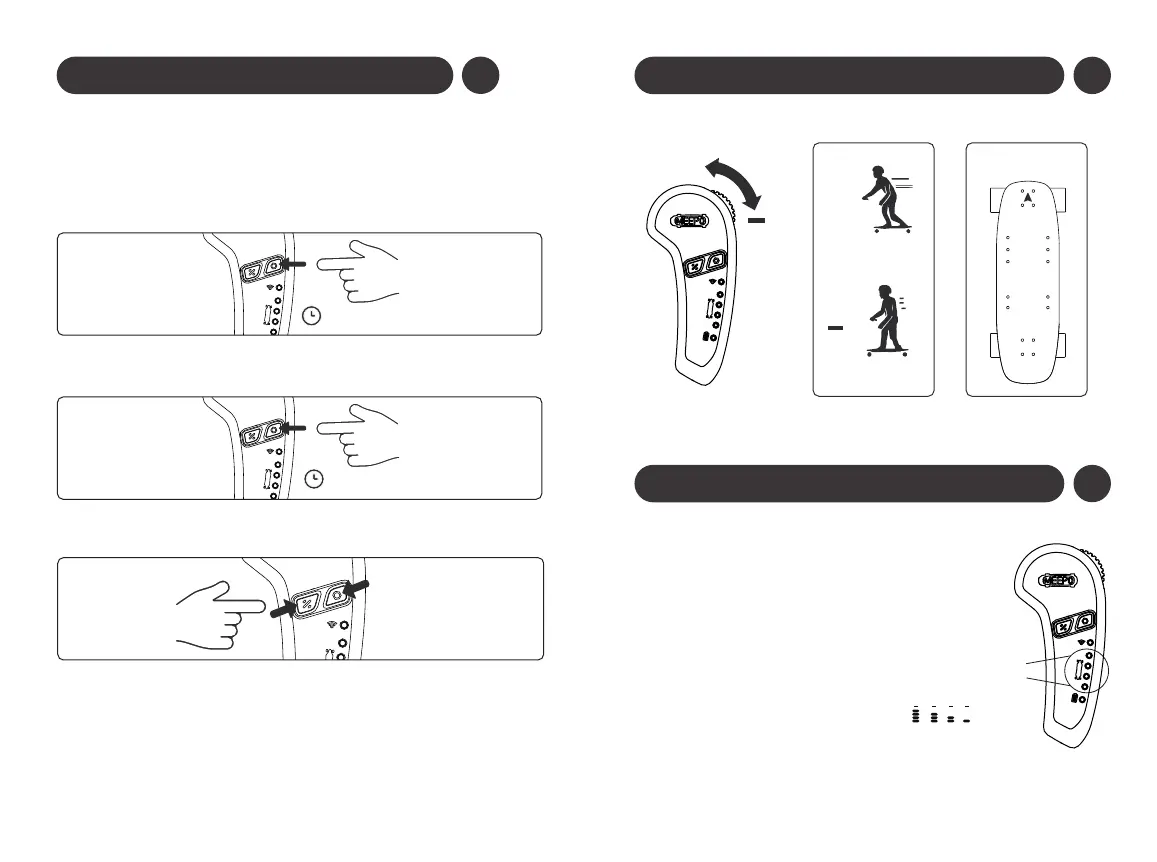
• Make sure the old remote is turned off, if you have one.
• Hold the power button on the board for 7 seconds.
• Press the “power” and “function” buttons on the remote at the
same time.
• The connection light on the remote will flash green light.
• When the power button blinks rapidly and the remote displays all
the specs, the board and remote have been paired.
• After 10 minutes of standby, the ESC will automatically turn off, and then the
remote control will shut off 10 seconds later.
• But when the board and the remote control are not connected, the remote
control will shut off after 10 seconds of standby.
6
Check the Remote-Board Pairing*
* Your board and remote have already been paired in the factory. You need to
do the following procedure when pairing a new remote to a board.
• Turn on the board by pressing the power button on the board once.
• Turn on the remote by long pressing the “power” button on the
remote.
+
+
+
Forward
Brake
Skateboard
Battery Remaining
100% 75% 50% 25%
(When the remote’s power on)
The remote is equipped with
battery indicator lights below
the power button.
When your remote’s power on,
the remote lights will indicate
the power level.
7
Operating the Board with the Remote
8


 To Next Page