10
Change Ride Mode
The board is set in beginner mode by default. Before switching modes, make
sure you have mastered the beginner mode.
LO: Limited acceleration, top speed of 11km/h (7mph).
MI: Moderate acceleration, top speed of 25km/h (15.5mph).
HI: High acceleration, top speed of 45km/h (28mph).
PRO: Max acceleration, top speed of 45km/h (28mph).
It usually takes the remote several hours to get fully charged. If the board and
remote are charged at the same time, the remote will be charged first.
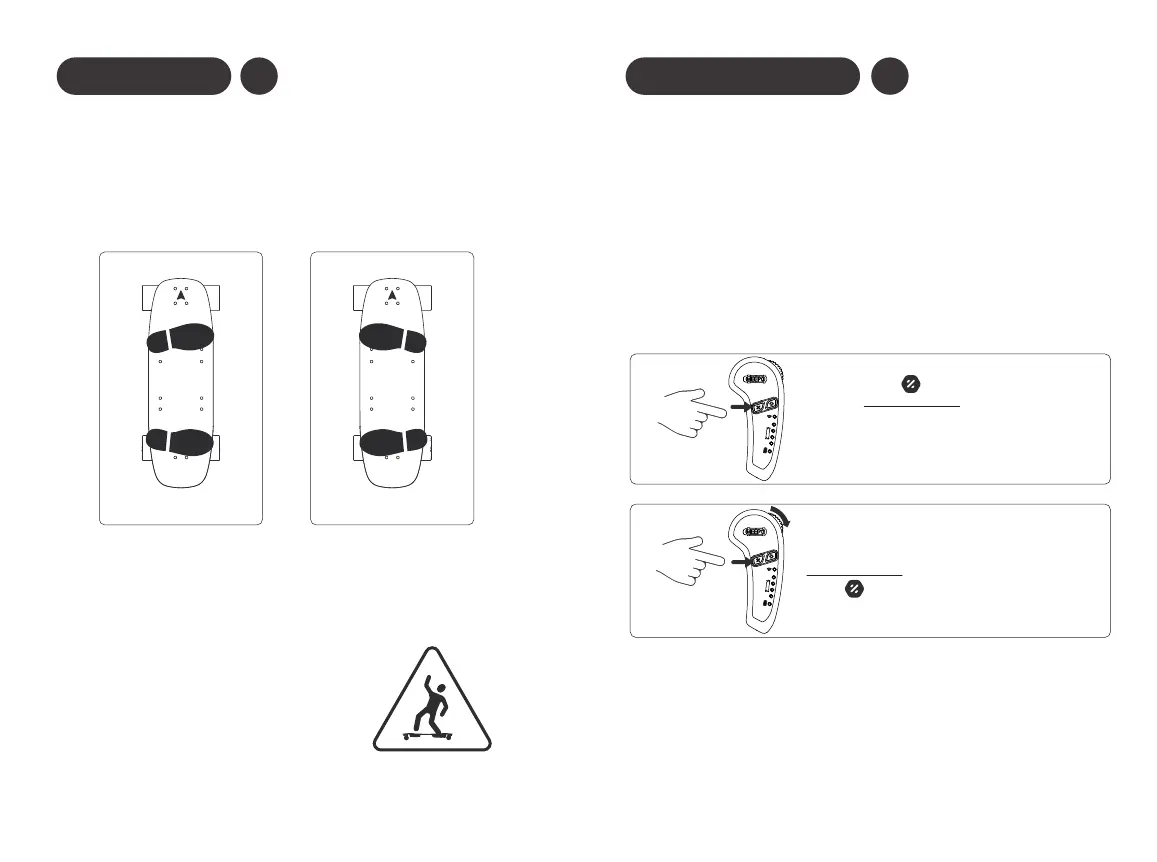
CYCLE THROUGH SPEED /BRAKE MODES:
While holding the throttle down press the
function-button to change brake modes.
Press the function-button once to change
speed modes.
9
Riding Basics
R
L
Regular Goofy
Your Meepo board has a lot of power. Follow these tips to ensure a safe
riding experience:
ARE YOU A “REGULAR” OR “GOOFY” FOOTED RIDER?
Typically, if you kick a ball with your right foot, you are a regular footed
rider. However, this is not always the case! Try both stances to see what
feels best. If you don’ t know which to choose, one advantage of riding
goofy footed is that you have a better view of the traffic.
L
R
STANCE
• Move the throttle wheel in small increments.
• Keep a wide stance on the board.
• Keep a low center of gravity.
• Lean forward when accelerating.
• Lean backward when braking.


 To Next Page