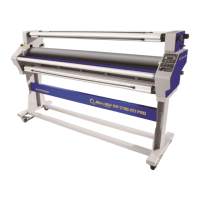
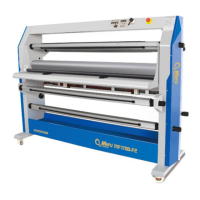
The MEFU MF1700-M1+ is a full-auto heat-assist cold laminator designed for industrial use, representing a high-end product from Mefu. It is engineered for efficiency and ease of use, making it suitable for a wide range of applications, including those requiring a laminating and mounting width of up to 1620mm (64 inches). This machine is particularly beneficial for high-end markets and is considered a good helper for new users due to its straightforward operation.
Function Description
The primary function of the MF1700-M1+ laminator is to apply a protective film to various materials, enhancing their durability and appearance. It supports both cold lamination and heat-assist cold lamination, offering versatility for different media types and desired finishes. The heat-assist function helps to improve the adhesion of the film, resulting in a smoother, clearer, and more professional finish, especially for certain types of cold laminating films.
The laminator is capable of heavy-duty roll-to-roll operation, allowing for continuous lamination of long media rolls. It also supports piece-to-piece operation for individual items. The machine boasts a maximum speed of up to 6m/min, contributing to efficient workflow and productivity.
A key feature is its fully adjustable nip-gap and pressure system, which is controlled pneumatically. This allows for precise application and consistent results across different material thicknesses and types. The ability to adjust pressure and height pneumatically simplifies the entire lamination process, making it easy and user-friendly.
The laminator includes an emergency stop function, which is a critical safety feature. In the event of an emergency, pressing the emergency stop button immediately halts the machine. To resume operation, the button must be rotated clockwise to its neutral position, causing it to bounce up. These red emergency stop buttons are conveniently located on both sides of the machine for quick access.
Usage Features
Before operating the MEFU laminator, users are strongly advised to read the manual carefully to understand all instructions, indications, and safety information. Failure to do so could lead to serious injury or machine damage. The manual highlights specific warning symbols that users should familiarize themselves with, such as general warnings, electrical risks, and instructions to contact a technician for installation.
Installation and Setup:
The laminator should be assembled and used in a clean, dry, and ventilated room with normal temperature and humidity levels. It should not be placed near water sources or wet ground to minimize static electricity and should be kept away from combustible and explosive materials. Upon delivery, users should verify that all included units—the MEFU laminator, manual, and accessories—are present. Electrical connections should only be made to sockets with the correct voltage (AC220/240V 50-60HZ), and all other electrical operations must be performed by authorized staff.
Pre-Operation Checks:
Before each use, it is important to check the chains and gears regularly, cleaning and lubricating them as needed. The rollers are hot during operation, so direct contact should be avoided to prevent scalds or bruises.
Operation Steps:
- Prepare the Working Table: Turn over the working table to prepare for laminating.
- Install Oil-Water Separator: Install the oil-water separator.
- Connect Air Tubes: Connect the tube from the machine to the air outlet of the oil-water separator. Then, connect the tube from an air compressor to the air inlet of the oil-water separator.
- Install Pedal Switch: Install the pedal switch, which provides convenient control during operation.
- Switch On: Turn on the laminator.
- Load Film and Graphic: Place the roll of cold film and paper tube onto the upper rolls (film roll and release liner roll). Place the roll of graphic and paper tube onto the lower rolls (feeding roll and finish product roll). Ensure they are measured straightly using the scale on the rolls.
- Fix Mandrel: Securely fix the mandrel.
- Lift Roller: Use the Air knob to lift the roller.
- Prepare Film: Peel off the liner from the film and stick it to the paper tube.
- Pass Film: Pass the film through the laminator.
- Pull and Stick Film: Pull out the film and stick it to the paper tube.
- Feed Graphic: Feed the graphic into the laminator.
- Steady Feeding: Put down the roll to keep the feeding graphic steady.
- Align Graphic: Use the graphic beam to keep the graphic straight for accurate application.
- Adjust Tension: Adjust the tension based on the material being used.
- Lift Down Roller: Lift down the roller using the control.
- Set Lamination Mode and Temperature: Use the Hot/Cold lamination switch to select the desired mode. For heat-assist cold lamination, pre-heat the upper roller to a recommended temperature of 40-50°C. For hot lamination, set the temperature to 90-100°C. Press the SET button to initiate heating.
- Start Lamination: Press the "Continue" switch to begin lamination.
- Adjust Speed: Adjust the laminating speed as needed using the controls.
Post-Operation:
After use, place the roller in the idle position, raised 5mm above the working table. The temperature of the roller should be below 40°C before stopping heating. Avoid focusing heat on one point for extended periods.
Maintenance Features
Regular maintenance is crucial for ensuring the longevity and optimal performance of the MF1700-M1+ laminator.
Daily Maintenance:
- Ensure no hard objects are placed on the machine or rollers to prevent damage.
- Check all buttons on the machine for proper function.
Weekly Maintenance:
- Clean the machine thoroughly.
Monthly Maintenance:
- Clean and lubricate the chains and gears to ensure smooth operation.
- Check the power supply and the foot switch for any signs of leakage to prevent electrical hazards.
- If an air compressor is used with the laminator, check and clean it according to its manual.
As Necessary Maintenance:
- Check the power supply.
- Clean the rollers.
Cleaning Rollers:
- Do not use water to clean the machine to avoid short circuits, electric shocks, or rust.
- To clean the rollers after lamination, use 80% alcohol, detergent, or an eraser. This practice helps to lengthen the rollers' lifespan.
- Clean any residuum on the rollers promptly, as it can affect the quality of the laminated products.
Roller Care:
- The rollers are critical components of the machine, and any damage to them will affect the yield quality.
- Always raise the upper roller after lamination to prevent deformation of the lower roller due to prolonged weight.
Troubleshooting Guidance:
The manual provides a comprehensive troubleshooting guide for common issues:
-
Roller Won't Move Up and Down:
- Reset the emergency stop button.
- Reset the controls.
- If issues persist, contact a technician.
-
Control Panel Dead/Faulty:
- Check the power supply or emergency button.
- If the fuse is blown, replace it.
-
Roller Cannot Run:
- Regulate the friction of the rollers.
- Fix or regulate the chain wheel key on the motor shaft.
- If the motor or speed controller is broken, replace it.
-
Snow Points (Imperfections):
- Increase the temperature.
- Clean the surface of the graphic.
- If the film is problematic, change it.
-
Air Bubbles or Folds:
- Adjust the pressure of the rollers.
- Ensure printings are flat.
- Improve speed or lower temperature.
- Place the beam weight on printings.
-
Printings Go Tilt:
- Regulate the pressure of the rollers.
-
Folds of Films:
- Regulate the film roll's friction.
- Lower the temperature.
-
Finished Products Too Curled:
- Regulate the tension of the film or the reception roll.
By adhering to these operational and maintenance guidelines, users can ensure safe, efficient, and high-quality lamination results with the MEFU MF1700-M1+ laminator.


 To Next Page
 General