Need help?
Do you have a question about the MEI Conlux CV1000 and is the answer not in the manual?
Indicates the unit is enabled and ready to accept a bill. No action necessary.
Indicates that no power has been applied to the unit. Check to ensure that power is applied.
Indicates something is obstructing the bill path. Remove magazine and LED housing; inspect for foreign material.
Indicates the unit is not enabled. Verify configuration. Check coin tube levels.
Indicates the bill path needs cleaning for optimum performance. Remove magazine and LED housing and follow cleaning instructions.
Indicates something is obstructing the cross channel sensor. Remove LED housing; inspect/clean for foreign material.
Indicates the magazine is removed. Unit will not accept bills without magazine attached. Reinstall magazine.
Unit is defective. Replace the unit.
The magazine is full of money. Remove money from the magazine.
Designed for easy mounting onto existing studs. May require brackets or faceplates. Refer to machine manual.
Disconnect power, secure unit, connect harnesses, apply power. Check Status LED for steady ON.
Insert a bill to check acceptance. Make a vend to ensure credit and proper change.
Copy coupon from guide, use standard non-color copier. Copies must be $1 bill size.
Use #2 pencil. Fill only one block per line. Complete sections 1, 2, and 5 for options.
Press blue button on back. Red LED flashes rapidly. Depress again to exit.
Insert coupon face up. Accepted: coupon returned, green arrows flash 10 times. Rejected: returned after 10s, flashes indicate error.
Press blue button. Red LED flashes. Insert bill of desired denomination. Bill returned.
Enabled: red LED/green arrows flash 10 times. Disabled: flash 3 times. 7 flashes = not accepted.
DO NOT leave machine until Status LED returns to steady ON.
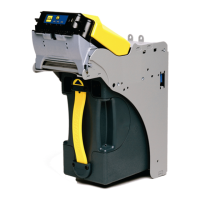
The CONLUX CV1000 is a bill validator designed for use in various machines, primarily for vending and similar applications. It is capable of accepting multiple denominations of currency, as well as specific coupons.
The primary function of the CV1000 is to validate and accept banknotes, converting them into credit for a machine. It is preconfigured during manufacture to accept U.S. $1.00 bills but can be manually configured to accept other denominations and specific coupons. The device uses an LED Status light to provide diagnostic information about its operational state and any potential issues.
 General
| Brand | MEI |
|---|---|
| Model | Conlux CV1000 |
| Category | Bank Note Validator |
| Language | English |

 To Next Page