OVAL device takes use of both Bluetooth BLE4.0 and ANT + two wireless
protocols; It can be connected to sensors which is with same protocol.
Disclaimer: If there is a large amount of 2.4GHZ same frequency radio
interference in your surroundings, which may cause OVAL malfuncon.
For example: some traffic monitoring equipment, building wireless video
transmission, etc.
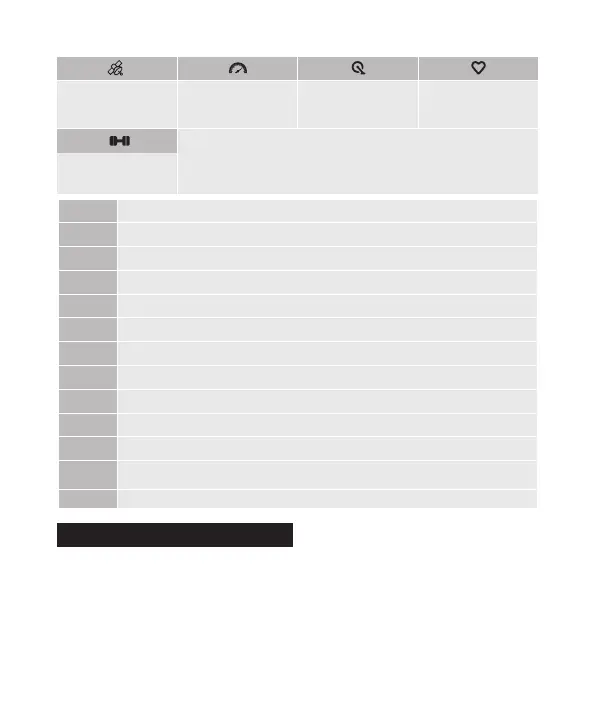
Wireless Connecon Protocols
Speed sensor
connecon status
Cadence sensor
connecon status
Heart rate with
connecon status
When the icon is flickering, it show that the computer is sll
searching the signal of the device;
when the icon is not flickering and fixed, it shows that the device is
connected successfully.
Average
Maximum
Current slope
Greenwich Mean Time
Current me
Altude
Total me of one me cycle, including the rest me
Cumulave rise height
Cyclist weight seng
Total distance of one me cycle
Calorie Consumpon
Total mileage of one me cycle,which will only be cleared 0 when the device
is restored to the factory set
Wheel Size (when the speed cadence is paired with device)
Power meter
connecon status
GPS working status
AVG
MAX
SLOPE
GMT
TM
ALTI
TOT
ASCE
WT
DST
CAT
ODO
WS
-09-
MPH
LAP
TM
MI
OVALcan upload data to the APP by
Bluetooth connecon;Users can also take
use of USB port to duplicate the data to
the computer and then upload to the
internet:
1. Power off and insert the USB cable;
Data Upload
Short press : Switch and display different laps of this me historical record;
LAP 1, 2, 3 quickly;
Short press : Switch the data name of display;
Short press : Display next historical record;
Long press : Exit the list of historical mode.
Of this me record:
M:D/H:Min
Currently in the review
menu of historical records
The total segment mes
of this me historical
record: 5LaPs
We recommend you to quickly view the historical record saved by OVAL
through the APP.
There are two types of ways into Historical mode:
Long press , Aer it saves the current record, OVAL will move into the
display of this me historical record automa cally.
Before star ng to ride,long press , OVAL will move into the display of
the latest historical records.
Historical Record View
-11--10-


 To Next Page