GPS Working Status
Icon Flashing: OVAL is searching GPS signal.
Icon stays on: GPS signal is strong; OVAL can work normally.
Note: if there is high building or an electric transming device of high
frequency nearby, it may cause that your GPS posioning needs more
me or even cannot be located.
KM/H
LAP
TM
SLOPE
ASCE
KM KM
Aer the Meilan app is installed, register and enter in the app;
adapt to different opera ng interface somemes.
connuously with the market demand. You may need to
mobile phone, connect the app with OVAL; and then you can enter into the app and
conduct the operaons such as basic set and connec on / delete of sensors through
the app; By this way you do not need to do the same opera on on OVAL device, which
will improve your efficiency; When a new record is produced, OVAL will upload it to
app and thus you can quickly view your detailed sports data.
You can download our APP through Google Play Store; iOS
from www.meilancycling.com. The app will be updated
App Store and Yingyongbao app.You can also download it
Please turn on the Bluetooth and Locaon func on of your
APP Connecon
-03-
Start/Set and Sensor Pairing
GMT
A B C D E
WT
KG
WT
KG
ALTI
KM
M
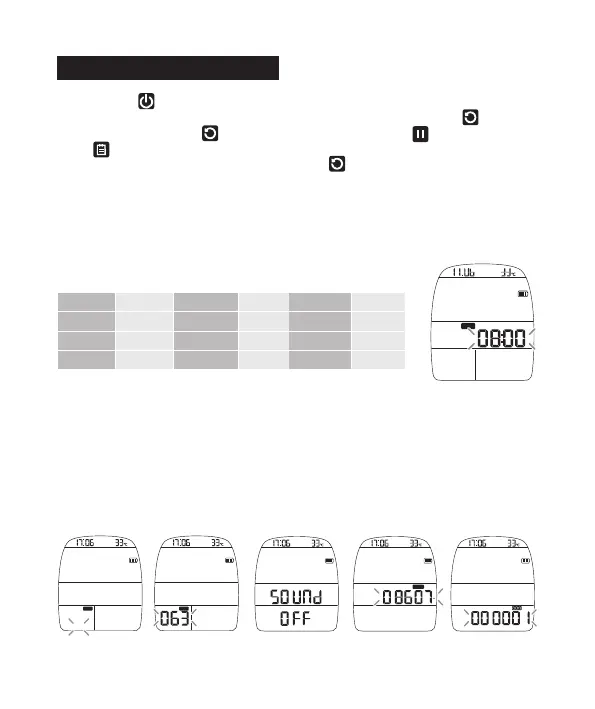
II. Choose Metrics and Imperial units. Brish system: Brish Pound;
Metric system: kilogram (Image A)
III. WGT rider weight seng (Image B)
IV. Sound: On/Off: Open the noficaon sound / On
Close the noficaon sound / Off (Image C)
V. Altude: Correct the altude value; Change and input the correct altude
value here (Image D)
VI.Input your total inial value (Image E)
Beijing
Sao paulo
Moscow
Warsaw
UTC+8 UTC+9 UTC+7
UTC-3 UTC-8 UTC-5
UTC+3 UTC+10 UTC+0
UTC+1 UTC+1 UTC-8
Tokyo
Los Angeles
Sydney
Berlin
Bangkok
New York
London
San Diego
1. Long press to power on;
2. When OVAL is enabled, you need to make the seng. Long press to
enter seng page,press to to select previous itme; press to change data;
press to set the next item;
You can also make the seng on the APP, hold exit the seng menu. Connect ,
the APP with OVAL, and make the sengs via APP. We suggest you to set via
APP and please skip the pairing and seng on the device.
I. Seng of me zone: please check your local me zone from the Internet and input
accordingly; aer seng, the GPS will automacally correct the me and period. The
following table shows the me zones of some regular cies:
-04-


 To Next Page