WS
MM
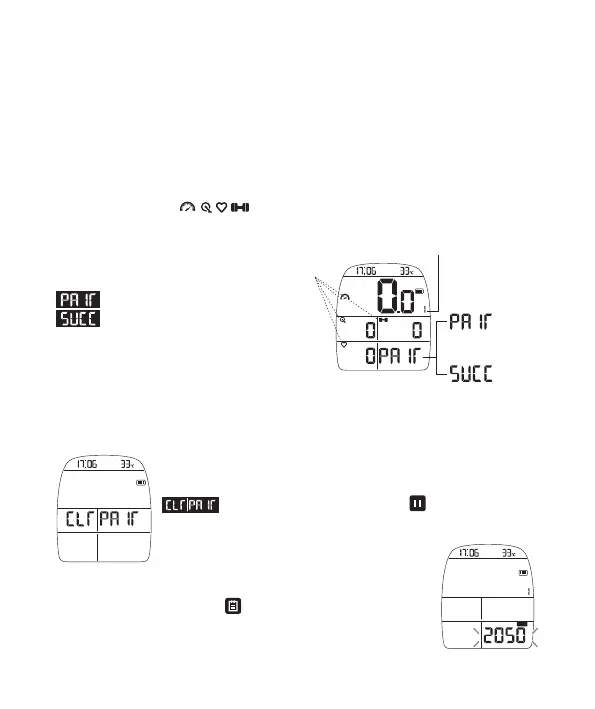
③Aer confirming that the sensor you need to connect has
been connected, short press start the seng of first bike rim
circumference. The set of rim circumference can be viewed and
modified in the app.
CLEAR: If OVAL device has paired with sensors already
before, it will show CLEAR when it is in paring page again;
means to clear all pairing; Press key to confirm;
it will remove all paired sensors in device and reconnect with
sensors.
VIII. Connecon with the sensor (If you do not need to connect the sensor, please
ignore this item).
① First, make sure that the sensor baery you want to connect with OVAL is in
normal operaon state and the installaon posion / wearing is correct way; Ride for
2-3 circles for a short me to ensure that these sensors have been acvated in operaon
state. All sensors are set with power saving mode. When it is in non-operaon state, it will
enter into sleep mode automacally in 3 minutes;Users must move it up and down as to
acvate it again; Some power meters need to be pedaled to acvate.
KM/H
W
M
② Arabian number 1 means all sensors which are searching for first bike.
When below four signs are flashing, it means OVAL device is searching all
sensors of this kind and trying to connect;
When one of the sensors has been connected
by OVAL, the icon will stop flashing, and the
display will be always on.
: OVAL is searching for a connected sensor.
: Only when the four sensors of speed,
cadence, heart rate and power are all connected
successfully, OVAL will display SUCC; If you don't
need to connect all the four types of sensors
menoned above, you just need to make sure
that the icon of the sensor you need to connect
has stopped flashing. If it's constantly on without
flashing again, it means that the sensor is connected successfully.
Searching And
Paring
Paired Successfully
Searching for first bike sensor
Flashing
-05-
3.Please go to open and spacious area outside and wait for the locaon of sate-lite signals.
Wheel Size Wheel Size Wheel Size
*Below is the size of rim circumference for reference.
Searching for second bike sensor
KM/H
W
M
④ Press right buon again and it will
enter into the search of second bike; the
process is same as that of first bike.
⑤ If you don't have the sensor of the second
bike to connect, you can directly press to
exit.
-06-


 To Next Page