Need help?
Do you have a question about the Memorex MAEBT411 and is the answer not in the manual?
Details touch operations for play/pause, call handling, voice assistant, and track/volume control.
Instructions for placing earbuds in the case and their LED charging indicators.
Guide for connecting the case to power via USB-C and its LED indicators.
Information on ANC for noise reduction and Transparent Mode for ambient sound awareness.
How to accept or end phone calls using the function button.
How placing earbuds in the case automatically powers them off and begins charging.
Regulatory information regarding RF exposure, interference, and digital device limits.
Precautions against fire/shock, battery disposal, hearing damage, and California Proposition 65.
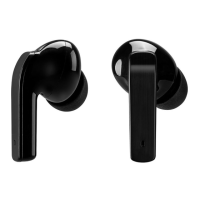
The Memorex Truly Wire Free Earbuds (MAEBT411 v2750-01) are designed for a seamless audio experience, offering both convenience and advanced features for music playback, phone calls, and environmental awareness.
These earbuds are truly wireless, meaning they operate independently of each other and connect to your device via Bluetooth. They are designed for both audio playback and hands-free communication. Each earbud features a sensitive Function Touch Pad that allows for various controls with simple taps and holds. The earbuds come with a charging case that not only stores them but also recharges them, ensuring they are ready for use whenever you need them.
A key feature of these earbuds is their Active Noise Cancellation (ANC) capability. This function electronically mutes background noise, enhancing the clarity and quality of any audio being played. Complementing ANC is the Transparent Mode, which allows external sounds to be picked up by the earbuds, keeping you aware of your surroundings. Both modes, however, will affect battery life.
For communication, the earbuds include an integrated microphone and support speakerphone functionality, enabling you to answer, end, or reject phone calls directly from the earbuds.
Powering On/Off and Basic Controls: To power the earbuds ON or OFF, simply tap and hold the Function Touch Pad for 5 seconds. Once powered on, the earbuds automatically link and enter pairing mode. For music playback, a single tap on the Function Touch Pad will play or pause music. During calls, a single tap will answer or end a phone call, while tapping and holding for 2 seconds will reject an incoming call.
Voice Assistant and Mode Switching: Activating your device's voice assistant is easy: tap and hold the LEFT earbud's Function Touch Pad for 2 seconds. To switch between Normal, Transparent, and ANC modes, press and hold the RIGHT earbud's Function Touch Pad for 3 seconds.
Music Navigation and Volume Control: For music navigation, quickly tap the RIGHT earbud's Function Touch Pad twice to skip to the next track, and quickly tap the LEFT earbud's Function Touch Pad twice to play previous tracks. Volume control is also integrated: quickly tap the RIGHT earbud's Function Touch Pad three times to turn the volume up, and quickly tap the LEFT earbud's Function Touch Pad three times to turn the volume down.
Bluetooth Pairing: When the earbuds are linked and powered on, the right earbud's LED indicator will flash blue and red, signaling it's ready for Bluetooth pairing. On your Bluetooth device, navigate to Bluetooth Settings, search for "MAEBT411," and select it. Once successfully connected, both earbuds' LED indicators will flash blue slowly, and a voice prompt will confirm the connection. You can also use a single earbud as a standalone unit if desired.
Auto-On Feature: The charging case incorporates an auto-on feature. When the case power is ON, removing the earbuds from the case will automatically power them on, link them together, and connect to the last used Bluetooth device (provided they were previously linked).
Charging the Earbuds: The earbuds are charged by placing them on the charging contacts within the case. Ensure that the left and right earbuds are matched with their correct docking stations. While charging, the earbud indicator LEDs will glow red and turn off once fully charged. The Power Indicator LED on the bottom of the case will turn blue during earbud charging and turn off when complete.
Charging the Case: The charging case itself needs to be charged using the included USB-C to USB cable. Connect the cable to the USB-C port on the case and to a powered-on computer's USB port or a USB power adapter (not included). While the case is charging, its Power Indicator LED will flash red. Once fully charged, the LED will turn solid red.
Automatic Power Off: Placing the earbuds back into the charging case will automatically power them off and initiate charging, conserving battery life.
LED Indicators: The earbud indicator LEDs serve multiple purposes: they glow red when charging and turn off when fully charged. During pairing, the right earbud's LED flashes blue and red. Once connected, both earbuds' LEDs flash blue slowly. The Power Indicator LED on the case turns blue when charging the earbuds and flashes red when charging the case itself, turning solid red when the case is fully charged.
Environmental Considerations: It's important to note that due to the nature of truly wireless earbuds, slight audio interruptions may occur in areas with multiple 2.4GHz bands or high wireless traffic. The device is designed to comply with federal regulations and includes warnings regarding potential exposure to chemicals and proper battery disposal. Lithium batteries are recyclable and should be disposed of according to local guidelines, never in household waste or incinerated.
 General
| Brand | Memorex |
|---|---|
| Model | MAEBT411 |
| Wireless | Yes |
| Wireless Connectivity | Bluetooth |
| Bluetooth | Yes |
| Charging Time | 2 hours |
| Driver Size | 40mm |
| Frequency Response | 20Hz - 20kHz |
| Impedance | 32 Ohms |
| Color | Black |
| Range | 33 ft (10 m) |

 To Next Page