EasyManua.ls Logo

Memorex MAHN40B - User Manual

Memorex MAHN40B
2 pages
Print Icon
To Next Page IconTo Next Page
Loading...
Battery Charging
Initial charge time is approximately 3 hours. Charge fully before
use. The low battery indicator will ash, a voice prompt will
announce “low battery, then the unit will automatically power
OFF.
1. Using a Micro-USB to USB cable (included), connect to
the USB port of a powered on computer or USB power
adaptor (not included) to charge the unit.
DC IN
DC IN
AUX IN
AUX IN
LED
LED
MIC
MIC
ANC ON / OFF
ANC ON / OFF
Status Indicator
Power On Flashing blue light
Charging Solid red light
Charging Complete Light OFF
Pairing Flashing red / blue light
Pairing Complete Flashing blue light
Headpone Controls
DC Power Input
Microphone Microphone
Features
Bluetooth 5.0
Bluetooth Wireless: range -33ft.
Built-in microphone
Aux in (3.5mm audio input)
Folding adjustable headband
On-ear controls
Voice prompts announce headphone operations
Built-in rechargeable lithium ion battery: life - approx. 8 hrs at
50% volume + ANC on
Micro-USB port for battery recharge
Includes
3.5mm audio cable
Micro-USB to USB charging cable
Volume/Skip
Press to
adjust
volume.Press
and hold to
skip tracks.
Power / Play / Pair
Press and hold to
power ON/OFF. Press
to play or pause
audio. Press to answer
incoming phone call.
Quickly press twice to
manually pair.
Indicator LED
Aux In
Noise Canceling Bluetooth Headphones
User’s Guide for Model MAHN40B v2887-01
Question and Answer IconNeed help?

Do you have a question about the Memorex MAHN40B and is the answer not in the manual?

Summary

Features

Includes

Headphone Controls

Battery Charging

Pairing Bluetooth & Playing Audio

Power On and Pairing

Power on headphones for automatic Bluetooth pairing.

Device Bluetooth Settings

Select MAHN40 in device Bluetooth settings to pair.

Confirmation of Connection

Voice prompt announces successful Bluetooth connection.

Audio Playback and Control

Control audio playback and volume using device or headphone controls.

Aux In

Connect Audio Cable

Connect 3.5mm cable to headphones and audio device.

Play Audio via Aux

Use connected device controls to play audio through Aux In.

Active Noise Cancellation

Activate ANC

Slide the ANC switch to the ON position to enable.

Deactivate ANC

Slide the ANC switch to the OFF position to disable.

Previously Connected Devices

Customer Support

FCC Warnings

Additional Warnings

Warranty

Overview

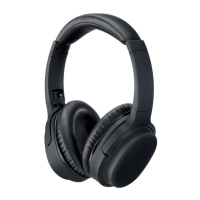
The Memorex Noise Canceling Bluetooth Headphones, model MAHN40B v2887-01, are designed to provide a high-quality audio experience with the added benefit of active noise cancellation. These on-ear headphones feature a folding adjustable headband for comfort and portability.

Function Description:

These headphones primarily function as a wireless audio device, connecting to other devices via Bluetooth 5.0. They also offer an Aux In option for wired connections, allowing them to be used even when not powered on, which helps conserve battery life. The active noise canceling (ANC) feature electronically mutes background noise, enhancing the audio quality whether listening to music or taking calls. A built-in microphone enables hands-free calling. Voice prompts announce various headphone operations, such as "low battery" or "Bluetooth is connected."
Important Technical Specifications:

  • Bluetooth Version: 5.0
  • Wireless Range: Up to 33 feet
  • Audio Input: 3.5mm Aux In
  • Charging Port: Micro-USB
  • Battery Type: Built-in rechargeable lithium-ion battery
  • Battery Life: Approximately 8 hours at 50% volume with ANC on
  • Initial Charge Time: Approximately 3 hours

Usage Features:

  • On-Ear Controls: The headphones feature intuitive on-ear controls for various functions:
    • Power / Play / Pair Button: Press and hold to power ON/OFF. Press once to play or pause audio. Press once to answer an incoming phone call. Quickly press twice to manually enter pairing mode.
    • Volume/Skip Buttons (VOL+ / VOL-): Press to adjust volume. Press and hold to skip tracks forward or backward.
    • ANC Switch: Slide to ON to activate noise canceling, or to OFF to deactivate.
  • Pairing:
    • Automatic Pairing: Upon powering on, the headphones default to Bluetooth Mode and are ready to pair automatically.
    • Manual Pairing: Quickly press the Power/Play/Pair button twice to manually enter pairing mode for a different device.
    • Previously Connected Devices: The headphones can remember multiple Bluetooth devices and will attempt to reconnect to the last used device. To connect to a different previously paired device, turn off Bluetooth on unwanted devices, then select MAHN40 from the desired device's Bluetooth settings.
  • Aux In Mode: Connect a 3.5mm audio cable (included) from the headphone's Aux In port to an audio device's output. Audio can be played even when the headphones are off, conserving battery.
  • Battery Status Indicators:
    • Low Battery: The low battery indicator will flash, and a voice prompt will announce "low battery" before the unit automatically powers off.
    • Power On: Flashing blue light.
    • Charging: Solid red light.
    • Charging Complete: Light OFF.
    • Pairing: Flashing red/blue light.
    • Pairing Complete: Flashing blue light.

Maintenance Features:

  • Charging: The headphones are charged via a Micro-USB to USB cable (included). Connect the Micro-USB end to the headphone's DC IN port and the USB end to a powered computer USB port or a USB power adapter (not included). It is recommended to fully charge the headphones before first use.
  • Battery Disposal: Lithium batteries are recyclable and should be disposed of according to state and local guidelines, not in normal household waste. They should never be incinerated.
  • Cleaning: While not explicitly detailed, general electronic device cleaning practices should apply. Avoid exposing the unit to rain or moisture to prevent fire or shock hazards.
  • Safety Warnings:
    • To prevent hearing damage, turn down the volume on your music player before connecting headphones. Gradually increase volume to a comfortable listening level after placing headphones on your ears.
    • This product may contain chemicals, including lead, known to cause cancer and birth defects or other reproductive harm (refer to www.P65Warnings.ca.gov).
    • The device complies with Federal regulations and FCC rules. Any unauthorized changes or modifications could void the user's authority to operate the equipment. If interference occurs, measures like reorienting the receiving antenna, increasing separation between equipment, or connecting to a different circuit are suggested.

Memorex MAHN40B Specifications

General IconGeneral
BrandMemorex
ModelMAHN40B
CategoryHeadphone
LanguageEnglish

Related product manuals