EasyManua.ls Logo

Memorex MAHB239 - User Manual

Memorex MAHB239
2 pages
Print Icon
To Next Page IconTo Next Page
Loading...
Features
•BluetoothWireless:
range-33ft.
•Built-inmicrophone
•Auxin(3.5mmaudio
input)
•Foldingadjustable
headband
•On-earcontrols
•Voiceprompts
announceheadphone
operations
•Built-inrechargeable
lithiumionbattery
•Batterylife-approx.6
hrsat50%volume
•Micro-USBportfor
batteryrecharge
Includes
•3.5mmaudiocable
•Micro-USBtoUSB
chargingcable
Power
Press and hold to
power ON or OFF
Volume/Skip
Press to adjust volume.
Press and hold to skip tracks.
Play / Pause /
Speakerphone
Press to play or pause
audio.
Press to answer incoming
phone call.
Microphone
Indicator LED
Aux In
(3.5mm audio input)
Battery Charging
Initialchargetimeisapproximately3hours.Charge
fullybeforeuse.Thelowbatteryindicatorwillashfor
3-5minutes,thentheunitwillautomaticallypower
OFF.
UsingaMicro-USB to USBcable(included),connectto
theUSBportofapoweredoncomputerorUSBpower
adaptor(notincluded)tochargetheunit.
STATUS INDICATOR
PowerOnFlashingbluelight
ChargingSolidredlight
ChargingCompleteLightOFF
PairingFlashingred/bluelight
PairingCompleteFlashingbluelight
Pair (M)
Press and hold to
manually enter into
pairing mode.
Bluetooth Headphones
MAHB239 v2766-01
Question and Answer IconNeed help?

Do you have a question about the Memorex MAHB239 and is the answer not in the manual?

Summary

Headphone Features and Components

Product Features Overview

Details the wireless capabilities, built-in microphone, audio input, foldable design, and voice prompts.

Included Accessories

Lists the items provided with the headphones, including audio and charging cables.

Controls and Indicators

Explains buttons for volume, track skipping, power, playback, and the indicator LED status.

Battery Charging Information

Details initial charge time, battery life, charging method via Micro-USB, and low battery indication.

Bluetooth Operation

Pairing and Playing Audio

Guide on pairing headphones via Bluetooth, connecting to devices, and controlling audio playback.

Speakerphone Functionality

Instructions for answering, ending calls, and redialing the last number using the headphone controls.

Auxiliary Input Usage

How to connect and use the headphones with an audio device via a 3.5mm audio cable.

Safety and Compliance Information

FCC Warnings and Compliance

Details on FCC regulations, potential interference, and radiation exposure compliance.

Additional Safety Precautions

Warnings regarding fire/shock hazards, battery disposal, and preventing hearing damage.

Summary

Headphone Features and Components

Product Features Overview

Details the wireless capabilities, built-in microphone, audio input, foldable design, and voice prompts.

Included Accessories

Lists the items provided with the headphones, including audio and charging cables.

Controls and Indicators

Explains buttons for volume, track skipping, power, playback, and the indicator LED status.

Battery Charging Information

Details initial charge time, battery life, charging method via Micro-USB, and low battery indication.

Bluetooth Operation

Pairing and Playing Audio

Guide on pairing headphones via Bluetooth, connecting to devices, and controlling audio playback.

Speakerphone Functionality

Instructions for answering, ending calls, and redialing the last number using the headphone controls.

Auxiliary Input Usage

How to connect and use the headphones with an audio device via a 3.5mm audio cable.

Safety and Compliance Information

FCC Warnings and Compliance

Details on FCC regulations, potential interference, and radiation exposure compliance.

Additional Safety Precautions

Warnings regarding fire/shock hazards, battery disposal, and preventing hearing damage.

Overview

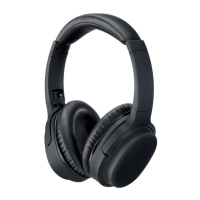
This document describes the Memorex MAHB239 v2766-01 Bluetooth Headphones, a wireless audio device designed for portable use.

Function Description

The Memorex Bluetooth Headphones are primarily designed for wireless audio playback via Bluetooth connectivity. They can also function as a speakerphone for answering incoming calls and support wired audio input through an Aux In port. The headphones feature on-ear controls for managing audio playback, volume, and calls, along with voice prompts that announce various headphone operations. A built-in rechargeable lithium-ion battery powers the device for wireless use.

Usage Features

Wireless Audio Playback (Bluetooth Mode):

The headphones operate wirelessly via Bluetooth, offering a range of up to 33 feet. Upon powering on, the headphones automatically enter Bluetooth Mode and are ready for pairing. A voice prompt will confirm "Bluetooth is connected" once successfully paired. For initial pairing, users need to select "MAHB239" from their Bluetooth device's settings. The headphones will automatically connect to the last paired Bluetooth device when in Bluetooth Mode. If the device becomes unpaired or connection issues arise, users can manually enter pairing mode by pressing and holding the "Pair" button.

On-Ear Controls:

The headphones are equipped with intuitive on-ear controls.

  • Power (ON/OFF): A dedicated button allows users to power the headphones ON or OFF by pressing and holding it.
  • Volume/Skip: These controls enable users to adjust the audio volume with a short press and skip tracks by pressing and holding.
  • Pair (M): A specific button is available to manually enter pairing mode by pressing and holding it.
  • Play/Pause/Speakerphone: This multi-function button allows users to play or pause audio playback. It also serves as the control for speakerphone functions.

Speakerphone Functionality:

When connected via Bluetooth, the headphones can be used as a speakerphone.

  • Accepting Calls: Users can accept an incoming call by pressing the Play/Pause/Speakerphone button or by using the controls on their connected phone.
  • Ending Calls: Calls can be ended by pressing the Play/Pause/Speakerphone button or by using the controls on their connected phone.
  • Redialing: To redial the last dialed number, users need to press the Play/Pause/Speakerphone button twice.

Wired Audio Input (Aux In Mode):

The headphones include a 3.5mm Aux In port, allowing for wired connection to audio devices using the provided 3.5mm audio cable. This mode functions even if the headphones are not powered on, which can help conserve battery power. Users simply connect the audio cable to the Aux In port on the headphones and to the audio output of their audio device. Audio playback and selection are then controlled via the connected device.

Folding Adjustable Headband:

The headphones feature a folding adjustable headband, enhancing portability and comfort for different head sizes.

Voice Prompts:

The device provides voice prompts to announce various operational statuses, such as "Bluetooth is connected," guiding users through the headphone's functions.

Indicator LED:

An LED indicator provides visual feedback on the headphone's status:

  • Power On: Flashing blue light.
  • Charging: Solid red light.
  • Charging Complete: Light OFF.
  • Pairing: Flashing red/blue light.
  • Pairing Complete: Flashing blue light.

Maintenance Features

Battery Charging:

The headphones are equipped with a built-in rechargeable lithium-ion battery.

  • Initial Charge: The initial charge time is approximately 3 hours. It is recommended to fully charge the headphones before first use.
  • Charging Process: To charge the unit, users connect the included Micro-USB to USB cable to the Micro-USB port on the headphones and to a USB port on a powered-on computer or a USB power adapter (not included).
  • Low Battery Indicator: When the battery is low, the indicator will flash for 3-5 minutes before the unit automatically powers OFF.
  • Battery Life: The battery provides approximately 6 hours of use at 50% volume.

Built-in Microphone:

A built-in microphone allows for hands-free calling when connected via Bluetooth.

General Maintenance:

  • Storage: The folding design allows for compact storage.
  • Cleaning: While not explicitly detailed, general electronic device cleaning practices (e.g., wiping with a dry cloth) are typically recommended.
  • Environmental Protection: The manual includes warnings against exposing the unit to rain or moisture to prevent fire or shock hazards.
  • Battery Disposal: Lithium batteries are recyclable and should be disposed of according to state and local guidelines, not in normal household waste, and should never be incinerated.

Memorex MAHB239 Specifications

General IconGeneral
TypeOver-Ear
Driver Size40mm
Frequency Response20Hz - 20kHz
Impedance32 Ohms
Connector3.5mm
ColorBlack
Cable Length1.2m

Related product manuals