AB
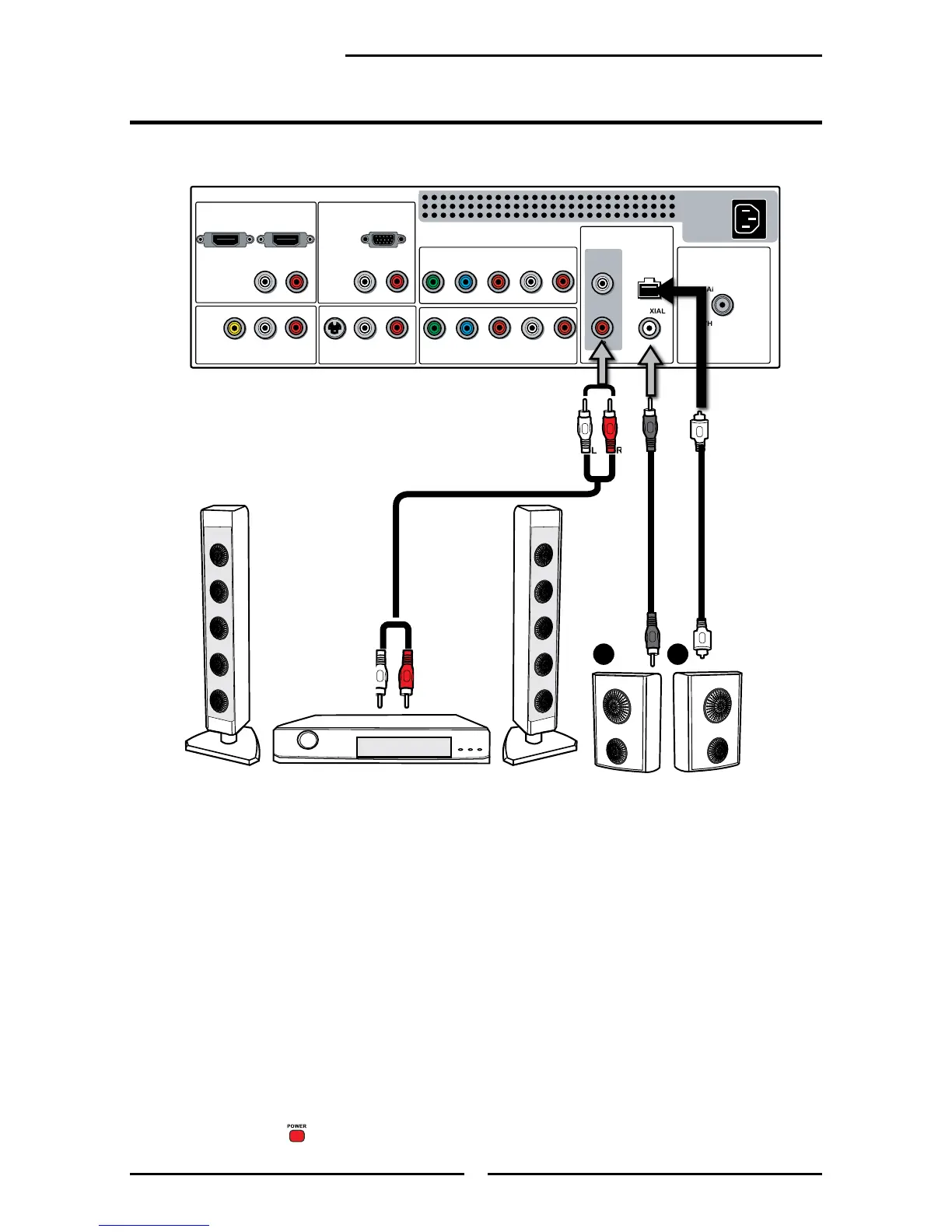
Connecting to Audio Receiver:
Use an audio cable to connect the audio receiver’s audio LINE IN jacks to LCD TV’s
AUDIO OUT jacks.
Connecting to Digital 5.1 Sound System:
METHOD A:
Use a optical cable to connect the audio amplier’s OPTICAL IN jacks to LCD TV’s
OPTICAL OUT jacks.
METHOD B:
Use a coaxial cable to connect the audio amplier’s COAXIAL IN jacks to LCD TV’s
COAXIAL OUT jacks.
Connect all AC power sources, before turning on the power switch of the LCD TV or
other connected equipment.
Press the button on the remote to turn on the LCD TV.
Connecting an Audio Receiver or a Dolby Digital 5.1 Sound System
AUDIO Cable
For better sound quality, you may want to play the LCD TV audio through your stereo system.


 To Next Page