TROUBLESHOOTING GUIDE
31
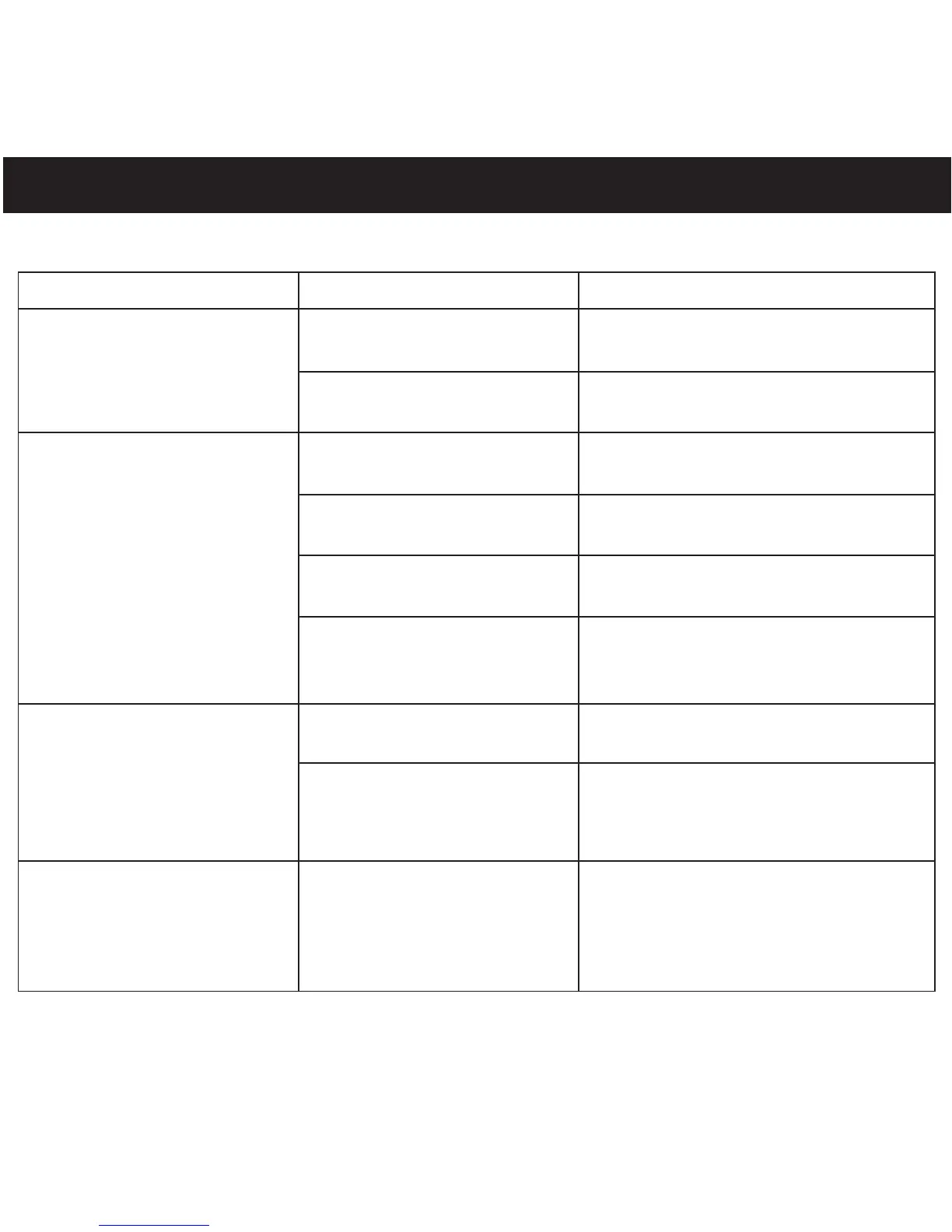
If you experience a problem with this unit, check the chart below before calling for service.
SYMPTOM CAUSE SOLUTION
Unit will not Battery is low/empty. Replace battery.
turn on.
Unit is not turned
Press Play/Pause ®p/Power On
on.
button to turn the unit on.
No sound. Headphones are not Insert headphones.
inserted.
Volume is set too Raise the volume using the
low. Navigation
▲/Volume + button.
The MP3 or WMA files Download uncorrupted
are corrupted. files.
No files are in the Upload files to the unit as
player. described on pages 8-12.
The computer is not The player is Make sure player is
recognizing the not securely connected. securely connected.
player. Computer is not Supported OS: Windows ME,
compatible. 2000, XP and Mac OS 9.2X
WMA files with DRM Incorrect downloading
See page 12 to download
can’t playback. methods. WMA files with DRM.


 To Next Page