11
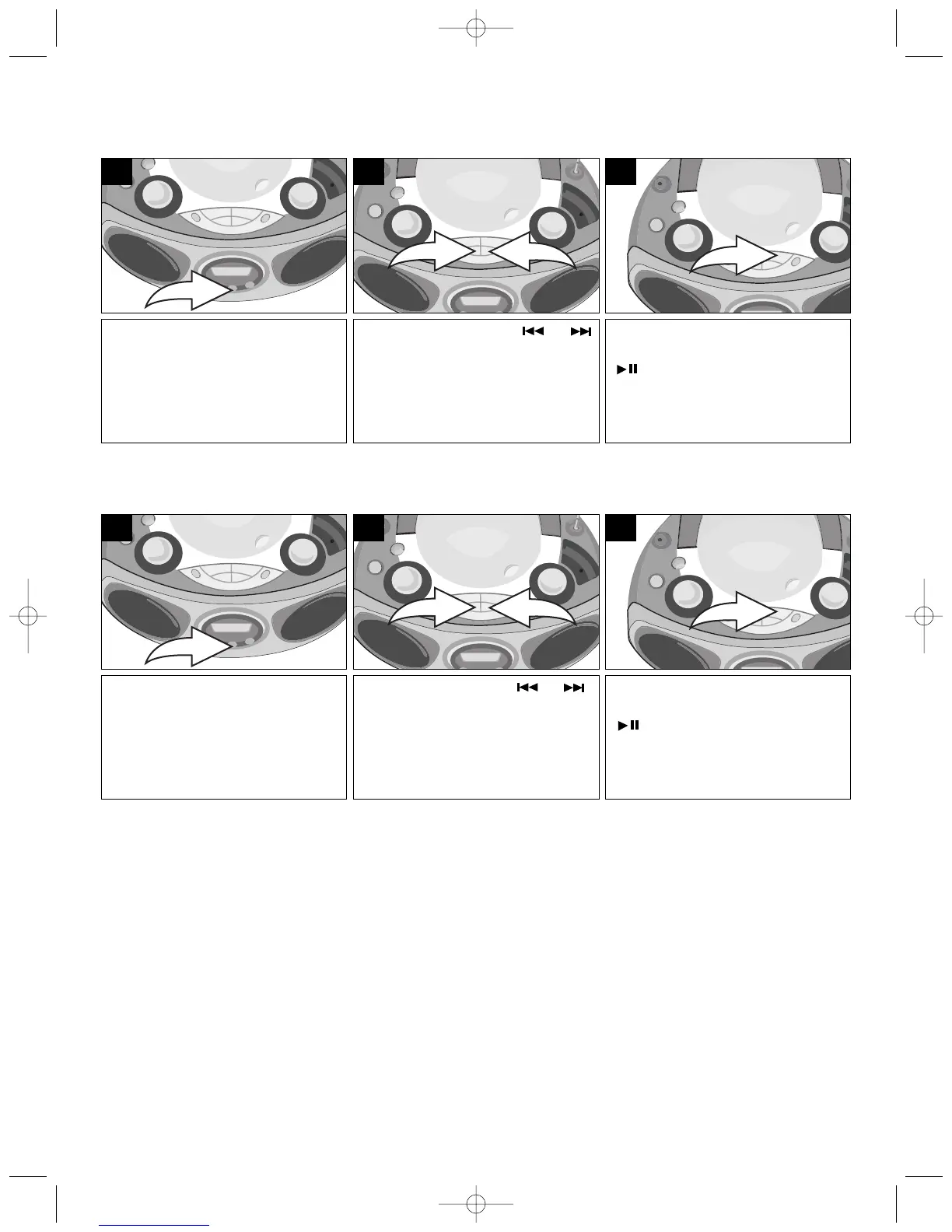
SEARCHING THROUGH MP3 TRACKS/FILES
You can search the contents of the MP3 albums (if burned on CD) as follows:
Press the FIND button once and
the track/file starting with the
letter “A” will appear in the
display.
1
When the desired track/file
appears, press the PLAY/PAUSE
( ) button to play the track/file.
3
Press the SKIP/Search or
button to scroll through the letters
and numbers to locate a specific
track/file.
2
SEARCHING THROUGH MP3 ALBUMS/FOLDERS
Press the FIND button twice and
the first album/folder name and
number will appear in the display.
1
When the desired album/folder
appears, press the PLAY/PAUSE
( ) button to play the first
track/file of the album/folder.
3
Press the SKIP/Search or
button to scroll through the albums/
folders and numbers to locate a
specific album/folder.
2
NOTE: When scrolling through track/files or albums/folders, if there is no name or contents, “NOTHING” will
appear in the display.



 To Next Page