÷
÷
STEREO AND SECOND AUDIO PROGRAM (SAP)
The TV is equipped with a feature known as Multi-channel TV
Sound or MTS. MTS broadcasts greatly enhance TV viewing
by bringing you programs with high fidelity stereo sound.
MTS also provides an extra channel called the Second
Audio Program or SAP which broadcasters can use to
transmit a second language for bilingual transmission or for
other purposes.
LISTENING TO STEREO SOUND
When the TV is turned on or a channel selection is made,
make certain that the word 'STEREO" appears on the
screen. This means that "Stereo" broadcasting is available.
You can enjoy stereo sound from the left and right speakers.
• When the "MONO" broadcasting is received, no indication
is displayed.
• If the broadcast signal is not strong enough or clear stereo
sound is not available, press the AUDIO SELECT button
to change to mono sound. The noise should be eliminated.
Press it again to return to the stereo sound.
USTENtNG TO SAP (SECOND AUDIO PROGRAM)
When the TV is turned on or a channel selection is made, make
certain that the letters "SAP" appear on the screen. This means
that the "Second Audio Program" broadcasting is available.
TO SELECT DESIRED SOUND
Press the AUDIO SELECT button to select the desired sound.
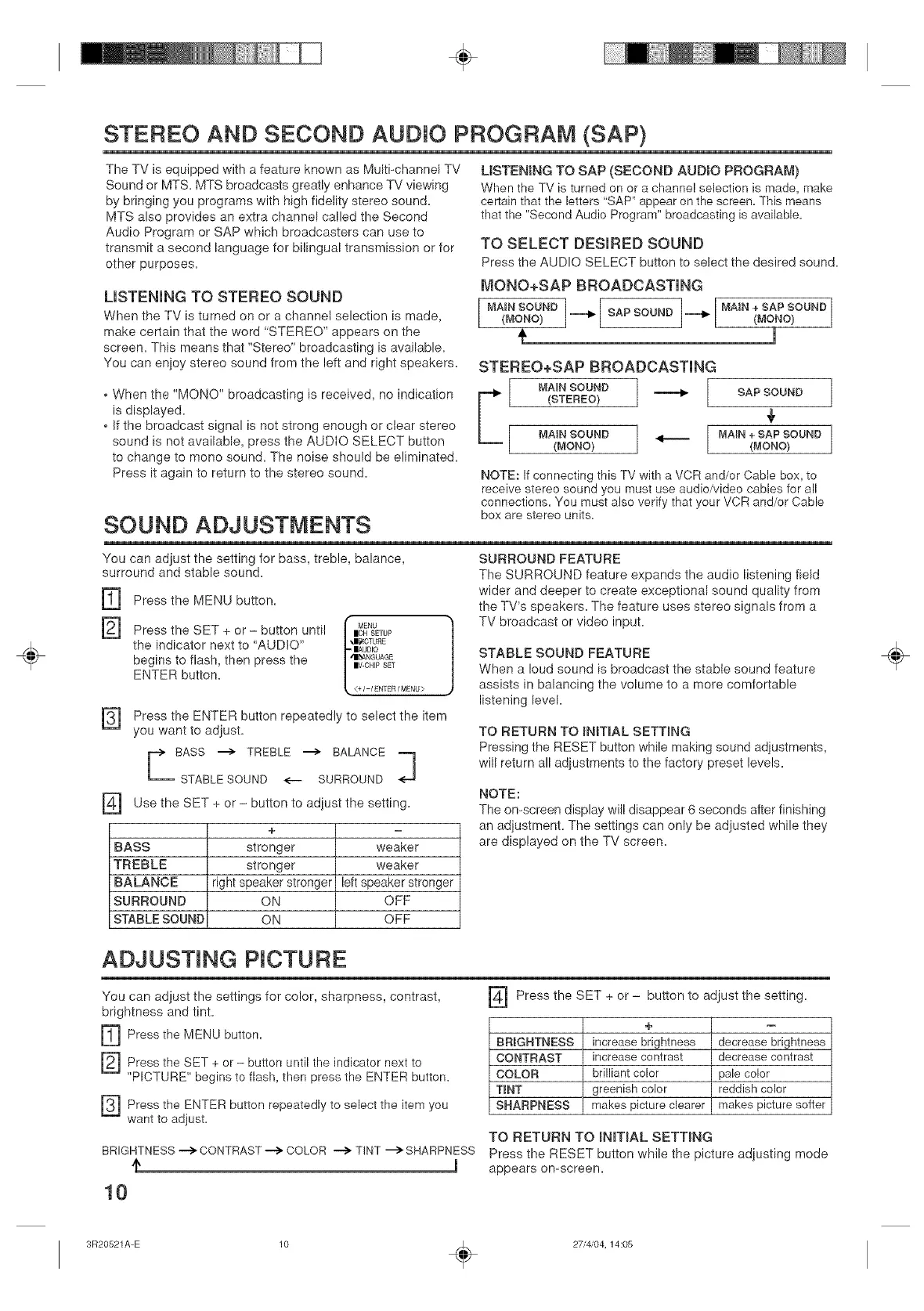
I_ONO+SAP BROADCASTING
[ 1
MAiN + SAP SOUND
[MA'NSOUNDj--'I_(MONO) SAPSOUND _ (MONO}
t 1
STEREO+SAP BROADCASTING
F"'_ / MAIN SOUND
(STEREO} 1 ,,,,_ [ SAP SOUND
4,
MAiN SOUND _ MAIN +SAP SOUND
(MONO) (MONO)
NOTE: If connecting this TV with a VCR and/or Cable box, to
receive stereo sound you must use audio/video cables for all
connections. You must also verify that your VCR and/or Cable
SOUND ADJUSTNENTS boxarcstereounits=
You can adjust the setting for bass, treble, balance,
surround and stable sound.
rq
@
Press the MENU button.
Press the SET + or - button until
the indicator next to "AUDIO"
begins to flash, then press the
ENTER button.
I MENU
|OH SETUP
klI£1CTURE
|AUDIO
/IIL_ANGUAGE
|V CHIP SET
E+I-IENTERIMENU>
Press the ENTER button repeatedly to select the item
you want to adjust.
::i
F_ Use the SET + or- button to adiust the setting,
+ E
BASS stronger weaker
TREBLE stronger weaker
BALANCE right speaker stronger left speaker stronger
SURROUND ON OFF
STABLE SOUND ON OFF
SURROUND FEATURE
The SURROUND feature expands the audio listening field
wider and deeper to create exceptional sound quality from
the TV's speakers. The feature uses stereo signals from a
TV broadcast or video input.
STABLE SOUND FEATURE
When a loud sound is broadcast the stable sound feature
assists in balancing the volume to a more comfortable
listening level
TO RETURN TO _NmAL SETTmNG
Pressing the RESET button while making sound adiustments,
will return all adjustments to the factory preset levels.
NOTE:
The omscreen display will disappear 6 seconds after finishing
an adiustment. The settings can only be adjusted while they
are displayed on the TV screen.
ADJUSTING PICTURE
You can adjust the settings for color, sharpness, contrast,
brightness and tint.
[_ Press the MENU button.
[_ Press the SET button until the indicator next to
+ or
"PICTURE" begins to flash, then press the ENTER button.
Press the ENTER button to select the item
repeatedly you
want to adjust.
Press the SET + or - button to adjust the setting.
+
BRIGHTNESS increase brightness decrease brightness
CONTRAST increase contrast decrease contrast
COLOR brilliant color pale color
TINT greenish color reddish color
SHARPNESS makes picture clearer makes picture softer
TO RETURN TO INITIAL SETTING
BRIGHTNESS --> CONTRAST --> COLOR --> TINT ---> SHARPNESS Press the RESET button while the picture adiusting mode
m appears on-screen.
10
÷
3R20521A-E 10 _ 27/4/04, 14:05


 To Next Page
 Loading...



