- 5 -
Red
AV I N
ENTER Enter
Stop
Pause/Play
Previous
Next
Rewind
Forward
VOL+ Increase the volume
VOL- Decrease the volume
REPEAT Change repeat play mode
INTERVAL
TIME
Change the transition time between photos during a slideshow
SLIDE SHOW Plays photos in continuous mode
OTB One Touch Backup ---Saves the memory card data directly on hard drive
Only one touch is needed
Music Plays music
DVD play By selecting DVD button, you enter into DVD navigation functions
P/N Choose TV type: PAL/NISC/MULTI-SYSTEM
SR Playback DVD in slow motion mode
SF Playback DVD in forward mode
Preview
On/off
Activates or deactivates the preview file mode
5. Product Use
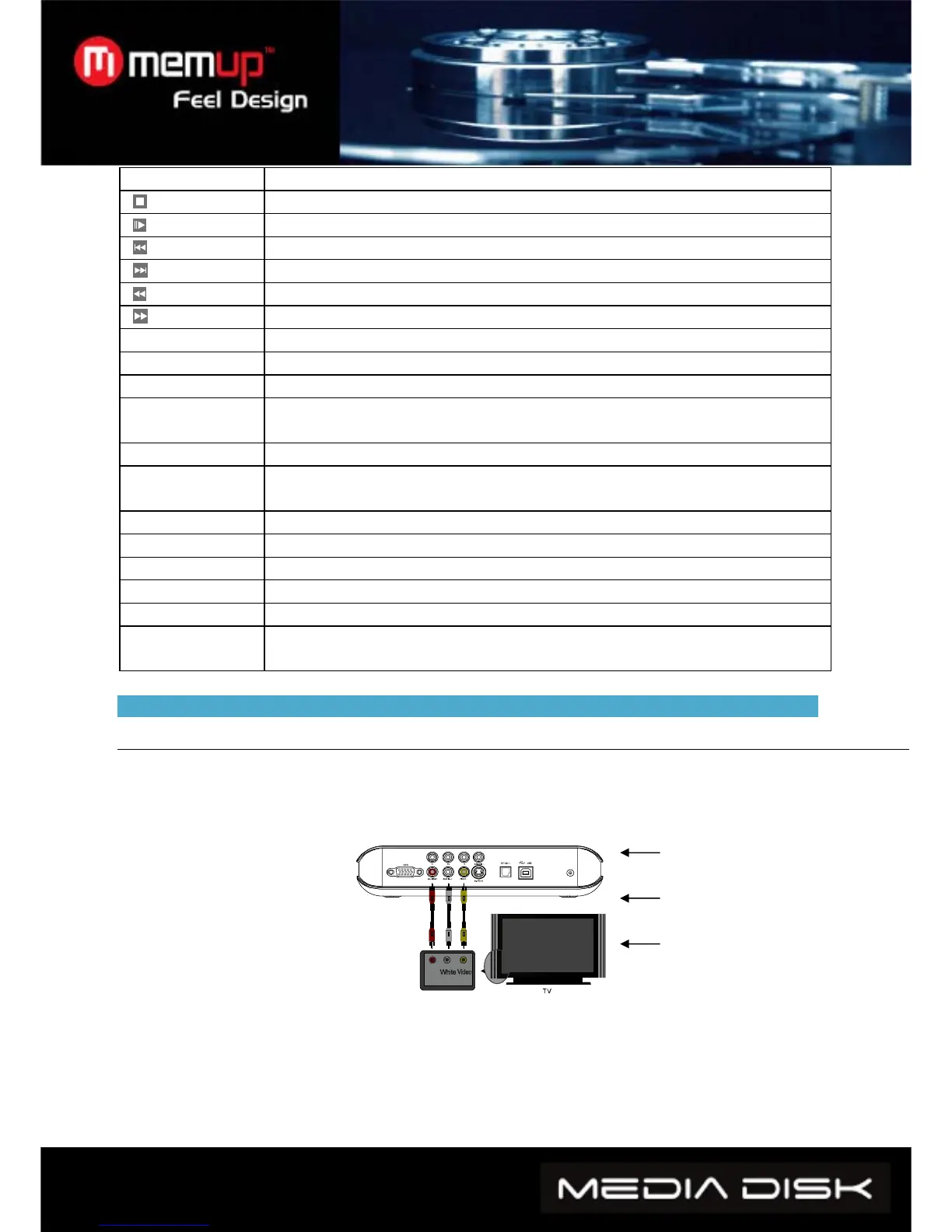
5.1 Device Connection
Connect the device as indicated in the pictures, switch on the power and follow these steps:
1. AV(CVBS) mode: press INPUT CHOICE key of the TV, and turn to AV INPUT MODE. If no
image appears, press VIDEO key of the Media player remote control and wait for a few seconds
until it turns to CVBS mode, then menu appears on TV.
AV OUTPUT MODE
Audio right(Red)
Audio left(white)
Video (Yeollw)



 To Next Page