- 3 -
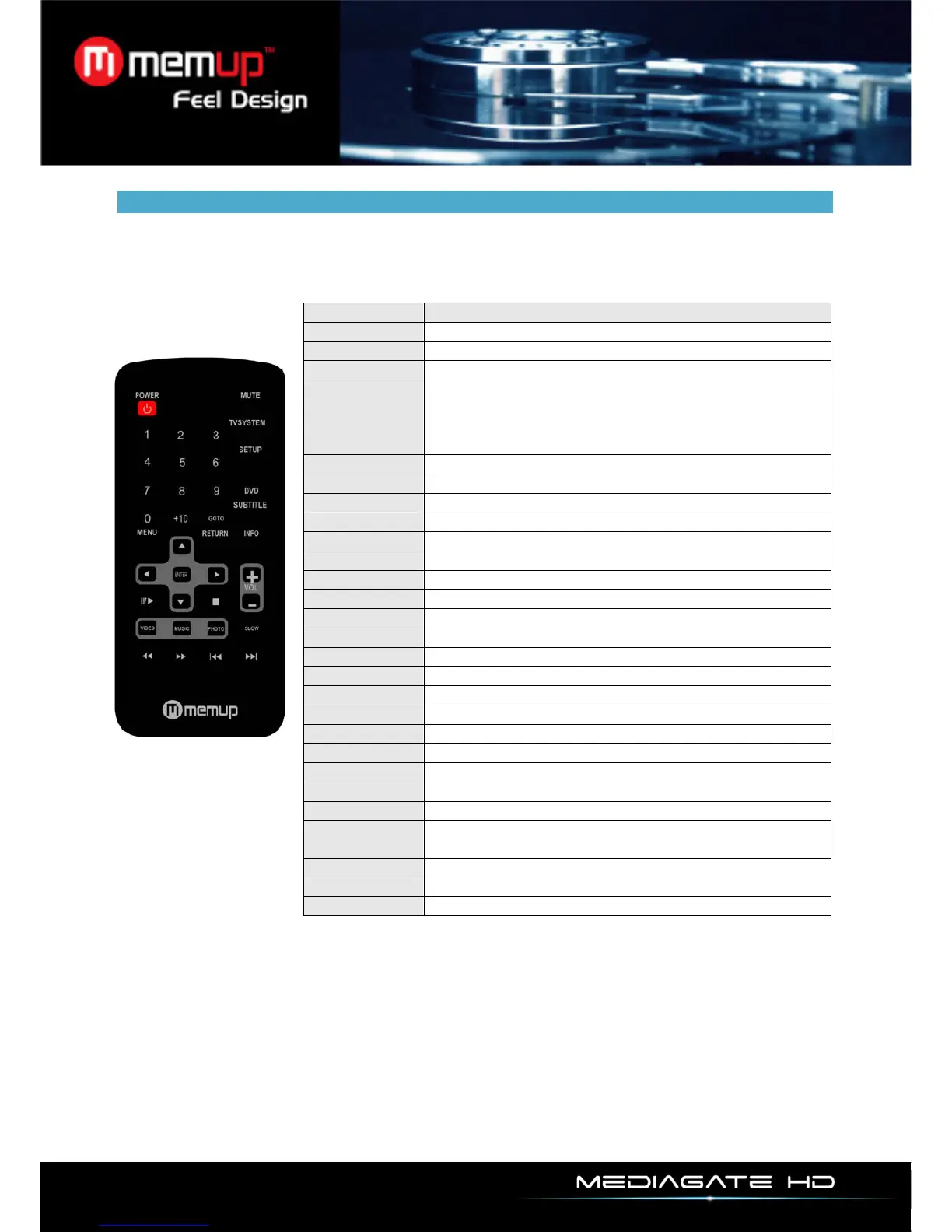
REMOTE CONTROL
KEY FUNCTION
POWER
Power ON/OFF
MUTE
Audio mute key
GOTO
Select Playback Time
SLOW
During playing, Press Slow key, the device will enter
slow playback status, there are 3 selectable speeds
2×/4×/8×.Press ENTER key to return to normal
playback
TV SYSTEM
Video output mode
SUBTITLE
Subtitle:SRT.SSA.ASS.SUB.ASS.PSB.TXT
DVD
DVD Navigation
SETUP
Enter menu setup, press again to return
Play/Pause
Play or Pause Button
MENU
Return to main menu
RETURN
Return to main menu or to Home
Up picture rotation
Down picture rotation
Enter
Enter to select to playback
Left Key
Right Key, Back to the last directory
(VOL -)
Left,( Decrease volume)
(VOL+)
Right,(Increase volume)
Stop
Stop
REV
Skip backward
FWD
Skip forward
PREV
Previous
NEXT
Next
INFO
File properties: display playback time when playing
video
VIDEO
Shortcut key for Video menu
MUSIC
Shortcut key for Music menu
PHOTO
Shortcut key for Photo menu



 To Next Page