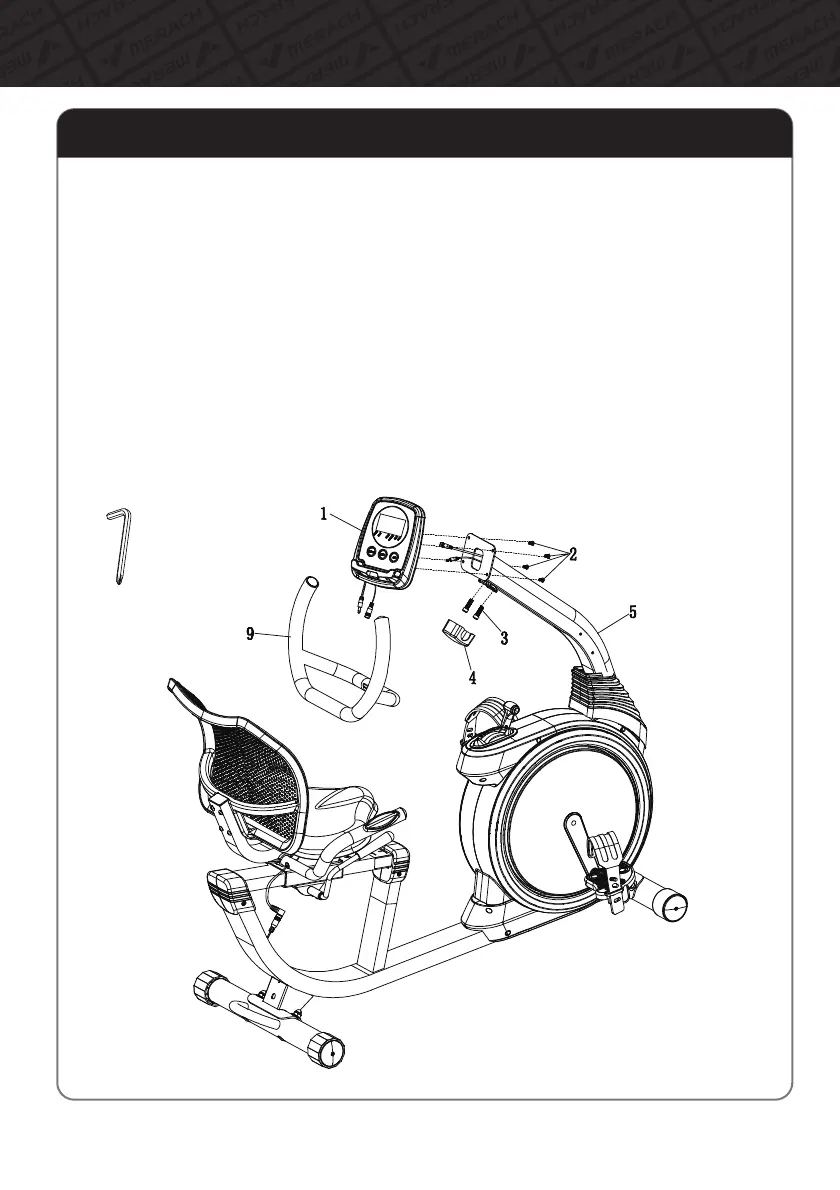
Step7:InstalltheHandlebarandtheMonitor
A.AttachtheHandlebar(#9)totheSupportTube(#5)withBolts(#3).Clipthe
HandlebarCap(#4)ontotheHandlebar(#9)tocovertheBolts(#3).
B.PlugtheMiddleMeterWireontheSupportTube(#5)andthePulseSensorWireinto
theconnectingwiresoftheMonitor(#1),andpushtheexcesswiresbackinto
theSupportTube(#5).
C.AttachtheMonitor(#1)totheplateontheSupportTube(#5)withBolts(#2)and
CrossHexagonWrench(#B)
NOTE:PleasebecarefulnottodamagethewireswhenattachingtheMonitor(#1),and4Bolts(#2)
arepre-assembledontothebackofMonitor(#1).
11
AssemblyInstructions



 To Next Page