27
4. Follow the dialog boxes to save the downloaded file to a directory on the host PC. Remember the directory
location.
5. Once the download is completed, open the file and use the unzip application to extract the individual files.
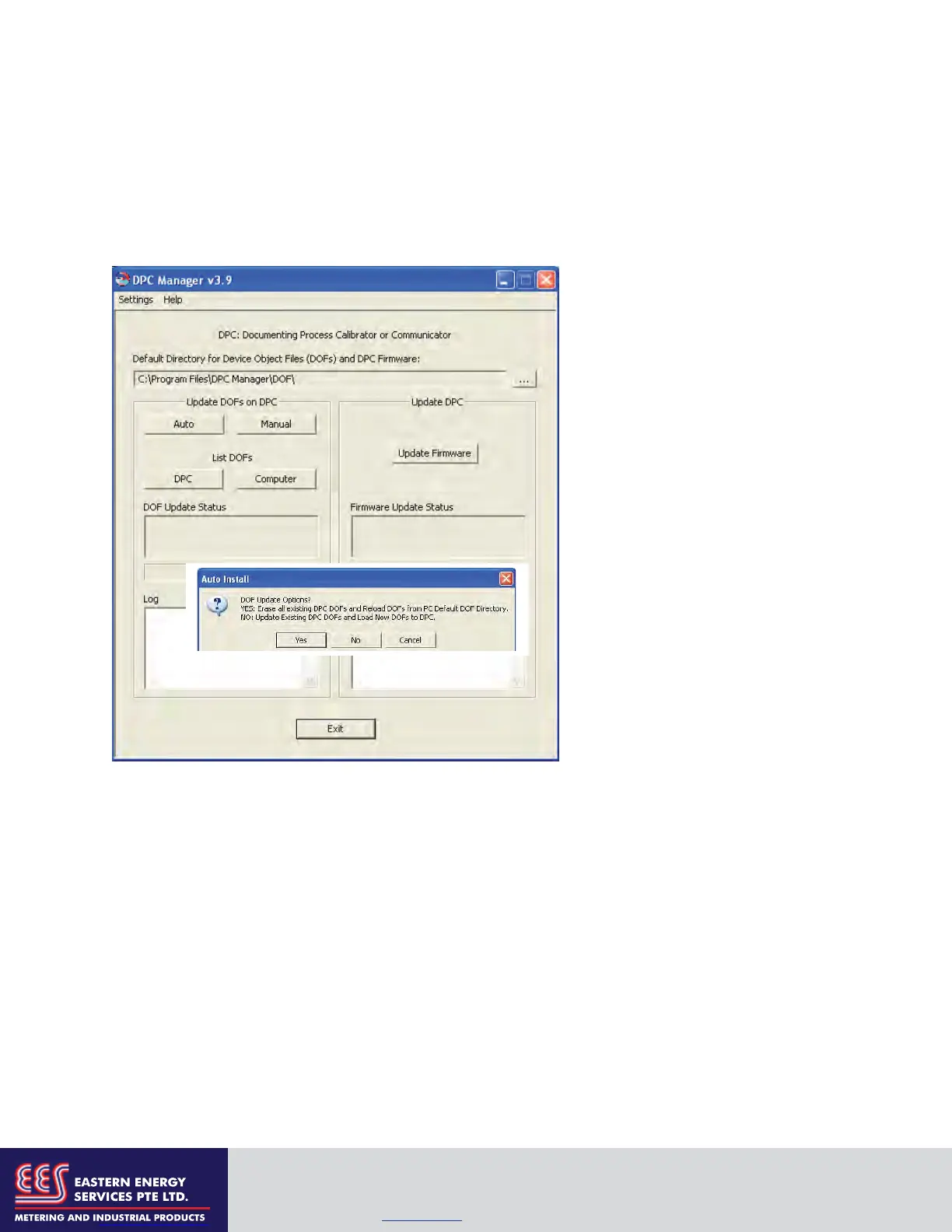
6. Open DPC Manager and select the “Manage DPC Device Driver and Firmware Updates” button.
7. Click on “Settings” in the toolbar and select “Advance Settings.”
To report any difficulties with downloading operations, please contact Meriam at 216-281-1100 or
meriam@meriam.com
8. Use the browser button to navigate to
the location of the DOF files on the host
PC.
9. Start a Firmware update by clicking
on the “Update Firmware” button under
the “Update DPC” header.
10. Start a DOF update by clicking on
the “Auto” button under the “Update
DOFs on DPC” header.
a. Answer YES to erase all DOFs in
memory and re-install all DOFs.
b. Answer NO to add any new or
revised DOFs to existing
memory.
12. DPC Manager will provide updates
as firmware or DOFs are being loaded.
EASTERN ENERGY SERVICES PTE LTD.
60 Kaki Bukit Place #02-19 Eunos Tech Park Singapore, SG 415979 Singapore
Telephone: +65-6748 6911 Fax: +65-6748 6912
Email: info@eesgroup.com Website: www.eesgroup.com


 To Next Page