COPYRIGHT © 2006 MERIT ENTERTAINMENT
FIGURE 30 - TOURNAMENT CLOCK
SCREEN
Programming a Tournament
1. Press the SETUP button.
2. At the MAIN MENU, touch the Tourna-
ment button.
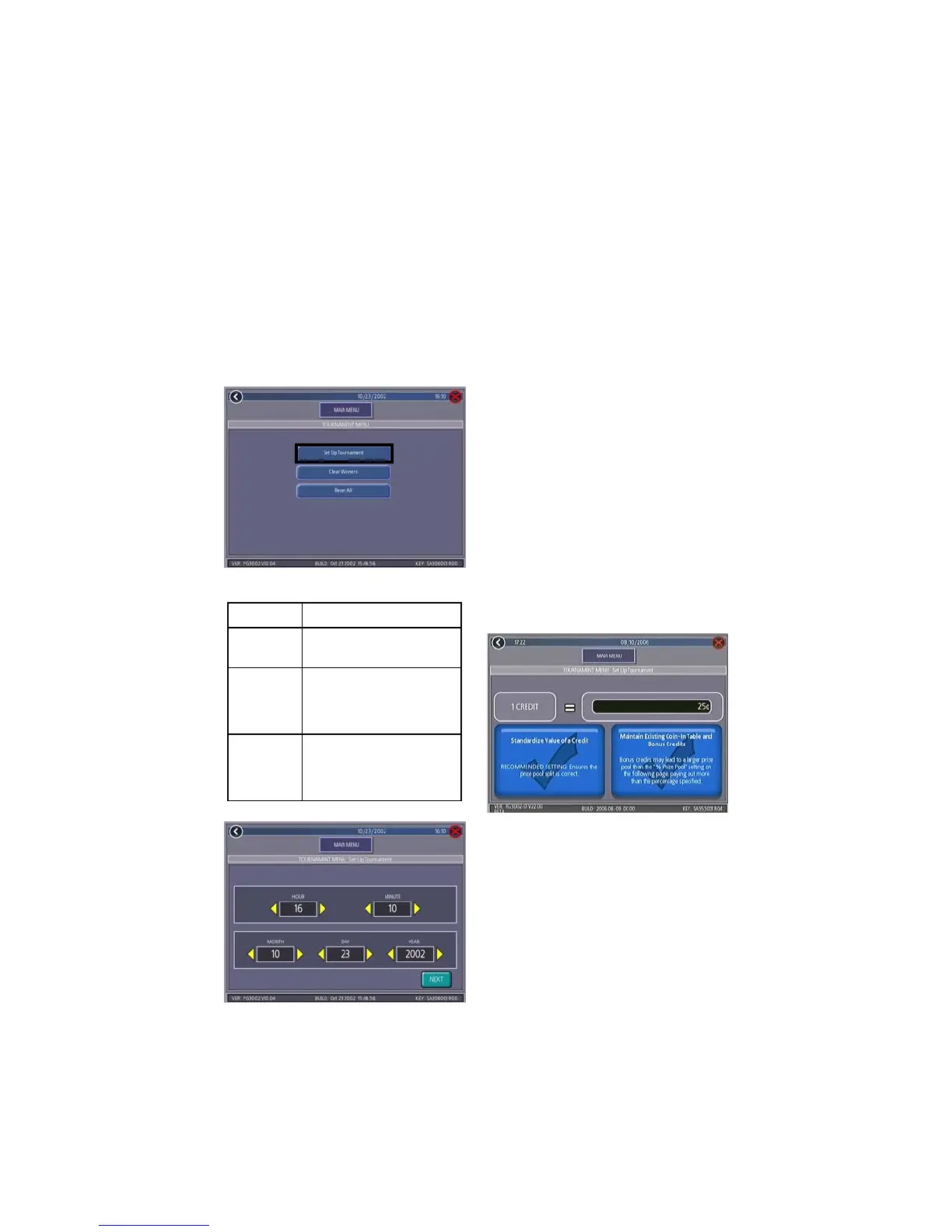
3. At the TOURNAMENT MENU, touch the
Set Up Tournament button (see Fig-
ure 29) to enter the Tournament Clock
Screen.
BUTTON
ICON
DESCRIPTION
SET-UP
TOURNA-
MENT
Accesses the Tournament Set-
Up screens.
CLEAR
WINNERS
Enters the Clear Winners
screen, which allows you to
clear all winners or clear all
winners who have been
awarded prizes.
RESET ALL
Erases ALL tournament
information from the memory
of game!
This includes ALL prize
information!
4. At the Tournament Clock Screen (see
Figure 30) confirm the correct date and
time (if the date and/or time is incor-
rect, set the correct values using the
arrows next to each field).
5. Touch the NEXT button to enter the Tour-
nament Value of Credit Screen.
6. At the Value of Credit Screen, confirm
the correct currency and value of one
credit. Select one of the two options
presented: Standardize Value of a
Credit or Maintain Existing Coin-In
Table and Bonus Credits. To en-
sure a proper prize pool split, select
the standardized setting displayed at
left (see Figure 31). By contrast,
choosing to maintain bonus credits will
misallocate the percentage split speci-
fied on the Tournament Setup Screen.
This occurs because the prize pool is
calculated based on the value of a
credit, regardless of the cost of a credit.
FIGURE 31 - VALUE OF CREDIT SCREEN
NOTE: Choosing the standardized set-
ting changes the Coin-In Table by re-
moving bonus credit lines. To restore
bonus credits at the conclusion of tour-
nament play, you must reset the Coin-
In Table through the Credits Menu.
7. Touch the NEXT button to enter the Tour-
nament Setup Screen (see Figure 32).
8. Follow the explanation of each button
on the next pages to set up a Tourna-
ment.
31 MEGATOUCH ION EVO WALLETTE OWNER’S MANUAL PM0480-16
FIGURE 29 - TOURNAMENT MENU SCREEN


 To Next Page