COPYRIGHT © 2008 MERIT ENTERTAINMENT
7 MEGATOUCH ION EVO OWNER’S MANUAL PM0426-25
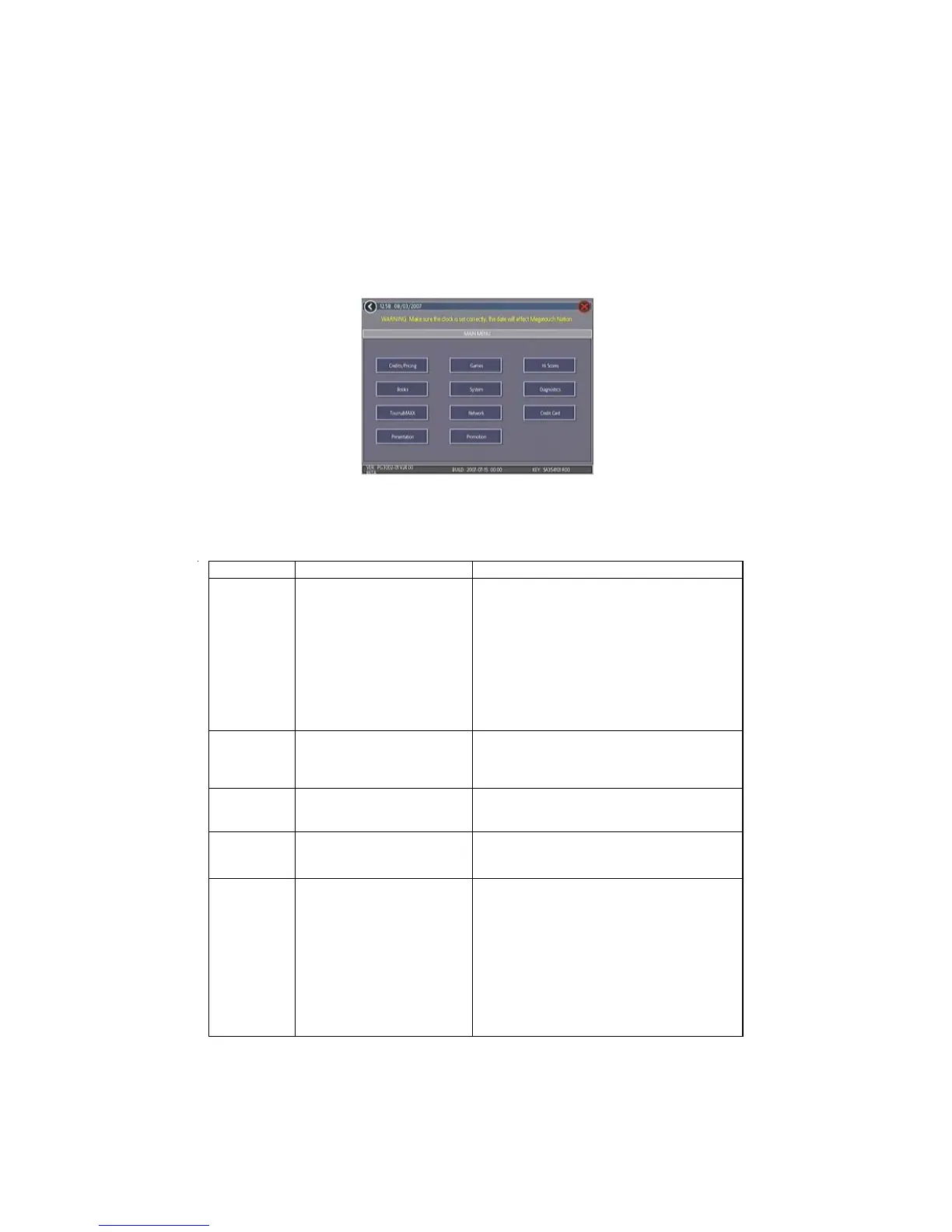
Main Menu
The Main Menu can be accessed by pressing the SETUP button inside the game. Use the
Main Menu to set up all game software options.
NOTE: For help with the Options in any menu section, touch the green “?” buttons
to bring up a help screen.
A summary of the Main Menu functions appears in the following table. For more detail, see
the corresponding sections of the manual.
FIGURE 1 - MAIN MENU
Main Menu Available Options Information
CREDITS/
PRICING
•
Quick Price Setup
•
Coin-In
•
Value of a Credit
•
Coinless Coin Op
•
Pay Per Time
•
Options
•
Player Key Cost (Ion Only)
•
Clear Credits
•
Free Credits
•
AMI Play Cost
The Credits Screens allow the operator to set
credit rules for all games, set up the Coin-In
Menu, enable the Coinless Coin Op feature,
enable the Rental Mode feature, set the cost to
purchase player keys (if applicable), select
freeplay mode, and add or clear credits.
Operators with a Mega-Link connection can
also set up AMI jukebox play cost.
GAMES
•
Game Setup
•
Options
In the Games Screens, you can edit the game
list (choose which games are available and in
what category they appear on the Category
Menu), and select options for individual games.
HI SCORES
•
View/Clear Hi Scores
•
Options
Touch
CLEAR ALL GAMES
to clear all high
scores or select a particular game to edit high
scores for that game.
BOOKS
•
Books Display
•
Cash Settlement Setup
•
Cash Settlement Collection
The Books Screens display current and lifetime
credits information as well as calculate and
collect the location and operator fees.
SYSTEM
•
Set Time
•
Security Setup
•
Set Game Serial Number
•
Volume Control
•
Set 6 Star PIN
•
Data Transfer
•
Setup Operator Keys
(Ion Only)
•
AMI Setup
•
Options
Set the game clock, security PIN, serial
number, game volume, 6 star PIN and features,
and system options such as language control, 6
Star Enable, and theft deterrent. Also use this
menu to transfer machine configuration, books
data, and ad screens with a USB Pen and
program Operator keys to enable access to the
setup screens via the key (if applicable). The
AMI Setup option allows operators to establish
a Mega-Link between their Megatouch game
and an AMI-powered jukebox.


 To Next Page