COPYRIGHT © 2008 MERIT ENTERTAINMENT
9 MEGATOUCH ION EVO OWNER’S MANUAL PM0426-25
Credits/Pricing Menu
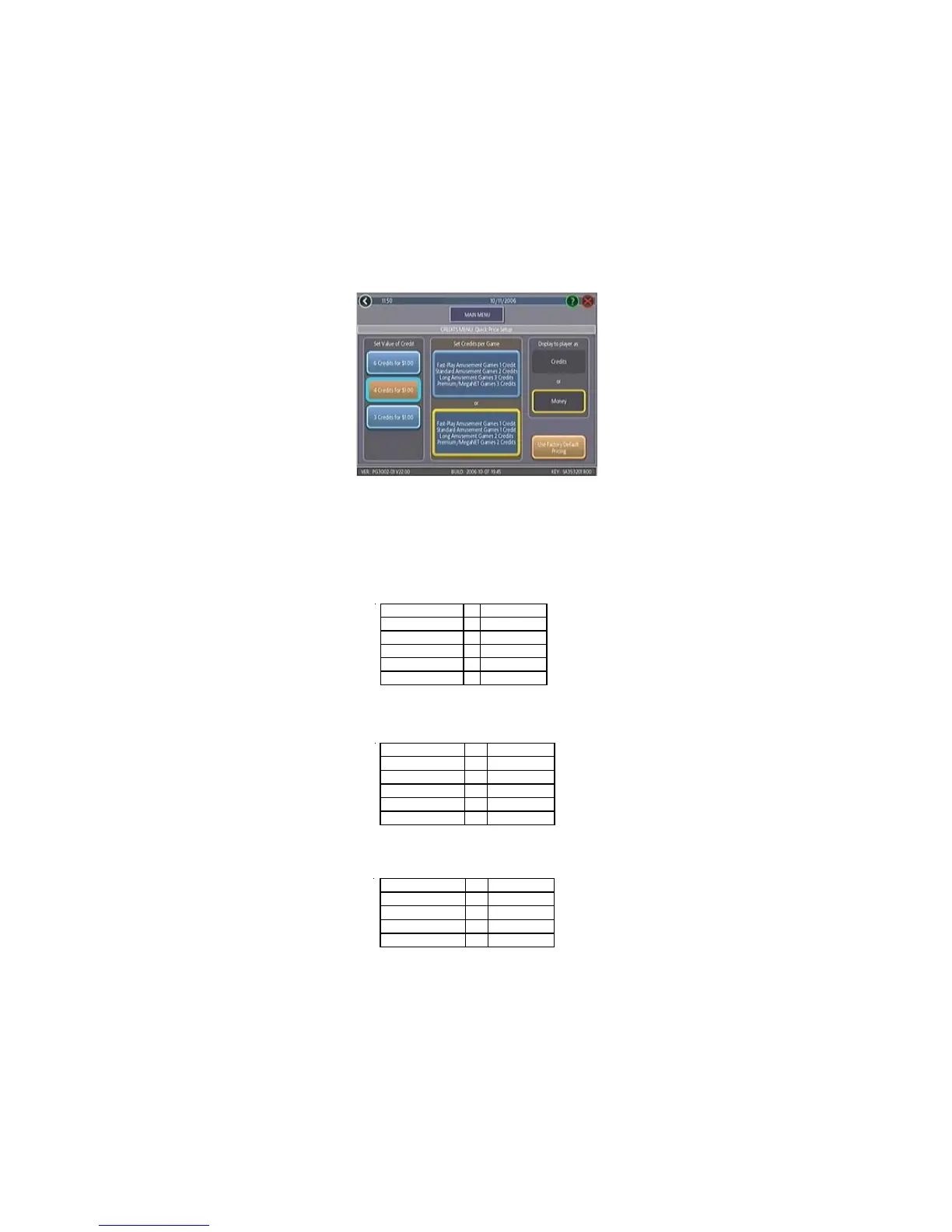
Quick Price Setup - This feature is only available in U.S. games.
Quick Price Setup allows the operator to make general pricing changes without entering the
Games Menu.
NOTE: If the game is set to 3 or 6 Credits for a Dollar, prices will display as Credits.
FIGURE 2 - QUICK PRICE SETUP SCREEN
The operator can also use this screen to determine whether prices are displayed to players
as credits or monetary amounts, and set the cost of Fast-Play Amusement, Standard Amuse-
ment, Long Amusement, and Premium/MegaNET games. Touch the Use Factory Default
Pricing button to restore default values.
3 Credits for a Dollar: Sets each game to the following price settings:
COIN VALUE = CREDITS
$0.25 1
$0.50 2
$0.75 3
$1.00 4
$5.00 20
6 Credits for a Dollar (default setting): Sets each game to the following price settings:
COIN VALUE = CREDITS
$0.25 1
$.50 2
$.75 4
$1.00 6
$5.00 30
4 Credits for a Dollar: Sets each game to the following price settings:
COIN VALUE = CREDITS
$0.50 1
$0.75 2
$1.00 3
$5.00 15


 To Next Page