COPYRIGHT © 2008 MERIT ENTERTAINMENT
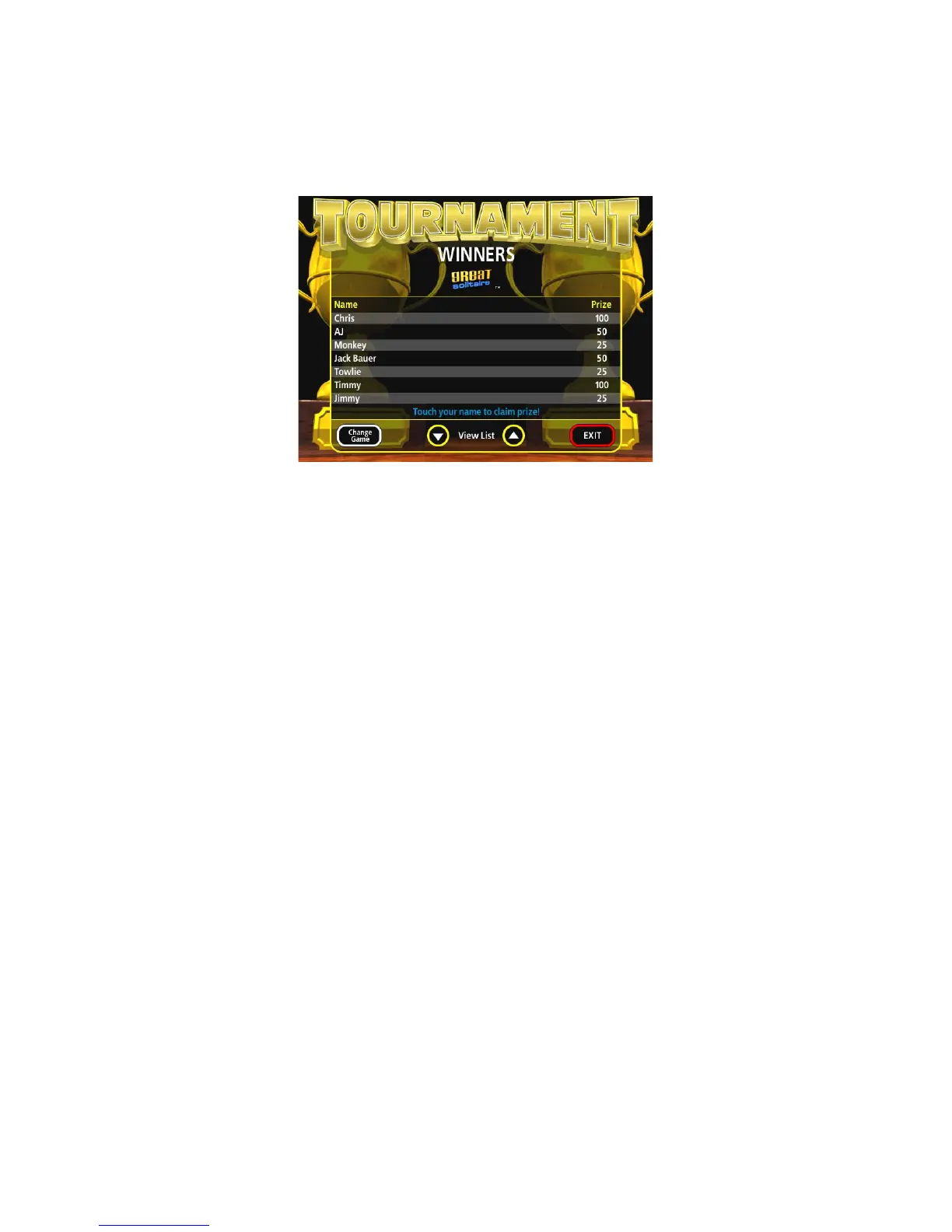
FIGURE 27 - WINNERS’ LIST SCREEN
Awarding Prizes
Players qualify for prizes by finishing with one of the top three high scores for the
tournament.
1. To award a prize, access the Winners’ List by touching the Tournament icon on
the Player Menu. Then touch the CLAIM PRIZE icon.
2. On the Winners’ List Screen, touch the players’ name to whom the prize will be
awarded (see Figure 27).
3. When the PIN keypad is displayed, an attendant must enter one of the four, pre-
programmed attendant PINs.
4. The player then enters their PIN to confirm the awarding of the prize.
5. The attendant must then touch the PRIZE AWARDED icon to register the payout.
NOTE: Touching EXIT without touching PRIZE AWARDED will cause the
prize award sequence to be aborted. The sequence will have to be re-
peated to award the prize.
Pay Without PIN
If players should forget their PIN, the attendant can press the SETUP button in place
of entering the player’s PIN. The sequence will continue as though the PIN had been
entered. Touch PRIZE AWARDED to register the payout.
PM0426-25 MEGATOUCH ION EVO OWNER’S MANUAL 30


 To Next Page