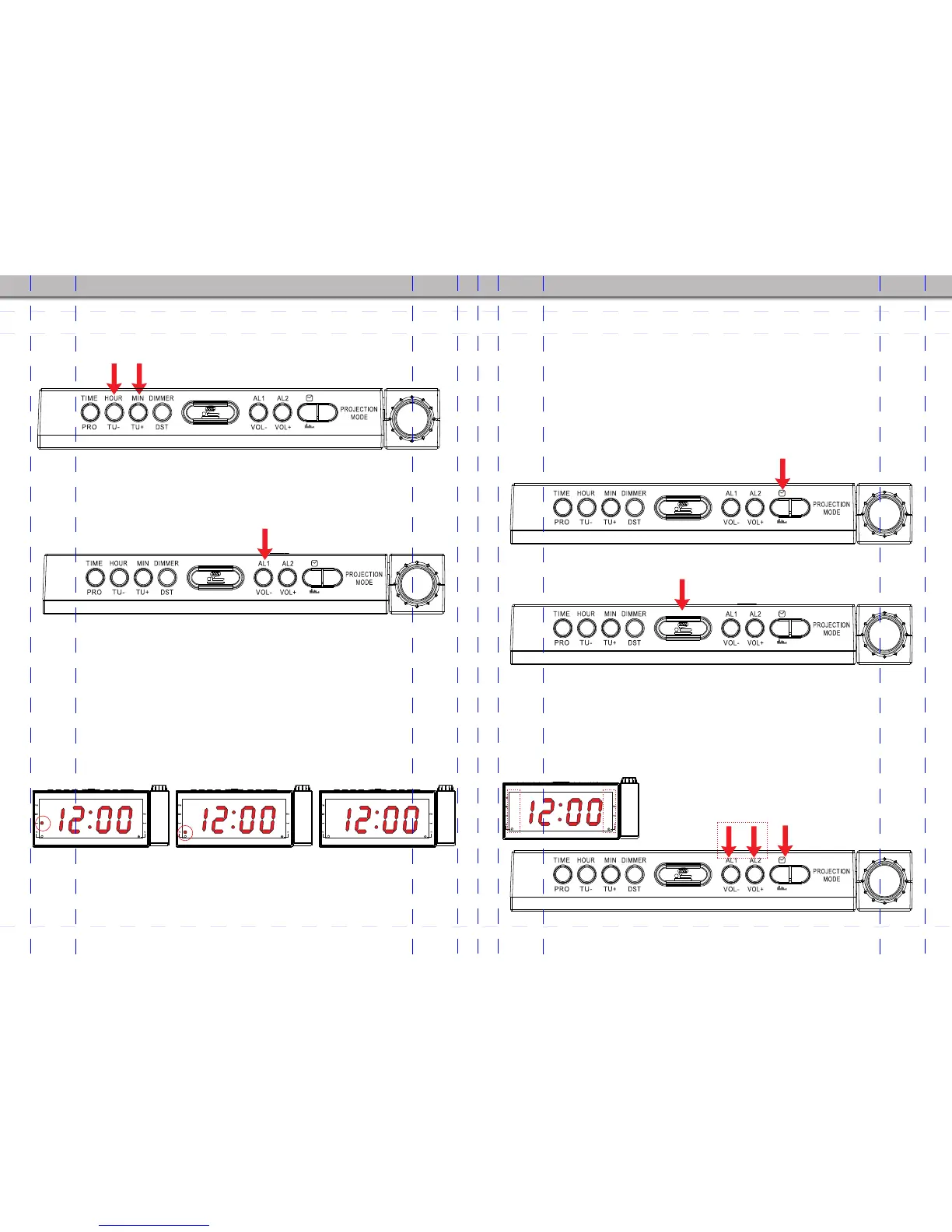
6. To use Alarm 2, just follow steps 2 to 5 with using the AL2/VOL+
button (7) instead of AL1/VOL- button (6). Similarly, the Wake To
Buzzer indicator is Alarm 2 Buzzer indicator (14) and the Wake To
Radio indicator is Alarm 2 Radio indicator (15) on the RIGHT of the
display.
7. How to switch off the alarm?
A) Press RADIO button (8) once to switch off the alarm. You can see
that the alarm indicator is still on, showing that the alarm function is still
activated and will sound again after 24 hours.
B) Press the SLEEP/SNOOZE button (5) to temporarily turn the alarm
off for 9 minutes. (See SNOOZE SETTING below)
C) If no button is pressed after the alarm sounds, the alarm will
continue sounding and automatically turn off at 1 hour after the alarm
time.
D) To disable the alarm completely, press the “RADIO” button(8)
once and then press AL1/VOL- button (6) or AL1/VOL+ button (7) until
their indicators (radio or buzzer) disappear from the display.
- 09 - - 10 -
AM/FM
3. Press the HOUR/TU- button (2) to set the hour. Press the MIN/TU+
button (3) to set the minute.
4. After setting the desired alarm time, press AL1/VOL- button (6)
again, or simply wait for 5 seconds. The display will return to the current
time and the alarm time is saved.
5. Now press AL1/VOL- button (6) repeatedly to choose the alarm
status.
The status indicators for Alarm 1 appear in the following sequence on
the LEFT of the display:
A) Wake To Buzzer: Alarm 1 Buzzer indicator (11) is lighted up and Alarm time is
flashing on the display.
B) Wake To Radio: Alarm 1 Radio indicator (12) is lighted up and Alarm time is
flashing on the display.
C) Alarm Off: All Alarm 1 indicators are off and the current time is shown on the
display.
AM/FM
AM/FM
Press this button or wait for 5 seconds to confirm alarm setting
AM/FM
1
AM/FM
1
AM/FM
1
Buzzer indicator is on
Notes:5 seconds after the desired status is chosen, the display will
stop flashing and return to current time. Please make sure the indicator
for the selected status (buzzer or radio) is ON, or no indicator is on in
case if you choose to turn off the alarm.
AM/FM
AM/FM
Press to set hour Press to set minute
Press once
Repeatedly press
Radio indicator is on All indicators are off
Press once
Press to temporatily turn off
AM/FM
1
All indicators are off


 To Next Page