20
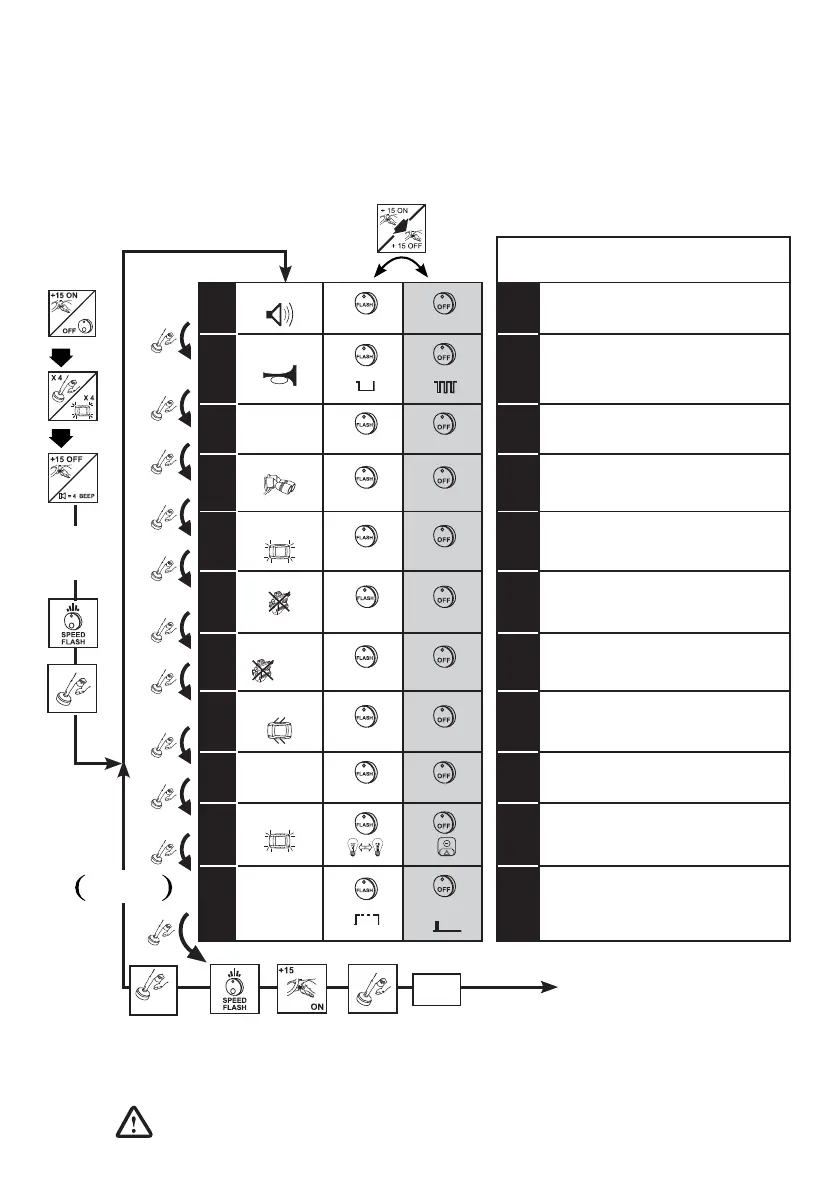
When programming is nished the selections made can be checked again and even changed if wanted by
returning to function no. 1. To go from function no. 11 to no. 1, press the key for 3 seconds; 1 BEEP signals return
to function no. 1.
FUNCTION DESCRIPTION
1
ARM./DISARM.
YES
NO
1
Buzzer rings during activation
and deactivation of the alarm.
2
HORN
CONTINUOUS
ALTERNATING
2
It allows to control a horn or pager relay
with a continuous or alternating command.
3
DELAYED
CURRENT
DROP
YES
NO
3
It renders operative the protection for
current absorption on the vehicle
.
4
SENS.
HIGH
STANDARD
4
It allows to vary the sensitivity of the
volumetric protection.
5
BLINKER ARM./
DISARM.
YES
NO
5
Blinker working during activation
and deactivation of the alarm.
6
PASSIVE ARMING
YES
NO
6
It automatically activates the engine
block protection.
7
PASSIVE
ARMING
+ ALARM
YES
NO
7
It automatically activates the engine
block protection and the alarm part,
disabling the ultrasounds
.
8
DOOR
PROTECTION
DERIVED
CONTINUOUS
8
It determines whether or not just the one
alarm cycle is executed with a Doors,
Boot and Bonnet alarm stimulation.
9
ANTI-CARJACK
ALARM
YES
NO
9
If it is ON it protects the vehicle in the case of
unauthorised use, triggering an alarm cycle and making
it impossible for the engine to be started again.
10
BLINKER
10
It determines whether the Blinker is
controlled by means of power on the lamps
or on the push button of the car blinkers.
11
CONTROL OF
BLINKER
SWITCH
CONTINUOUS
SINGLE
IMPULSE
11
It determines whether the Blinker push
button is controlled by means of a
continuous signal or with a single pulse.
MAX.
5 SEC.
MAX.
5 SEC.
ACCESS
TO THE
OPERATING
MODE
TABLEE
EXIT
1 BEEP
RE-CHECK/
REPROGRAMMING
CUSTOMISING THE OPERATING MODES
The available operating modes are listed in the following table. The factory settings are in bold type and the
possible alternatives are in plain text.
To change the factory programming, going from line “A” to line “B” of the table (or vice versa) proceed as follows:
NOTE: Passage, via +15 panel, from line “A” to line “B” is indicated by 1 Boop and by 1 Beep from line “B” to line “A”.
Going from one selection to the next using the push button is indicated by the arrows ashing. The functions that
are not available are shown by the very fast ashing of the LED.
2 BEEP
2 BOOP
The selectable functions, 1 and 9 contrast with the European Directive 95/56/EC.
(This means that activation is not allowed in all community member states).
X 3 SEC.


 To Next Page