Need help?
Do you have a question about the Meta System M43J and is the answer not in the manual?
Procedure for arming and disarming the immobiliser in manual mode.
How the immobiliser operates automatically using the ID-Tag's proximity.
Instructions for installing the service key receptacle for Valet mode.
Steps to complete the installation and secure components after testing.
Contact information and hours for installation support from the dealer.
The Meta System M43J(T) Immobiliser is a sophisticated security device designed to prevent unauthorized use of a vehicle by disabling critical engine functions. This installation and operating guide, version 2.2, dated 17/02/20, outlines the procedures for setting up and using the immobiliser, which is Thatcham Research Security Certified, indicating its adherence to high security standards.
The primary function of the M43J(T) Immobiliser is to secure a vehicle by preventing its engine from starting without proper authorization. It achieves this by cutting off essential electrical circuits, such as the fuel pump, ignition, or starter motor, when armed. The system offers two main modes of operation: Manual Mode and Automatic (Proximity) Mode, providing flexibility based on user preference and security requirements.
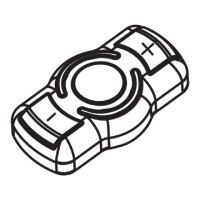
In Manual Mode, the immobiliser arms approximately 15 seconds after the ignition is switched off. During this armed state, the LED indicator will flash every 2 seconds. If the ignition is switched on without disarming the system, the immobiliser LED will remain solid, indicating that the system is still armed and the vehicle cannot be started. To disarm the system in Manual Mode, the user must press the button on the ID-Tag (a small, portable transponder) and then start the vehicle within 8 seconds. Upon successful disarming, the immobiliser LED will flash twice and then extinguish, allowing the vehicle to start.
The Automatic (Proximity) Mode offers a more convenient, hands-free operation. In this mode, the ID-Tag button will flash briefly once every 5 seconds to indicate its active status. The immobiliser arms approximately 15 seconds after the ignition is switched off and the ID-Tag moves out of range of the vehicle. Similar to Manual Mode, the LED will flash every 2 seconds when armed. If the ignition is switched on without the ID-Tag being present or detected, the immobiliser LED will be solid, signifying the armed state. Disarming in Automatic Mode is seamless: the user simply starts the vehicle as normal, and the ID-Tag is automatically detected. The immobiliser LED will flash twice and then extinguish, enabling the vehicle to start. A notable feature of the Automatic Mode is that the ID-Tag will switch off after 20 minutes if it detects no motion, conserving battery life. It will automatically switch back on once movement is detected.
The system also includes a Valet Mode, primarily for non-insurance installations. This mode allows the immobiliser to remain in a disarmed state, which is useful when the vehicle is being serviced or parked by a valet. To activate Valet Mode, the service key is momentarily inserted into its receptacle, and the LED will give one long flash to confirm. The immobiliser will then stay disarmed until the service key is used again, at which point it will revert to automatic arming mode. For Thatcham CAT2 installations, Valet Mode is explicitly not allowed, and the service key receptacle must not be mounted in a customer-accessible location, but rather in a place accessible only by a dealer for future ID-Tag programming.
The M43J(T) Immobiliser is designed for straightforward use once installed. The ID-Tags are compact and can be easily carried by the user. The LED indicator provides clear visual feedback on the immobiliser's status, whether it's armed, disarmed, or in the process of arming/disarming. The choice between Manual and Automatic modes caters to different user preferences for interaction with the security system.
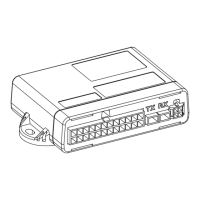
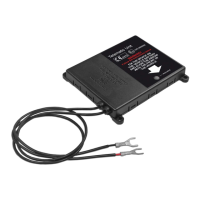
Installation involves connecting the immobiliser to various vehicle electrical circuits, including ignition, permanent positive, and ground, as well as cutting into critical circuits like the fuel pump, ignition relay, and starter motor. The wiring diagram provides a clear guide for these connections, emphasizing the importance of correct wiring to ensure proper functionality and safety. For instance, it specifies that the ignition must remain live whilst cranking and that a permanent live circuit should not be cut.
Checking the operation of the service key and ID-Tags is a crucial step after installation. This involves verifying that the immobiliser arms and disarms correctly with both the service key and each ID-Tag. The process includes inserting the service key to arm the system, pressing the ID-Tag button to disarm, and repeating for all ID-Tags to ensure they are properly recognized.
Maintenance primarily revolves around the ID-Tags and troubleshooting. The guide provides clear instructions for Replacement ID-Tag Programming, which is essential when adding new ID-Tags or replacing lost ones. It's important to note that when a new ID-Tag is added, all existing ID-Tags must also be reprogrammed to ensure they remain functional with the system. The programming process involves preparing the ID-Tags (ensuring they are not flashing, or by removing and re-inserting the battery for existing tags), then inserting and holding the service key until the immobiliser LED flashes rapidly. The ID-Tag button is then pressed and held until its LED becomes solid, confirming successful programming. This process is repeated for each ID-Tag (up to a maximum of four). After programming, the ID-Tags will default to Automatic Mode, but can be easily switched to Manual Mode by removing and re-inserting the battery for 5 seconds.
Troubleshooting is a key aspect of maintenance, and the guide addresses common issues. If the immobiliser clicks when trying to start the vehicle, it suggests checking that the 'KEY' and '3A' wires are correctly inserted into the 2-way connector and that the ignition connection is not on the dead side of the cut, meaning it must remain live when the cut is open. If the immobiliser does not arm, the guide advises checking if it's in Valet Mode (and toggling it with the service key if so) and ensuring that wire No. 5 has no residual voltage when the ignition is off. These troubleshooting steps help diagnose and resolve common operational problems, ensuring the immobiliser functions as intended.
For further support, the guide provides contact information for dealer support, including a phone number and website, indicating that professional assistance is available for installation and other issues. This comprehensive approach to installation, operation, and maintenance ensures the Meta System M43J(T) Immobiliser remains a reliable security solution for vehicles.
 General
| Category | Automobile Accessories |
|---|---|
| Type | Car Alarm System |
| Compatibility | Universal |
| Remote Control | Yes |
| Anti-Theft Protection | Yes |
| Shock Sensor | Yes |
| Immobilizer | Yes |
| Central Locking | Yes |
| Voltage | 12V |


 To Next Page