EasyManua.ls Logo

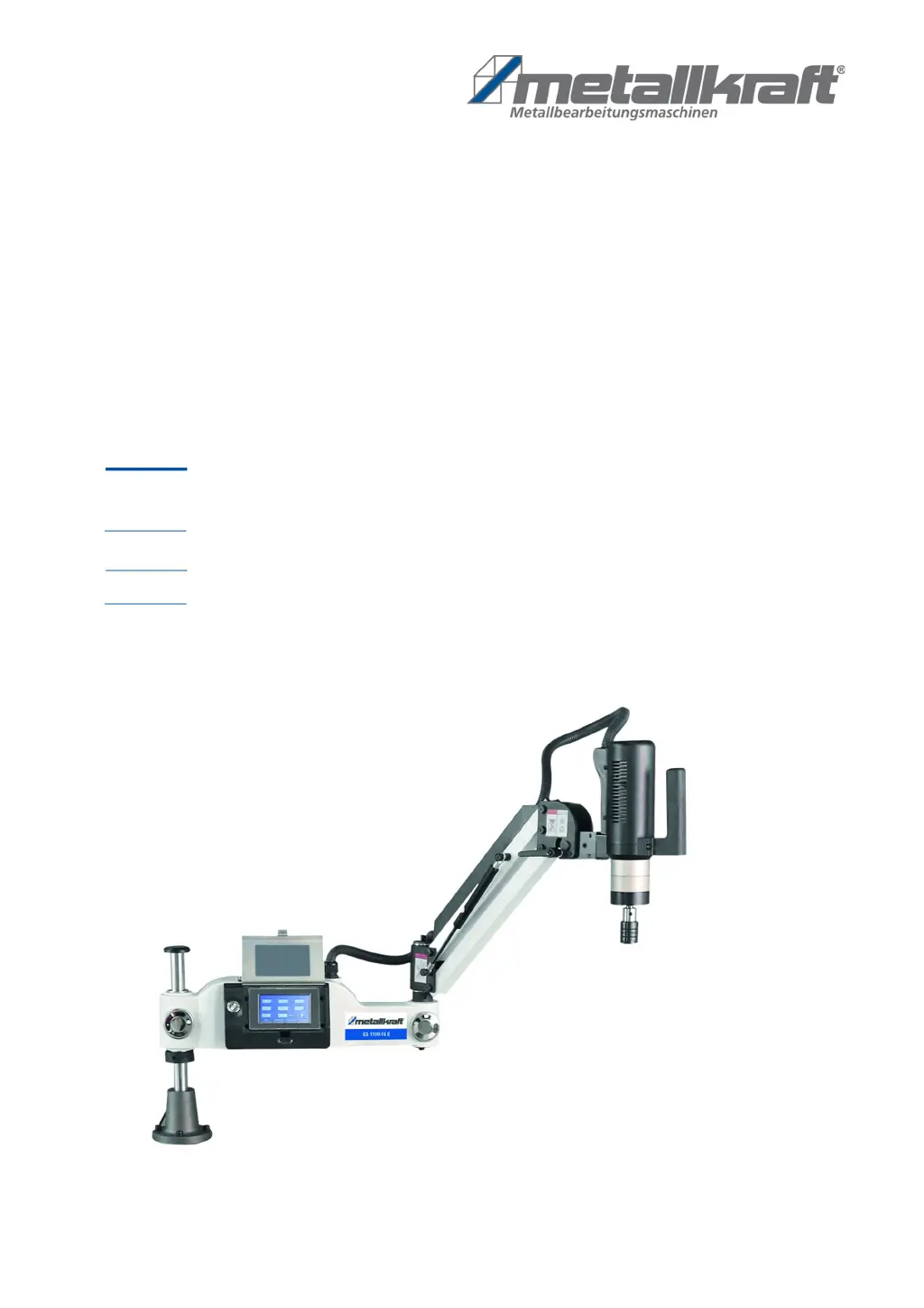
Metallkraft GS 1100-16 E - User Manual

Metallkraft GS 1100-16 E
22 pages
Print Icon
To Next Page IconTo Next Page
Loading...
GS 1100-16 E
Operating instructions
GS 1200-24 E
Thread Tapping Machine
GS-E SERIES
GS 1100-16 E
GS 1200-36 E

Questions and Answers

  • P
    potterstaceyAug 5, 2025
    What to do if Metallkraft GS 1100-16 E Industrial Equipment shows Erry-001 error?
    • R
      rfigueroaAug 5, 2025
      If your Metallkraft Industrial Equipment displays the Erry-001 error, it indicates a drive module malfunction. Check the vertical position of the main shaft, verify that the gearbox isn't blocked, ensure the screw tap isn't jammed, inspect the drive and motor for damage, and confirm the mains cable is correctly connected.
  • J
    Joseph ThompsonAug 9, 2025
    What to do if Metallkraft GS 1100-16 E Industrial Equipment shows Erry-04 or Erry-010 error?
    • R
      Robert VangAug 10, 2025
      If your Metallkraft Industrial Equipment shows Erry-04 or Erry-010, it means there's a drive overload. Check if the screw tap chip removal is working correctly. Also, if you're working with stainless steel or other hard materials, consider using a larger tapping machine.
  • D
    Derrick StevensAug 15, 2025
    What does it mean if Metallkraft Industrial Equipment shows error Erry-312?
    • J
      Joseph PageAug 15, 2025
      Error Erry-312 on your Metallkraft Industrial Equipment indicates a torque protection error. You can resolve this by either turning off the torque protection feature or setting a larger value for torque protection within the User Parameter interface.
  • I
    imillerAug 19, 2025
    Why does my Metallkraft GS 1100-16 E show error Erry-006?
    • D
      Diana LynchAug 19, 2025
      The Erry-006 error on your Metallkraft Industrial Equipment indicates that the engine is blocked. You should check the motor and verify whether the gearbox is blocked.
  • P
    patriciabowersAug 25, 2025
    What causes Erry-200 error on Metallkraft GS 1100-16 E and how to fix it?
    • M
      marissamasonAug 26, 2025
      The Erry-200 error on your Metallkraft Industrial Equipment indicates an internal communication error within the drive, caused by interference with the encoder signal. To resolve this, locate the source of the interference and move it away from the equipment.
  • T
    Timothy PerezAug 29, 2025
    What to do if Metallkraft Industrial Equipment shows errors Erry-008, 091, 092, or 093?
    • H
      Heather MorseAug 29, 2025
      If your Metallkraft Industrial Equipment is displaying errors Erry-008, Erry-091, Erry-092, or Erry-093, this indicates a motor encoder fault. Ensure that the CN5 encoder cable is properly connected.

Summary

Introduction

Copyright

Legal text regarding copyright and usage rights of the manual.

Customer service

Contact information and support details for customer inquiries and technical assistance.

Limitation of liability

Exclusions of manufacturer liability for specific usage scenarios and damages.

Safety

Symbol explanation

Explanation of warning symbols and signal words used in the manual.

Obligations of the operating company

Responsibilities of the company operating the machine regarding safety regulations.

Personnel requirements

Qualifications and requirements for personnel operating and maintaining the machine.

Personal protective equipment

Mandatory protective gear for users to ensure safety during operation.

Safety labels on the thread tapping machine

Description of safety markings affixed to the machine and their importance.

Safety devices

Information on essential safety features and their proper functioning.

Safety data sheets

Guidance on obtaining safety data sheets for hazardous materials.

Special safety rules for the thread tapping machine

Specific safety precautions and best practices for operating the tapping machine.

Intended Use

Reasonably foreseeable misuse

Examples of improper uses that go beyond the machine's intended purpose.

Residual risks

Identification of inherent risks that remain even when safety instructions are followed.

Technical Data

Table

A table detailing the specifications and technical parameters of the machine models.

Transport, packaging, storage

Delivery

Instructions for checking the machine upon delivery for damage or missing parts.

Transport

Safety guidelines and methods for transporting the machine.

Packaging

Information on recycling packaging materials used for the machine.

Storage

Conditions and precautions for storing the thread tapping machine.

Description of device

Representation

Visual representation and identification of machine components.

Assembly

Setting the tapping direction

Procedure for adjusting the machine's tapping direction (vertical/horizontal).

Electrical connection

Steps for connecting the machine to the power supply safely.

Operation

Operation

General instructions for operating the machine, including modes and controls.

Turn on;off

Procedures for powering the machine on and off.

User interface

Explanation of the control panel and its interface elements.

Language settings

Guide to changing the display language of the user interface.

Deep hole operation

Specific instructions for performing deep hole tapping operations.

Storage and recall of workpiece parameters

How to save and load machining parameters for efficiency.

User parameter

Customization options and settings for user-defined parameters.

User parameter for lubricating and scrap blowing

Settings for automatic lubrication and chip removal.

Adjusting the coupling torque of the collet chuck

Procedure for adjusting the torque sensitivity of the collet chuck.

Cleaning, maintenance and repair

Cleaning and maintenance

Routine cleaning and maintenance procedures to ensure optimal performance.

Disposal, recycling of old equipment

Decommission

Steps for safely taking the machine out of service.

Disposal of electrical equipment

Guidelines for the proper disposal of electrical components.

Disposal via municipal collection points

Information on using local collection points for electronic waste.

Disposal of lubricants

Instructions for the environmentally sound disposal of used lubricants.

Troubleshooting

Spare parts

Ordering spare parts

How to identify and order necessary replacement parts.

Spare parts drawing

Visual diagrams identifying all machine components for spare parts.

Wiring Diagram Control Unit

EC-Declaration of Conformity

Metallkraft GS 1100-16 E Specifications

General IconGeneral
BrandMetallkraft
ModelGS 1100-16 E
CategoryIndustrial Equipment
LanguageEnglish

Related product manuals