45
Update
Chapter 1
Understanding the Barcode Scanner
1.11 AUTO-SENSE MODE
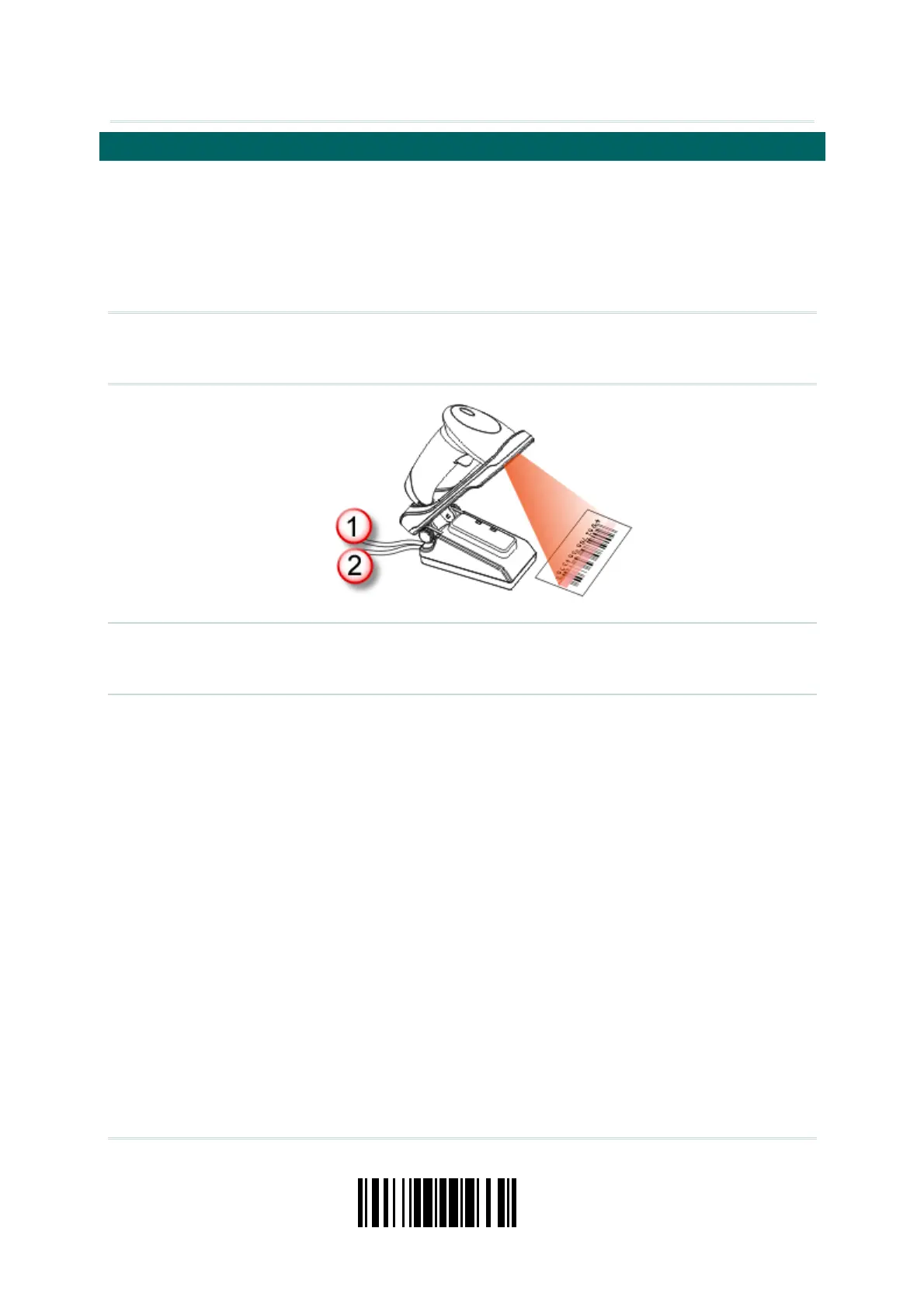
Users can just seat the scanner in the cradle to have it enter Auto-Sense mode. With
Auto-Sense mode enabled, it will force the scanner to apply Laser mode as the scan
mode; however, it works slightly differently from the original Laser mode. As the figure
illustrated below, now the scanner will be expecting barcodes as long as it is seated in
the cradle. Whenever a barcode is brought within the scanning range, the scanner will be
able to decode it.
Note: Remove the scanner from the cradle to exit Auto-Sense mode. It will return to
Laser mode. If Laser mode is not desired, proceed to select a scan mode best suits
your application.
Note: For Auto-Sense mode to work, you must connect both the power supply cord (1)
and the interface cable (2) to the cradle. A single interface cable drawing power
from the USB port is insufficient.



 To Next Page