9
6. TIPSAVER WORKSTAND OVERVIEW
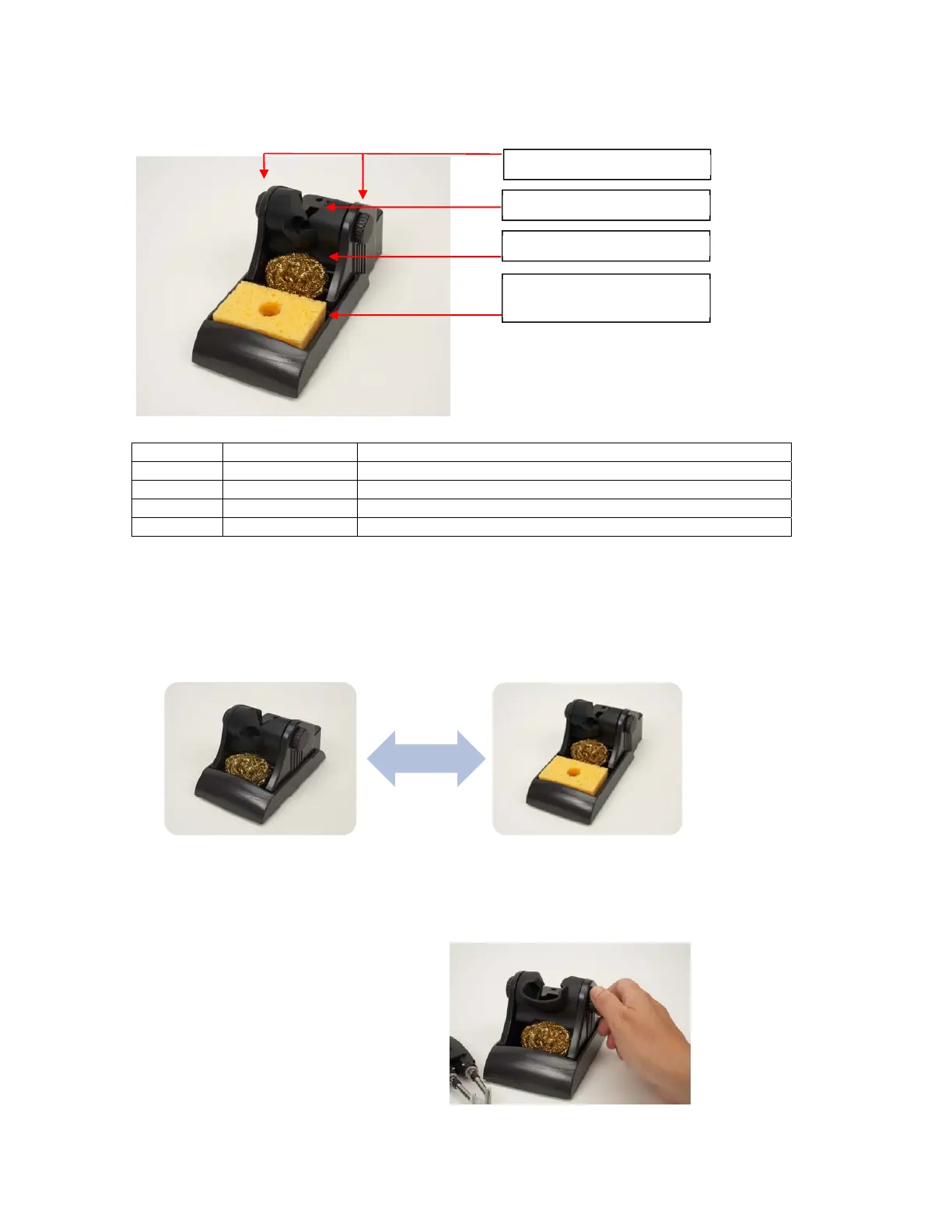
a. TipSaver Workstand Features
b. Adjustable Angle Cradle Guide*
Workstand Cradle Description
MX-W1AV MX-W1CR TipSaver cradle, Advanced hand-piece, includes knobs
MX-W1AV MX-W1CR TipSaver cradle, UltraFine hand-piece, includes knobs
MX-W4PT MX-W4CR TipSaver cradle, MX-PTZ hand-piece, includes knobs
MX-W5DS MX-W5CR TipSaver cradle, MX-DS1, includes knobs
c. TipSaver Workstand Configurations
The TipSaver Workstand is designed to accommodate different configurations in a minimal
footprint. To change the configuration;
1. Remove the two screws from the underside of the workstand base (MX-WB).
2. Move the Workstand Sponge Holder (MX-WSH) into the desired position.
3. Replace the two screws into the underside of the workstand base.
d. Cradle Positioning
The TipSaver Workstand incorporates an adjustable angle cradle allowing the insertion angle for
the hand-piece to be adjusted for the comfort of the operator. To adjust the angle of the cradle;
1. Loosen the knobs counterclockwise.
2. Adjust the cradle to the desired angle.
3. Tighten the knobs clockwise.
Workstand Sponge Holder
(MX-WSH)
Workstand Base (MX-WB)
Adjustable Angle Cradle*
Adjustment Knobs
Coiled Brass Cleane
or Coiled Brass Cleane
with Sponge


 To Next Page