95-7882B
2
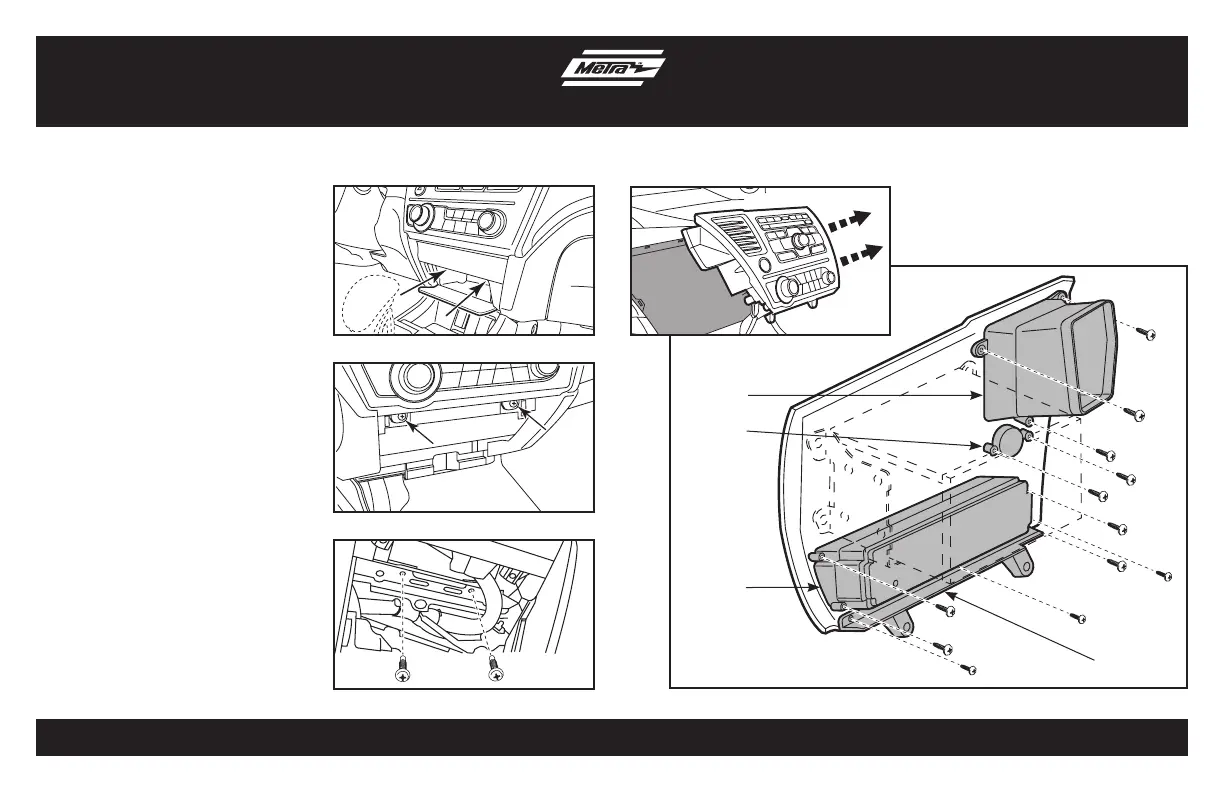
1. Below radio, open pocket door and
remove two Phillips screws and remove
pocket. (Figure A)
2. Remove two Phillips screws from
bottom edge of factory radio. (Figure B)
3. Remove two 8mm screw from inside
pocket cavity (facing up). (Figure C)
4. Unsnap and remove factory radio
assembly. (Figure D)
5. Remove four screws from the climate
controls and remove. (Figure E)
6. Remove two screws from the factory
hazard button and remove.
(Figure E)
7. Remove three screws from the factory
vent and remove. (Figure E)
8. Remove three screws from the lower
trim panel and remove. (Figure E)
Continue to kit assembly
Dash Disassembly
(Figure A)
(Figure D)
(Figure B)
(Figure E)
(Figure C)
Step 5
Step 6
Step 7
Step 8


 To Next Page