Need help?
Do you have a question about the Metria HC-520 and is the answer not in the manual?
Instructions for battery installation and initial power-up of the meter.
Guide on setting up and using the sensor for indoor/outdoor temperature readings.
Explanation of how the meter displays comfort levels based on temperature and humidity.
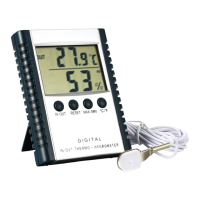
This document provides an operation manual for the METRIA HC-520 IN/OUT Temperature & Humidity Meter. The device is designed to measure and display both indoor and outdoor temperature and humidity, offering a comprehensive solution for environmental monitoring.
The METRIA HC-520 is a multi-function meter capable of simultaneously displaying temperature and humidity readings. Its primary function is to provide accurate measurements for both indoor and outdoor environments. The meter features a memory function that stores the last measured value, allowing users to track changes over time. It also records minimum and maximum temperature and humidity values, which can be easily accessed. For user convenience, the device includes a comfortable degree symbol on its display and allows users to select between Celsius (°C) and Fahrenheit (°F) units for temperature readings. The HC-520 is designed for versatility, offering options for both desk-top placement and wall hanging.
To begin using the HC-520, users must first install the battery. This involves removing the battery cover, inserting two 1.5V AAA batteries according to the indicated polarity, and then replacing the cover. Once the battery is installed, the meter will automatically power on.
For temperature and humidity measurements, the device offers several button functions:
To measure outdoor temperature, the sensor wire plug must be inserted into the socket located under the battery cover, and the sensor itself should be placed outside the house. If the sensor wire for outdoor temperature is not installed, the meter will only display indoor temperature. It's important to note that the meter can only measure indoor humidity, which is always indicated above the humidity unit symbol (%).
A unique feature of the HC-520 is its Environmental Comfort Status Indicating function. The meter automatically assesses the comfort level based on the measured humidity and temperature values. It indicates three distinct comfort statuses:
The METRIA HC-520 is designed for high stability and accuracy, ensuring reliable measurements over time. To maintain its performance and longevity, several cautions should be observed:
By adhering to these guidelines, users can ensure the optimal performance and extended lifespan of their METRIA HC-520 IN/OUT Temperature & Humidity Meter.
 General
| Type | Digital Multimeter |
|---|---|
| Diode Test | Yes |
| Continuity Test | Yes |
| Operating Temperature | 0°C to 40°C |
| Power Supply | 9V Battery |
| DC Voltage Range | 200mV/2V/20V/200V |
| AC Voltage Range | 200V |
| DC Current Range | 200μA/2mA/20mA/200mA/10A |
| Resistance Range | 200Ω/2kΩ/20kΩ/200kΩ/2MΩ |
| Display | 3 1/2 Digit LCD |
| Dimensions | 126mm x 70mm x 24mm |
| Accuracy | DC Voltage: ±(0.5% + 2 digits), AC Voltage: ±(1.0% + 3 digits), DC Current: ±(1.0% + 2 digits), Resistance: ±(0.8% + 2 digits) |

 To Next Page