Introduction
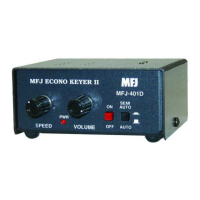
The MFJ-401D Econo Keyer II is a microprocessor controlled keyer that provides iambic key opera-
tion and dot-and-dash memory to make sending perfect code easier. It has tuneable code speed,
code weight, and sidetone frequency; it supports both direct and grid-block keying outputs. You
also get to choose between Iambic Type "A" and Type "B" keying.
Control Functions
1. The Power button turns the unit ON and OFF. The power is ON when the button is locked in
the "in" position and OFF in the "out" position.
2. The Semi-Auto/Auto button allows semi-automatic "bug" and manual operations. The keyer
generates dots automatically when a squeeze or single lever key is used. Dashes are manually
made. The keyer is completely manual when a straight key is used. Semi-Auto is active when
the switch is in the "in" position and Auto when in the "out" position.
3. The Speed control varies the code speed. The speed range is configured with an internal
jumper (JMP9) for 5 to 65 WPM or 10 to 40 WPM. Turn the control clockwise to increase speed
and counter-clockwise to decrease speed. The unit is factory set to 5 to 65 WPM. To make the
speed adjustment less sensitive, change the speed range to the narrower range of 10 to 40
WPM. To change the speed range the power must be off, then remove the cover by removing
the two screws (one on each side) that secure it. Locate jumper JMP9 and set it to the "H" po-
sition.
Note: Power must be off when changing the jumper settings.
4. The Weight control varies the code weight from approximately 25 % to 75 %, with the stan-
dard dot defined as 50% weight. The standard dot-dash-space ratio is 1:3:1 (trimpot at mid-
range). Turn the control clockwise to increase dot and dash lengths and counter-clockwise to
decrease dot and dash lengths. This control is located internally. When looking at the unit's
front panel, it is accessible through the small hole on the left side, closest to the rear and may
be adjusted by inserting a small, flat-headed screwdriver.
5. The Tone control sets the desired sidetone pitch from approximately 300 to 1200 Hz. Turn the
control clockwise to raise the pitch and counter-clockwise to lower the pitch. This control is lo-
cated internally. When looking at the unit's front panel, it is accessible through the small hole
on the left side, closest to the front and may be adjusted by inserting a small, flat-headed
screwdriver.
6. The Volume control adjusts the sidetone level of the internal speaker. Turn the control clock-
wise to increase the volume and counter-clockwise to decrease the volume.
7. The Direct/Grid-Block Output keying circuit allows keying of grid-block and solid state transmit-
ters. The MFJ-401D can only key one type of transmitter at a time. This is an internal jumper
selected option. The unit is factory set to direct keying. To change to grid-block keying the
power must be off, then remove the cover by removing the two screws (one on each side) that
secure it. Locate JMP1 and JMP2. JMP2 is directly behind the RCA jack and JMP1 is approxi-
mately one inch in front of JMP2. Set both jumpers JMP1 and JMP2 to the "G" position. To key
a solid state transmitter, set both jumpers to the "D" position.
Note: Power must be off when changing the jumper settings.


 To Next Page
 Loading...