... 20
Icon Detail Meaning
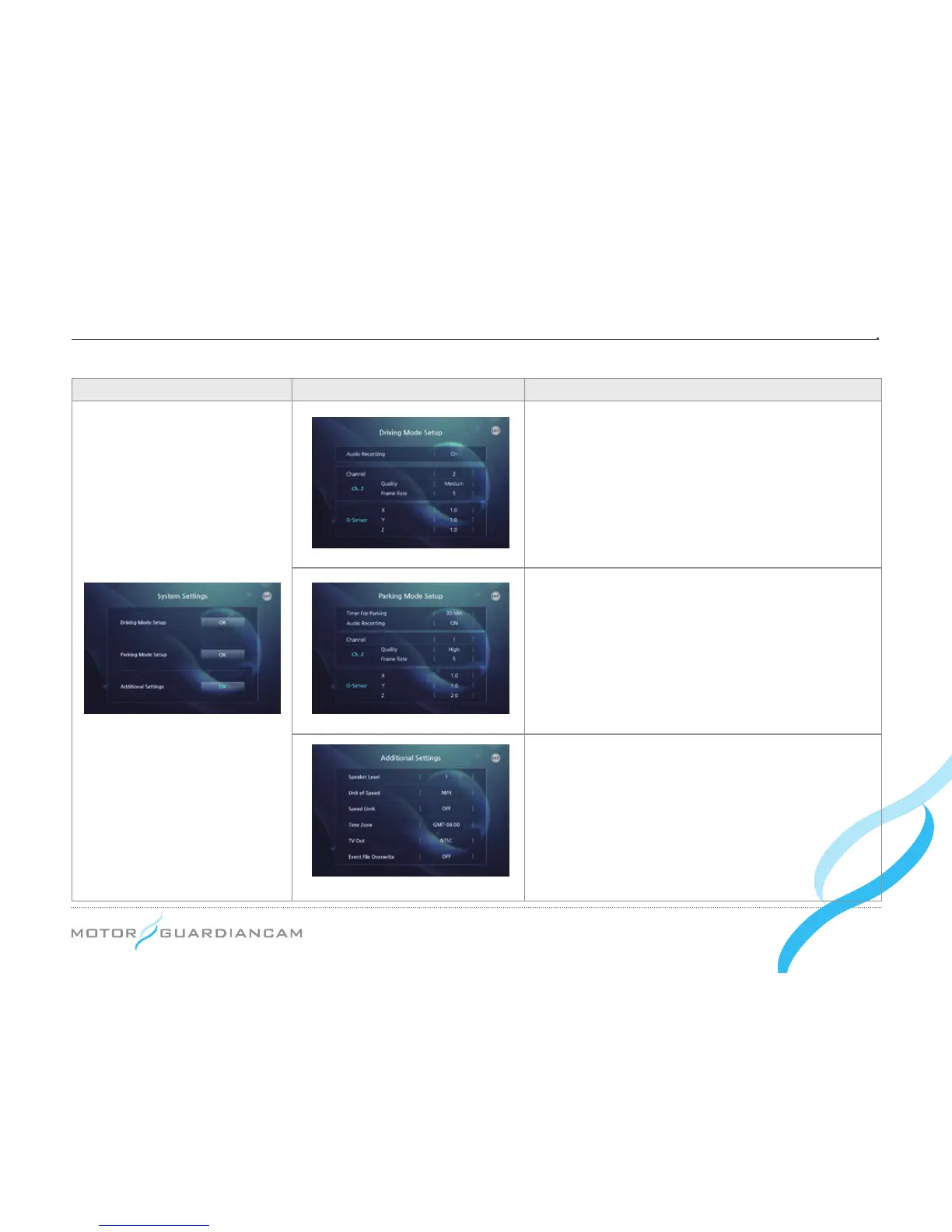
The driving mode recording can be set. Voice
recording ON/OFF, and the resolution/frame rates
by channels can be also set. (If the Frame rate of
Channel 2 is set to zero (0), the Inner Cam will not
work.
Sensitivity for recognizing shocks can be adjusted
by changing the values of the G-sensor. (The lower
the value is, the higher the sensitivity will be.)
The driving mode recording can be set. The
parking mode recording time, voice recording ON/
OFF, and the resolution/frame rates by channels
can be also set. Sensitivity for recognizing shocks
can be adjusted by changing the values of the
G-sensor. (The lower the value is, the higher
sensitivity will be.)
The volume, speed units, speeds to start the
event recording, Time Zone, and TV Out format,
Overwrite ON/OFF can be set.
MDR-5000A : Normal, Event File Overwrite
(Default : On)
MDR-5000U : Event File Overwrite (Default : Off)
MDR-5000U – Additional Setting


 To Next Page