... 30
12 Drive recorder setting - Recording setting
●
Drive recorder setting
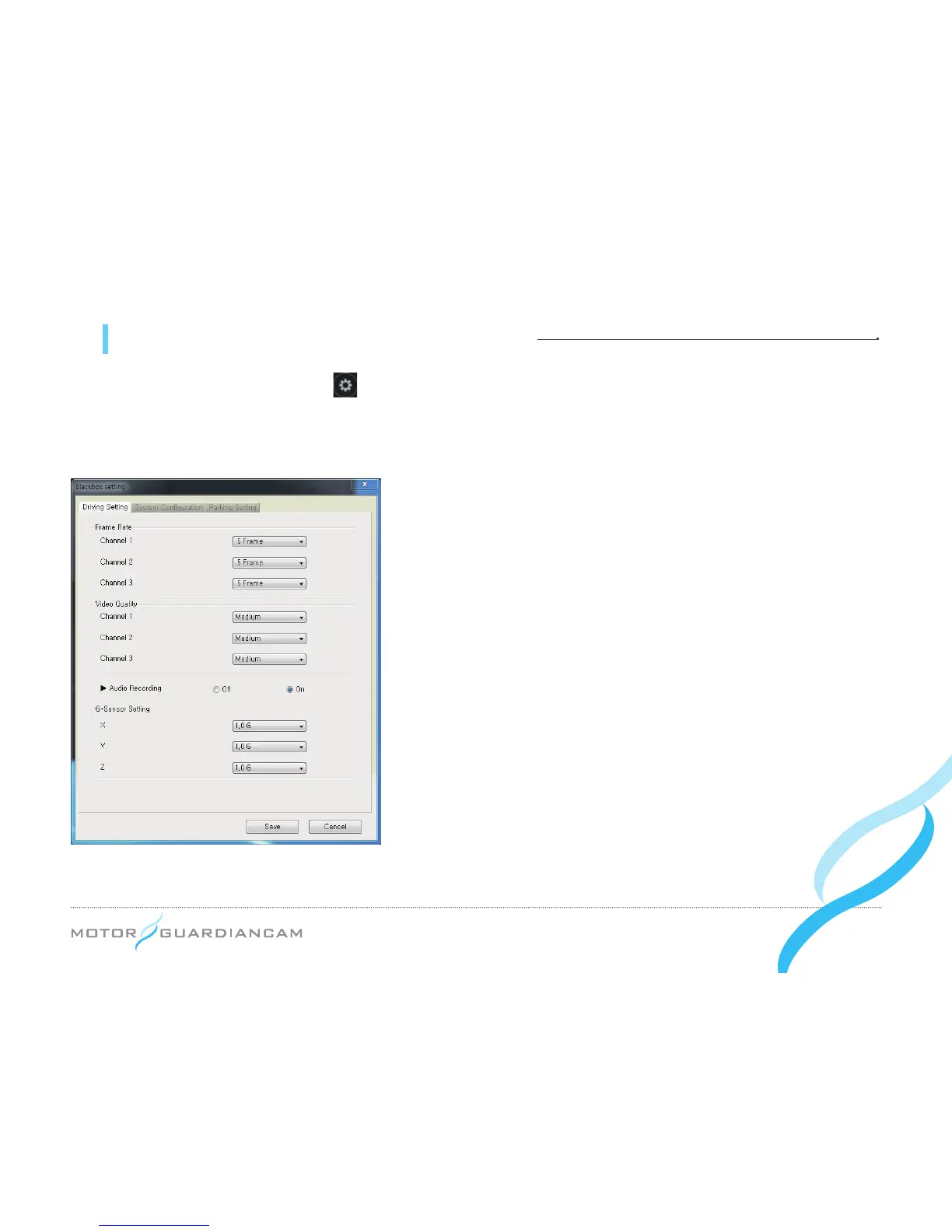
: Press the button on the viewer after connecting the SD card of the main body of the
drive recorder to a PC. The Drive recorder setting window will appear as follows. This setting is composed of the
Recording Setting, the System Conguration, and the Parking Setting
[Recording Setting]
1.
#
This menu is used to set the Frame Rate, Video Quality, Audio
Recording, and G-sensor Data by channels in the driving mode.
2.
#
When the Frame rate of Channel 2 is set to “0”, the Inner Cam will
not work.
3.
#
The G-sensor data is a menu used to set the value of sensitivity,
which is the degree of recognizing a shock. (The lower the value
is, the higher the sensitivity will be.)
*
As the size of a video file depends on the Frame Rate and Video Quality, a
higher Frame Rate and Video Quality can shorten the recording time.


 To Next Page