Need help?
Do you have a question about the Mi-Light FUT090 and is the answer not in the manual?
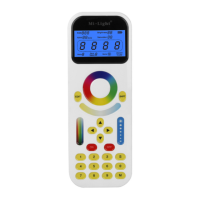
Switch key for choosing individual track light or group of track lights.
Edit key for grouping tracklights into groups up to 99.
Save and choose RGB color, Kelvin, brightness, saturation, and direction.
Choose dynamic modes or adjust tracklight directions.
 General
| Brand | Mi-Light |
|---|---|
| Model | FUT090 |
| Category | Remote Control |
| Language | English |

 To Next Page