Made in China
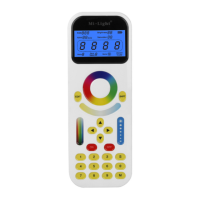
Link: Switch off the power of the tracklight, switch on again, press ‘ON’ button on
the remote control 3 times within 3 seconds, ON/OFF also shown on the bottom left
of LCD screen, the link is done when the green light blinks three times.
Unlink: Switch off the power of the tracklight, switch on again, press ‘ON’ button on
the remote control 5 times within 3 seconds, ON/OFF also shown on the bottom left
of LCD screen, the unlink is done when the red light blinks 10 times.
How to choose dynamic modes:
Press ‘M’, ‘Mode’ will be blinking on the bottom left of the remote control screen,
‘Motor’ will be shown on the bottom middle of the screen.
Now you can start choosing the 9 dynamic modes by pressing the number key from
1-9, ‘Mode’ will stop blinking and ‘Motor’ will disappear.
How to adjust the directions:
How to choose the mode which you saved:
1. Press ‘S’ when you see ‘Select’ blinking on the screen.
2. Press the number key which you have saved before, ‘Select’ will stop blinking, the
mode which you have saved on this key will show.
4. Link&Unlink
M ( Choose dynamic modes or Adjust the directions )
Press ‘M’, ‘Mode’ will be blinking on the bottom left of the remote control screen,
‘Motor’ will be shown on the bottom middle of the screen.
Now you can also change the directions of the tracklights, up and down, left and
right, ‘Mode’ will stop blinking and icon will show up along with ‘Motor’


 To Previous Page
 Loading...