Need help?
Do you have a question about the Mi-Light FUT095 RGBW and is the answer not in the manual?
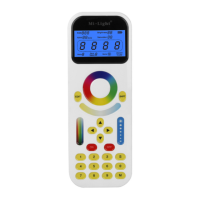
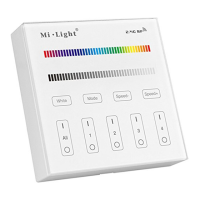
Describes two types of RGBW remote controls and their common functions.
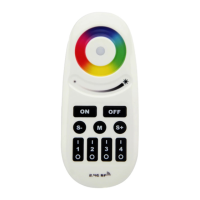
Details technical parameters for the FUT095 RGBW remote control with buttons.
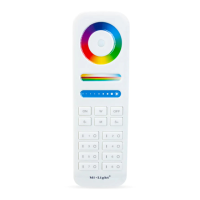
Details technical parameters for the FUT096 RGBW touch screen remote control.
Explains how to activate white mode and adjust saturation using the remote.
Details steps for dimming, color change, and zone control using Master ON.
Step-by-step guide on how to link lights to the remote controller.
Step-by-step guide on how to unlink lights from the remote controller.
Instructions and examples for grouping multiple lights to a zone.
Covers essential attention points for product use and safety.
This document describes two types of Mi-Light RGBW remote controls: the FUT095 with buttons and the FUT096 with a touch screen. Both remotes offer identical functionalities despite their different designs, allowing users to control LED lights across up to four distinct zones. These controls enable a wide range of adjustments, including changing colors, dimming or brightening lights, adjusting between warm and cool white tones, and activating various dynamic programs.
The FUT095 remote control features a tactile interface with dedicated buttons for various functions. It includes a color ring for selecting specific hues, along with separate buttons for increasing or decreasing brightness. A master ON/OFF button controls all lights, while individual zone buttons (1, 2, 3, 4) allow for granular control over different lighting groups. Speed adjustment buttons (S-, M, S+) are present for modifying the pace of dynamic lighting modes. An indicator light provides visual feedback on the remote's status. The "S-" and "S+" buttons serve multiple purposes: in white mode, they adjust between warm and cool white; in color mode, they control saturation; and when the "M" button is pressed, they adjust the speed of dynamic modes. To dim all RGBW lights or change their color simultaneously, the "Master ON" button must be pressed first. For individual light control, the "Zone ON" button should be pressed, followed by selecting the desired color or brightness from the respective rings.
The FUT096 remote control, on the other hand, offers a sleek touch-screen interface. It features a touch-sensitive color ring for intuitive color selection and a separate touch area for brightness adjustments. Similar to the FUT095, it includes a master ON/OFF function and individual zone controls (1, 2, 3, 4). Speed adjustment is managed through touch-sensitive "S-", "M", and "S+" areas. An indicator light is also present. The "S-" and "S+" functions mirror those of the FUT095: adjusting warm/cool white in white mode, saturation in color mode, and dynamic mode speed when "M" is active. The process for controlling all lights or individual zones is the same as with the FUT095: "Master ON" for global control, or "Zone ON" for specific groups, followed by adjustments on the color or brightness rings.
Both remote controls are designed for easy linking and unlinking with Mi-Light products. To link a light, first switch off the light, wait 10 seconds, then switch it back on. Within 3 seconds of the light turning on, short press any zone button on the remote once. A successful link is indicated by the light blinking three times slowly. If the light does not blink slowly, the linking has failed, and the process should be repeated. For unlinking, the procedure is similar: switch off the light, wait 10 seconds, then switch it back on. Within 3 seconds of the light turning on, long press the corresponding zone button on the remote. A successful unlink is indicated by the light blinking 10 times quickly. If the light does not blink quickly, the unlinking has failed, and the process should be repeated. It is crucial that the unlinking process is performed for the same zone that was used for linking.
A key feature of these remote controls is their ability to group multiple lights into different zones. Users can link an unlimited number of lights to any of the four available zones, providing complete flexibility in creating various lighting group combinations. This allows for customized control over different areas or moods within a space. For example, one remote can control numerous lamps or controllers, although a single lamp or controller can only be controlled by a maximum of four remotes. Users can freely reprogram their lighting setups as needed. When reprogramming after switching off and on, it is important to ensure that the battery installation and the controller's power are fully discharged.
Maintenance and attention points are crucial for optimal performance. These remote controllers are specifically designed to work with designated Mi-Light products and may not be compatible with all Mi-Light series. If the indicator lamp on the remote blinks quickly, it signals that the battery needs to be replaced. It is recommended to use good quality batteries to prevent leakage that could damage the remote controller. When installing batteries, users should keep their finger off the touch ring to improve sensitivity. After battery installation, it is advisable to wait 3 seconds before using the remote. If the touch ring exhibits low sensitivity, reinstalling the batteries may resolve the issue. These 2.4GHz remote control systems are precise electronic products and should be kept away from humid, high-temperature, dusty, and high-voltage environments. They should be stored indoors, in dry conditions, and away from static electricity. Furthermore, using the remote controller in areas with wide-range metal obstructions or strong electromagnetic waves can significantly impair the controlling distance and performance.
 General
| Model | FUT095 |
|---|---|
| Type | RGBW Remote Control |
| Brand | Mi-Light |
| Compatibility | Mi-Light RGBW LED Controllers |
| Frequency | 2.4 GHz |
| Control Channels | 4 |
| Material | Plastic |
| Power Source | 2 x AAA batteries |
| Control Distance | 30 meters |

 To Next Page