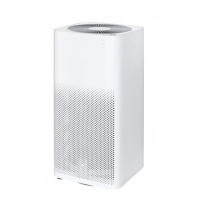
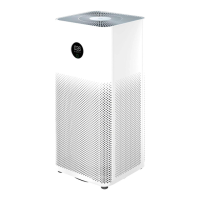
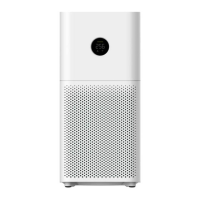
The Mi Air Purifier 2H is an air purification device designed to improve air quality in indoor environments. It features a sleek, tall, rectangular design with a fan grille at the top for air output and perforated panels on the sides for air intake. The device is equipped with various indicators and buttons for easy operation and monitoring.
Function Description
The primary function of the Mi Air Purifier 2H is to filter airborne particles and improve air quality. It operates by drawing in air, passing it through a filter, and then releasing cleaner air. The purifier offers different operating modes to suit various needs:
- Auto Mode: In this mode, the purifier automatically adjusts its operation based on the detected air quality. This ensures efficient purification without constant manual intervention.
- Night Mode: This low-noise mode is designed for quiet operation, making it suitable for use during sleep or in environments where minimal noise is desired.
- Manual Mode: Users can manually adjust and manage settings via a connected app, providing more control over the purification process.
The device includes an Air Quality Indicator that visually communicates the current air quality using a color-coded light: green for good air quality (0-75 µg/m³), orange for moderate air quality (76-150 µg/m³), and red for poor air quality (150 µg/m³ or higher). A Wi-Fi indicator shows the connection status, allowing users to know if the device is connected to their network for app control.
Usage Features
Operating the Mi Air Purifier 2H is straightforward:
- Initial Setup: Before first use, the filter compartment panel should be opened to ensure the filter is correctly installed. The power cord, which is initially stored inside the filter compartment, needs to be taken out.
- Power Connection: The power cord connects to a power connector at the bottom of the purifier and then to a power outlet.
- Power On/Off and Mode Switching: A dedicated Power/Mode Button allows users to turn the purifier on and off by pressing and holding for two seconds. A short press of this button cycles through the available operating modes (Auto, Night, Manual).
- Light Brightness Adjustment: The Light/Filter Reset Button, located on the back of the purifier, can be pressed to adjust the brightness of the indicator lights. The brightness settings include strong, soft, and off, allowing users to customize the visual feedback based on their preference or environment.
- Smart Control: The Mi Air Purifier 2H can be controlled via the Mi Home / Xiaomi Home app. Users can scan a QR code or search for the app in their app store, then follow the prompts to add and manage the device. This enables remote control and detailed settings adjustments.
Maintenance Features
Regular maintenance is crucial for the optimal performance and longevity of the Mi Air Purifier 2H:
- Safety First: Before any cleaning or maintenance, it is essential to turn off and unplug the purifier from the supply mains to prevent electric shock or other hazards.
- Filter Compartment Cleaning: To ensure proper function and purification efficiency, the filter compartment and ventilation holes should be cleaned periodically. This can be done using a vacuum cleaner or a soft cloth to remove accumulated dust.
- Dust Sensor Cleaning: The dust sensor, located behind a cover inside the filter compartment panel, also requires cleaning. The cover can be lifted using a latch. An air blow gun or hair dryer can be used to clean the dust sensor and its back cover.
- Filter Replacement: The filter has an average replacement period of 6-12 months. A blinking red light on the filter replacement indicator signals when a new filter is needed. Detailed instructions for filter replacement are provided on a label inside the filter compartment panel. After replacing the filter, the purifier should be turned on, and the Light/Filter Reset Button should be pressed and held for 6 seconds. A beeping sound confirms that the filter has been successfully replaced, and the filter service time has been reset. If the filter becomes saturated with harmful gases and emits odors, it can be placed in a sunny and ventilated area to help eliminate the odors.
- Wi-Fi Reset: If the phone is unable to connect to the air purifier, the Wi-Fi connection can be reset. This is achieved by simultaneously pressing and holding the mode button and the light button for 5 seconds. A beeping sound indicates a successful Wi-Fi reset.
Safety Precautions
The manual highlights several important safety precautions to prevent electric shock, fire, or other damage:
- Placement: Avoid unstable surfaces where the unit could topple, and high-temperature, humid, or wet places like bathrooms. Maintain a distance of 20 cm or more between the air inlets and walls or other objects to ensure proper airflow.
- Children: The appliance can be used by children aged 8 years and above, and persons with reduced physical, sensory, or mental capabilities, provided they have been given supervision and understand the hazards. Children should not play with the appliance, and cleaning or user maintenance should not be performed by children without supervision.
- Power Cord: Only use the power cord provided by Mi and plug it into suitable power outlets. Do not use the provided power cord for other products. Always unplug the purifier before maintenance or transport. Avoid over-tightening, bending, or twisting the power cord, and do not pull the cord when unplugging.
- Usage: Stop using the purifier immediately if abnormal noise, odors, excessive heat, or irregular fan rotation occurs. Do not insert fingers or foreign objects into the fan grille, air inlet, or air outlet. Keep hair and fabric bits away from these openings. Do not sit on, lean on, or tilt the purifier. When using the purifier in conjunction with gas appliances (e.g., gas stoves, water heaters), ensure proper ventilation to prevent carbon monoxide poisoning.

 Need help?
 General

 To Next Page