5
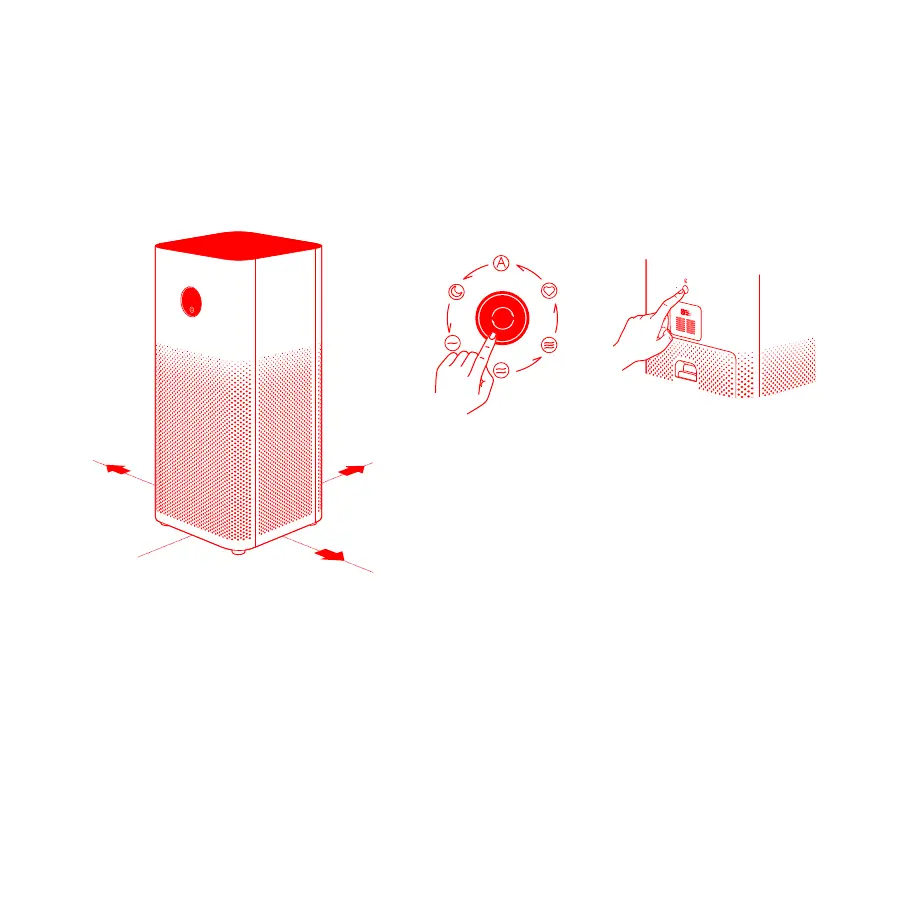
For optimal performance, maintain the
recommended distances between the
purifier, and walls and other objects (refer
to the illustration above).
Tap to turn on the purifier,
then tap to switch modes.
Press and hold for two
seconds to turn off the
purifier.
Reset the Wi-Fi connection of the air purifier.
Switch
℉
into
℃
: Go to Profile > Settings > Region in your app,
and select the countries other than the United States.
Switch
℃
into
℉
: Go to Profile > Settings > Region in your app,
and select the United States.
Reconnect your air purifer with the app.
After the connection is completed, wait about 10 seconds for
the unit of temperature to switch successfully.
1.
2.
3.
4.
Press the button on the back
of the purifier to adjust the
display's brightness, or to turn
the display on/off.
How to Use
Placing the purifier in a suitable location
On/Off & Mode Button
How to Switch the Unit of Temperature
Display On/Off Button
Note: It is recommended to keep doors and
windows closed for a better purifying effect when
using the purifier.
7.90 inches
7.90 inches
3.95
inches


 To Next Page