EasyManua.ls Logo

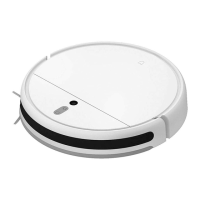
Mi Robot Vacuum-Mop 2 Ultra - User Manual

Mi Robot Vacuum-Mop 2 Ultra
11 pages
Print Icon
To Next Page IconTo Next Page
Loading...
For further information, please go to www.mi.com
Manufactured for: Xiaomi Communications Co., Ltd.
Manufactured by: Dreame (Tianjin) Information Technology Co., Ltd. (a Mi Ecosystem company)
Address: Room 2112-1-1, South District, Finance and Trade Center, No.6975 Yazhou Road, Dongjiang Bonded Port Area, Tianjin Pilot Free Trade Zone, Tianjin, China
Mi Robot Vacuum-Mop 2 Ultra User Manual
Importer:
Beryko s.r.o.
Na Roudné 1162/76, 301 00 Plzeň
www.beryko.cz

Questions and Answers

  • G
    George FergusonJul 29, 2025
    Why is my Mi Robot Vacuum-Mop 2 Ultra Vacuum Cleaner not cleaning properly?
    • E
      edward23Jul 29, 2025
      If your Mi Vacuum Cleaner isn't cleaning efficiently or is leaving dust behind, check the dust compartment to see if it's full and empty it if needed. Also, inspect the filter and clean it if necessary. Finally, check the brushes to see if anything is wrapped around them.
  • T
    Tony GibsonAug 3, 2025
    What to do if my Mi Robot Vacuum-Mop 2 Ultra does not turn on?
    • J
      John BushAug 3, 2025
      If your Mi Vacuum Cleaner does not turn on, it might be due to a low battery, especially if the ambient temperature is below 0°C or above 40°C. Please charge it before use.
  • R
    Rebecca GuzmanAug 7, 2025
    What to do if my Mi Robot Vacuum-Mop 2 Ultra Vacuum Cleaner is not charging?
    • R
      Robert FreyAug 7, 2025
      If your Mi Vacuum Cleaner is not charging, check whether the power cord is properly plugged into both the charging dock and the power outlet. Also, make sure the charging contacts are clean. If not, wipe the charging contacts on both the dock and the vacuum-mop with a dry cloth.
  • P
    Paul FrenchAug 13, 2025
    What to do if my Mi Robot Vacuum-Mop 2 Ultra is not working as expected?
    • L
      Linda YoungAug 13, 2025
      If your Mi Vacuum Cleaner is not working as expected, turn it off and then turn it on again.
  • D
    David BrewerAug 17, 2025
    Why is my Mi Robot Vacuum-Mop 2 Ultra Vacuum Cleaner making a strange noise?
    • A
      Ashley MartinezAug 17, 2025
      If your Mi Vacuum Cleaner is making a strange noise, a foreign object might be caught in the brush, side brush, or one of the main wheels. Stop the vacuum-mop and remove any debris.
  • J
    Jimmy PatelAug 22, 2025
    Why won't my Mi Robot Vacuum-Mop 2 Ultra Vacuum Cleaner return to the charging dock?
    • J
      Jonathan RossAug 22, 2025
      If your Mi Vacuum Cleaner isn't returning to the dock to charge, check for obstacles around the charging dock. Place the dock in a location without any obstacles around it. Ensure there are no obstacles within 0.5 meters on both sides and within 1.5 meters in front of the dock. Also, clean the dock's signaling area.

Summary

Safety Information

Usage Restrictions

Important guidelines for safe operation and age-appropriate use of the appliance.

General Safety Precautions

Crucial warnings regarding electrical safety, placement, handling, and environmental conditions.

Laser Safety Information

EU Declaration of Conformity

Product Overview

Accessories and Components

Identification and listing of all pre-installed and other included accessories with the vacuum-mop.

Vacuum-Mop Controls and Indicators

Explanation of the buttons, LED indicators, and their functions for operating the device.

Vacuum-mop and Sensors

Device Components and Sensors

Detailed diagrams and identification of the vacuum-mop's sensors and structural parts.

Dust Compartment and Charging Dock

Overview of the dust compartment and the charging dock, including their features and connections.

Mopping Assembly

Details on the water tank and mop pad, components essential for the mopping function.

Installation

Setup and Charging Procedures

Step-by-step guide for initial setup, including protective covering removal, side brush attachment, and dock placement.

How to Use

App Connectivity and Wi-Fi Setup

Instructions for connecting the vacuum-mop to the Mi Home/Xiaomi Home app and managing Wi-Fi settings.

Basic Cleaning and Resume Function

Guidance on starting a cleaning cycle, pausing, and resuming after charging.

Cleaning Modes and Advanced App Features

Explanation of different cleaning modes (pausing, sleep, spot clean) and extended app functionalities.

System Updates and Resets

Procedures for updating firmware, restarting the device, and restoring factory settings.

Using the Mopping Function

Care & Maintenance

Brush Maintenance

Instructions for cleaning and maintaining the main brush, including tool usage.

Side Brush Maintenance

Guidance on cleaning and replacing the side brush for optimal performance.

Wheel Maintenance

Procedure for cleaning the omnidirectional wheel and its axle.

Sensors and Charging Contacts

Sensor and Contact Cleaning

Instructions for cleaning all sensors and charging contacts on the vacuum-mop.

Dust Compartment Maintenance

Steps for cleaning the dust compartment, including filter care and washing.

Specifications

Vacuum-Mop Specifications

Technical details and dimensions of the robotic vacuum cleaner.

Charging Dock Specifications

Technical details and dimensions of the charging dock.

WEEE Disposal Information

Guidelines for proper disposal and recycling of electronic waste.

Mi Robot Vacuum-Mop 2 Ultra Specifications

General IconGeneral
Suction Power4000 Pa
Battery Capacity5200 mAh
Dustbin Capacity550 ml
Water Tank Capacity200 ml
Navigation SystemLDS Laser Navigation
ConnectivityWi-Fi
RuntimeUp to 180 minutes
Compatible Floor TypesHardwood, Tile, Carpet
ControlVoice Control
Dimensions353 x 350 x 98.8 mm
Charging TimeAbout 4 hours

Videos

How to setup Mi Robot Vacuum Mop 2 Ultra with Mi Home app

Related product manuals