Copyright © 2009-2014 Micca. All rights reserved. Page | 4
2 Player and Remote Overview
2.1 Connections and Ports
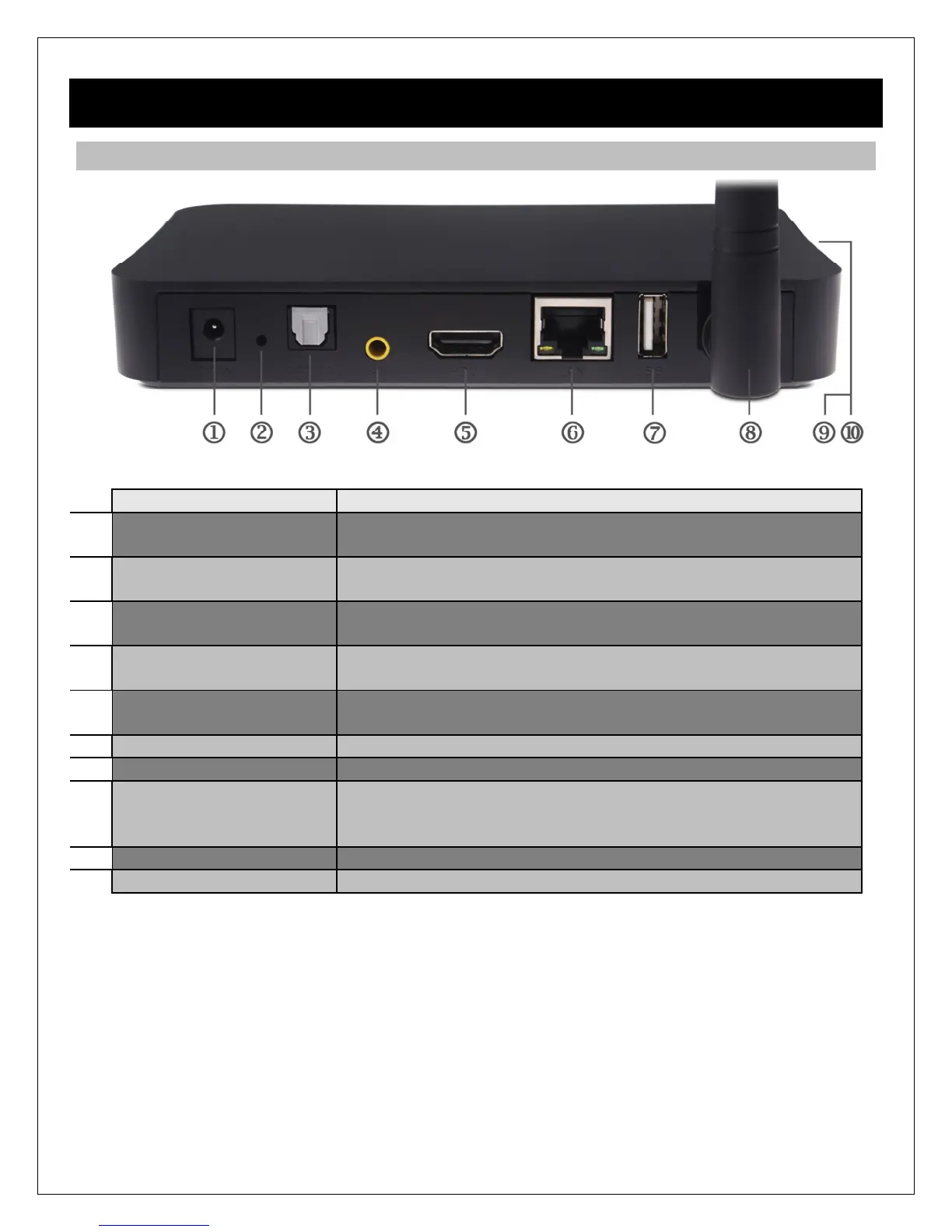
DC IN DC power input, 5-5.4V. Only use the AC adapter provided
with the player.
UPGRADE Pin-hole button for performing firmware. See ‘8.5.3 USB
Upgrade’ for more information.
OPTICAL S/PDIF optical digital audio output to a home theater receiver
with optical audio input.
AV Composite video and analog Left/Right audio output to a TV
or home theater with analog A/V input.
HDMI Provides digital audio/video to a TV or home theater with
HDMI input.
LAN 10/100Mbps Ethernet for local area network access.
USB1 USB 2.0 host jack for connecting USB storage drives.
WLAN WLAN antenna for local network access. Up to 300Mbps;
Actual transfer speed may vary due to interference, router
distance, environment, network conditions, and other factors.
USB2, USB3 USB 2.0 host jacks for connecting USB storage drives.
SD/SDHC Memory card reader for SD/SDHC memory cards.



 To Next Page