Refrigerator Features And Use
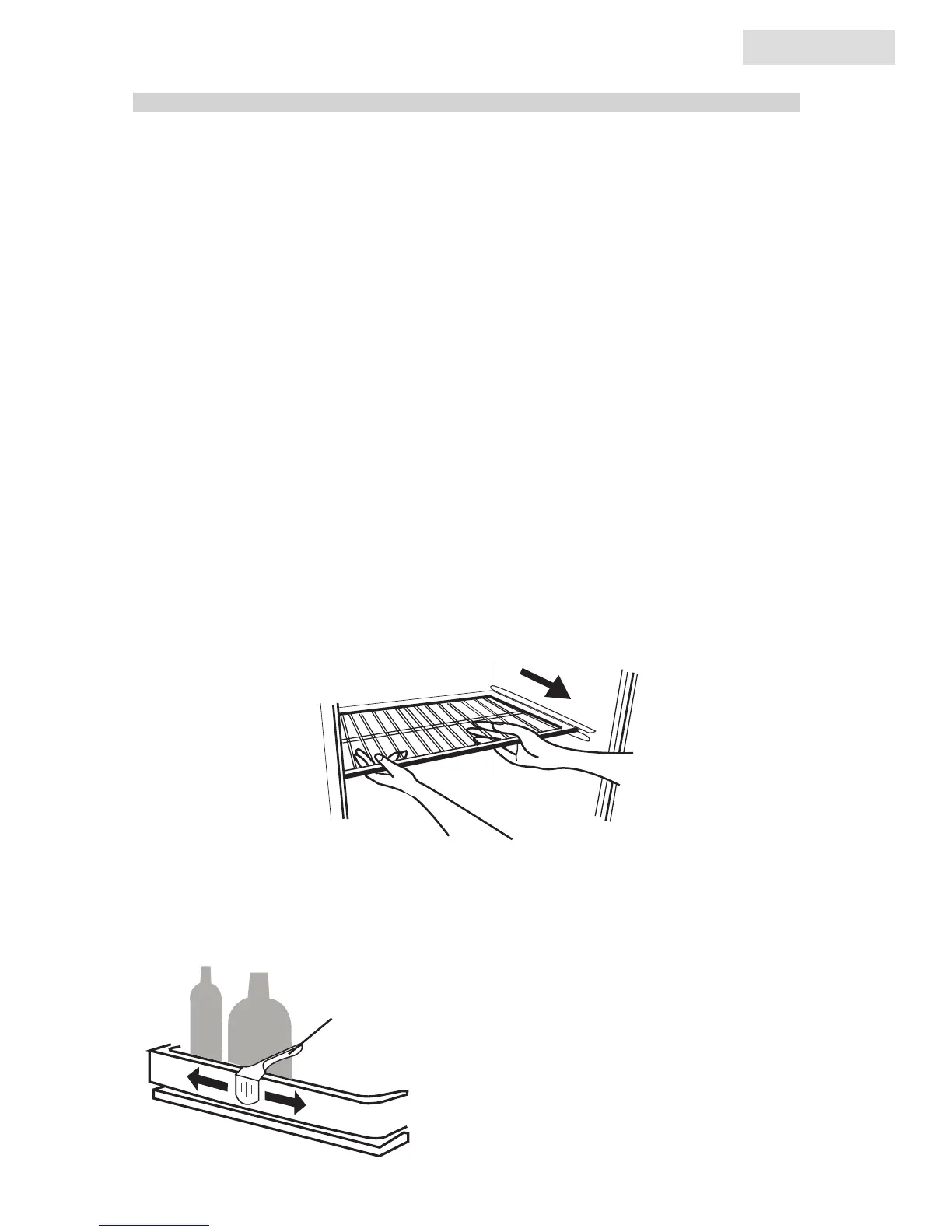
To remove or replace a full-width slide-out shelf:
(see fig. # 4)
1. Gently tilt the shelf up and slide forward until the shelf has been
completely removed.
2. To replace the shelf, gently slide the shelf back.
General Features
Adjustable temperature dial:
Your refrigerator will automatically
maintain the temperature level you
select. The temperature control dial has
7 settings plus off. 1 is the warmest. 7 is
the coldest. Turning the dial to OFF stops
cooling in both the refrigerator and ice
compartment sections. At first, set the
dial to 4 and allow 24 hours to pass
before adjusting the temperature to your
needs.
(Note: If the refrigerator has
been placed in a horizontal or
tilted position for any period
of time wait 24 hours before
plugging the unit in.)
Refrigerator Interior Shelves
fig. # 4
1. Grasp the hugger firmly and slide right or left until it is snug against the
items stored on the shelf.
fig. # 5
shelf bottle hugger
Adjusting Bottle Hugger (see fig # 5)
10
10
English



 To Next Page