Y-Cables
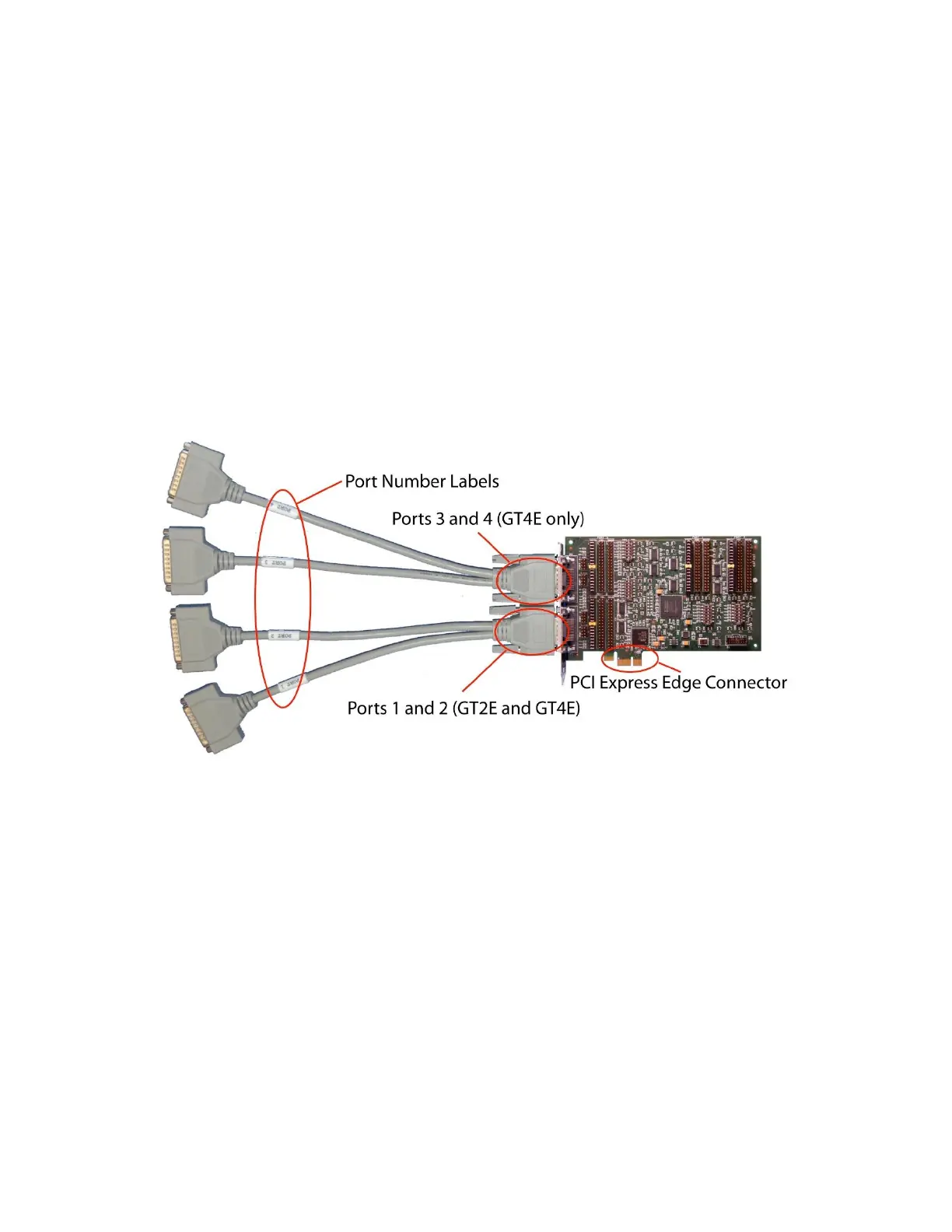
The card has two 60-pin connectors, each carrying two ports. Y-cables are included with the card to
convert each 60-pin connector into two standard DB-25 male connectors. The GT2E card uses one 60-
pin connector and includes a single Y-cable for a total of 2 ports. The GT4E card uses both 60-pin
connectors and includes two Y-cables for a total of 4 ports. Each branch of a Y-cable is labeled with a
port number. The Y-cable labeled 1 and 2 should be installed on the 60-pin connector closest to the PCI
Express edge connector (gold fingers). The Y-cable labeled 3 and 4 should be installed on the 60-pin
connector farthest from the PCI edge connector.
Note: The serial controller on the GT2E has only two ports. Adding a Y-cable to the second 60-pin
connector of a GT2E card will not add ports 3 and 4.


 To Next Page