5
Front/L
Subwoofer
Rear/L
Rear/R
Positioning the speakers
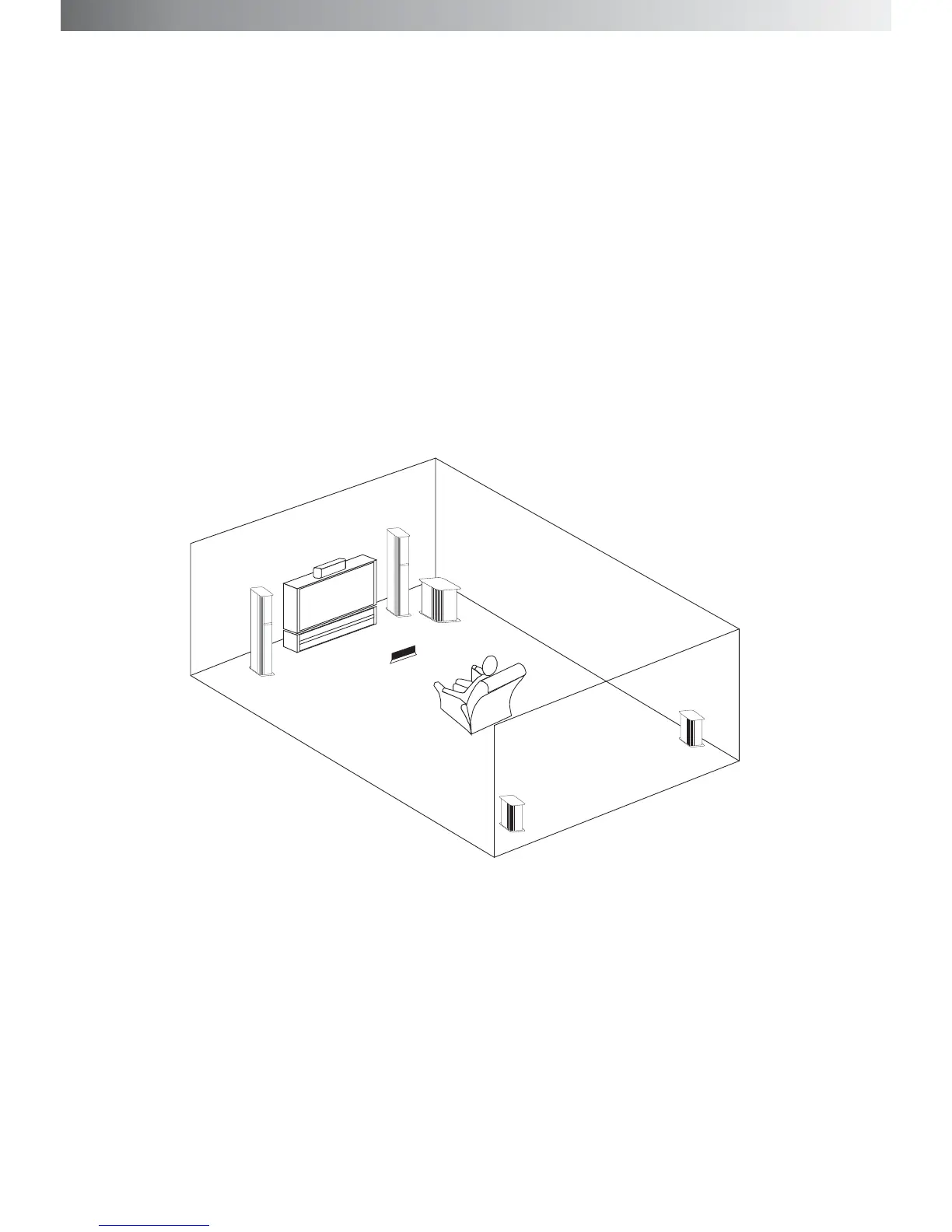
To reproduce sound of movie much better, we suggest that you setup your speakers as following diagram.
Each speaker should face the listening position. Better surround effect will result if all speakers are set at
the same distance from the listening position. Place the front speakers at a suitable distance to the left and
right of the TV. Place the center speaker on the top center of the TV. The placement of rear speakers
greatly depends on the configuration of the room. The rear speakers can be placed on the left and right
side of the listener or left and right sides behind the listener. The subwoofer can be placed anywhere on
the floor.
Setting the center speaker:
Set the center speaker firmly on top of the TV, making sure it is completely level.
Setting other speakers:
For greater flexibility in the positioning of the speakers, use the optional floor stands or the wall mounting
brackets( the height of all the satellite speakers should be adjusted to about the height of the listener's ears
for a better sound effet.)
Control unit
Front/L
Center


 To Next Page