Technical Information
Product connection and operation
65
Frequently Asked Questions (FAQ)
If the problem still exists, please contact the distributor or seek professional advice.
Check if the audio source is working well
Check if the audio and speaker cables well connected
Check if the volume at right level
• Note that between USB and SD card, the last inserted will activate for playback.
Static sound heard when
volume knob is turned
What are the products
supported?
Where to place this speaker
Check if the source file is not corrupted, play a different
song and test.
heck if the satellite cable well connected, and ensure
source connection is correctly inserted
C
One or more satellite no sound
No Sound
Sound is distorted
Turn off the playback source first, then turn the speaker
volume knob several times. Playback again and monitor.
The static noise is due to dust, so simply turning the
volume will remove it easily.
It is magnetically shielded so can be placed near LCD TV
Monitor without any distortion
Any playback devices such as PC, notebook, CD/DVD
player, Media Players with 3.5mm stereo plug. USB dongle with
type A plug and SD card up to 32GB storage capacity.
Solutions
SPECIFICATIONS
AMPLIFIER
SPEAKERS
INTERFACES
POWER
Dimensions
Output power: 46 Watt RMS
Power distribution: 14 Wattx2+18Watt
Harmonic distortion: < 0.3% 1W 1kHz
Frequency response: 35Hz - 20kHz
Signal/Noise ratio: > 75dB
Separation: > 45dB
Tweeter driver type: 2.5" x 2
Tweeter rated power: 14 Watt x 2, 4 ohm
Bass driver type: 5"
Bass rated power: 18 Watt, 6 ohm
Frequency range: 35Hz - 20kHz
Output: RCA sockets
Input: 3.5mm Stereo, 2RCA
USB type A interface
SD card interface
FM antenna
Power supply: AC 220V - 240V, 50Hz, 200mA or 120V,
60Hz 400mA
Subwoofer: 165 x 290 x 240mm
Satellites: 90 x 75 x 180mm
Product Net weight: 4.4kg
EAN barcode: 694519885146 8
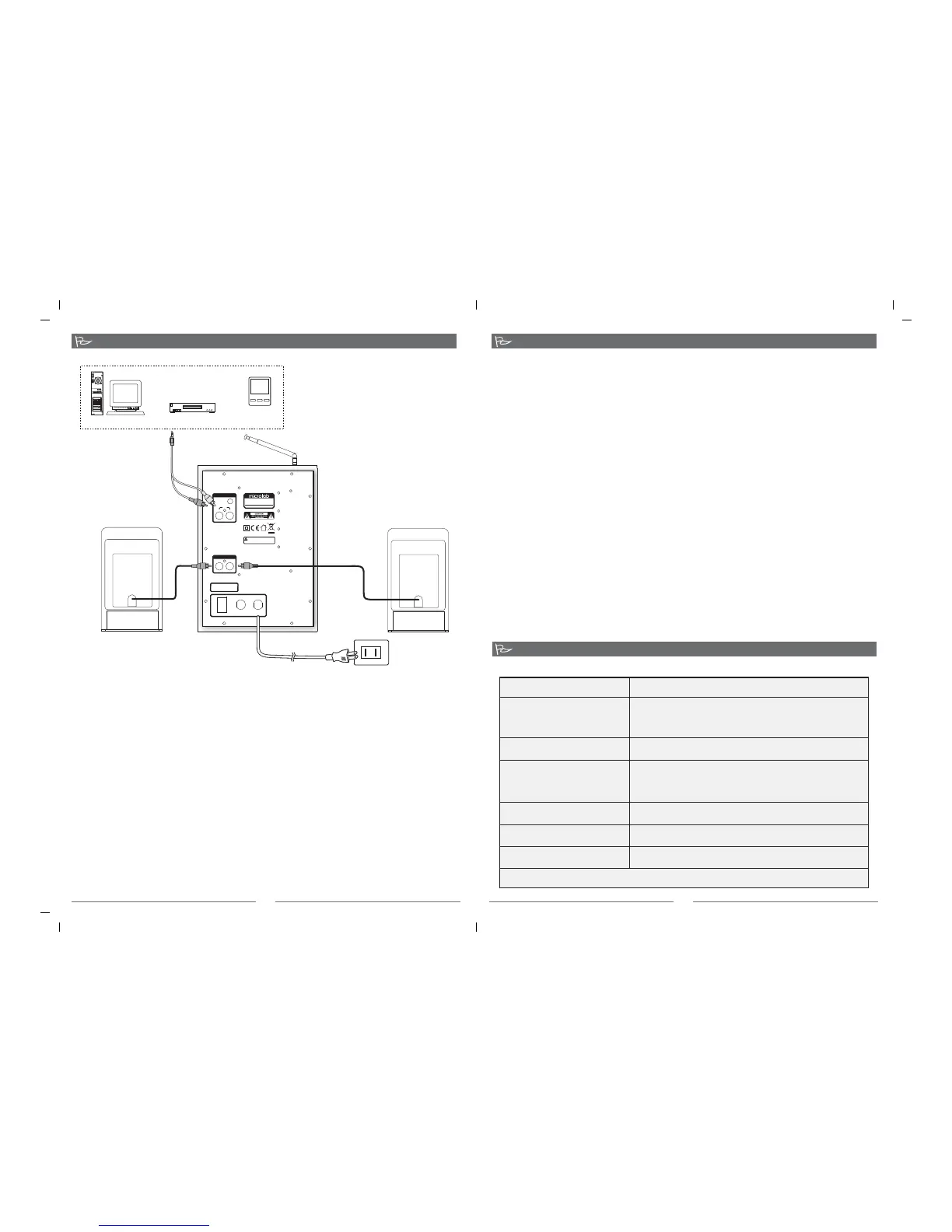
Connections
Operations
FM Radio
1. Connect the satellites to the left and right RCA interfaces.
2. Place both satellites on extreme sides of the listening position.
3. Connect the playback device to the rear input interfaces of the subwoofer with the included cable.
4. A choice of 3.5mm stereo or 2RCA jacks are available at the rear panel of the subwoofer.
5. Last, connect the power cable at the rear of the subwoofer to the AC power supply source. Please ensure the AC
power supply match the power requirement printed at the rear panel.
1. Ensure the master volume is at the lowest setting.
2. Turn on the main AC power and switch on the speaker system from the rear power switch.
3. Start the playback device and song
4. Slowly adjust the volume to your preferred volume level and enjoy.
Note: it is advisable not to turn the volume too loud or to its extreme volume limit to avoid damage to the speaker driver
material. Always adjust in slow increment.
5. Alternative playback inputs are from the USB type A and the SD card slot interfaces. Both are capable of supporting
Mp3 and WMA songs playback.
6. Use the Next or Previous buttons to move between tracks during playback.
7. Note: Whichever was last inserted between USB dongle and SD card, the last will be activated for playback.
1. Unlock the antenna and extend it
2. Select the Input source to FM radio
3. Depress the scan buttons to tune to your preferred radio stations
4. Alternatively if you have preset stations, use the remote control to select your saved station.
5. To save a station, scan to the radio station. Depress the MEMORY button and then the PRE buttons on the remote
control to the preferred number. Then depress MEMORY button again to save the station to the displayed number.
MODEL: M-700U
AC IN: 220V-240V~50Hz 200mA
AMPLIFIED SPEAKER
MADE IN CHINA
RL
ON
OFF
FUSE
T400mAL250V
AC IN
RL
AUDIOINPUT
PC
AUX
AUDIO OUTPUT
High temperature during operation.
Avoid touching back panel
CAUTION: FOR
CONTINUED
Subwoofer
Right satellite
Left satellite
To AC power supply: 220V - 240V 50Hz 200mA,
or 120V 60Hz 400mAdepending on country type
PC
Mp3\Mp4
Media player
CD\ VCD \ DVD
Audio sources
Antenna
80-M-700U-97-0001-01 2010-2-25



 To Previous Page
 Loading...