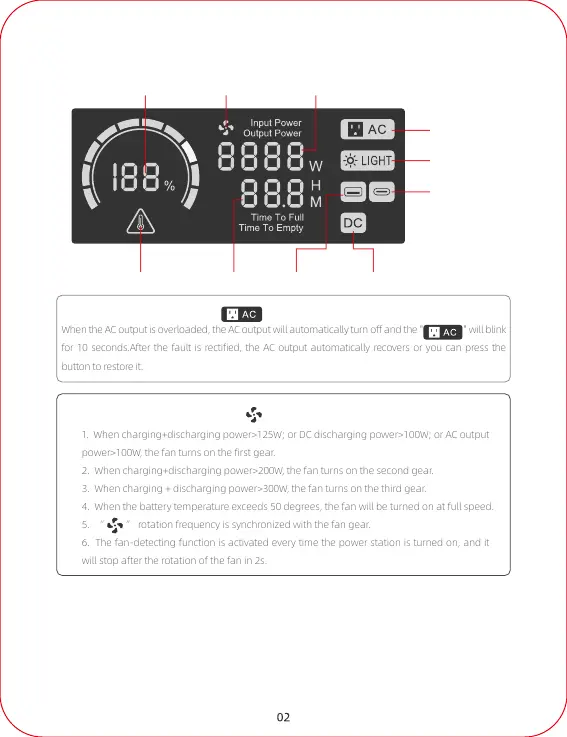
LCD Screen
Fault Indicator Time USB Output DC Output
Type-C Output
LED Light
AC Output
Input or Output PowerFan OnRemaining Battery
1. When charging+discharging power>125W; or DC discharging power>100W; or AC output
power>100
W, the fan turns on the first gear.
2. When charging+discharging power>200
W, the fan turns on the second gear.
3. When charging + discharging power>300
W, the fan turns on the third gear.
ttery temperature exceeds 50 degrees, the f
an will be turned on at full speed.
5. “ ”
rotation frequency is synchronized with the fan gear.
The fan-detecting function is activated every time the power station is turned on, and it
rotation of the fan in 2s.
AC OUTPUT
When the AC output is overloaded, the AC output will automatically turn off and the " " will blink
f
or 10 seconds.After the fault is rectified, the AC output automatically recovers or you can press the
FAN ON
1. When the output switch is not turned on, the display is as follows:
Current battery power; "Output Power", the power is 0; "Time to Empty",
the time is 999h. And it will automatically shut down after 30s of inactivity.
Discharge Display



 To Next Page