MaxNAS Owner’s Manual
47
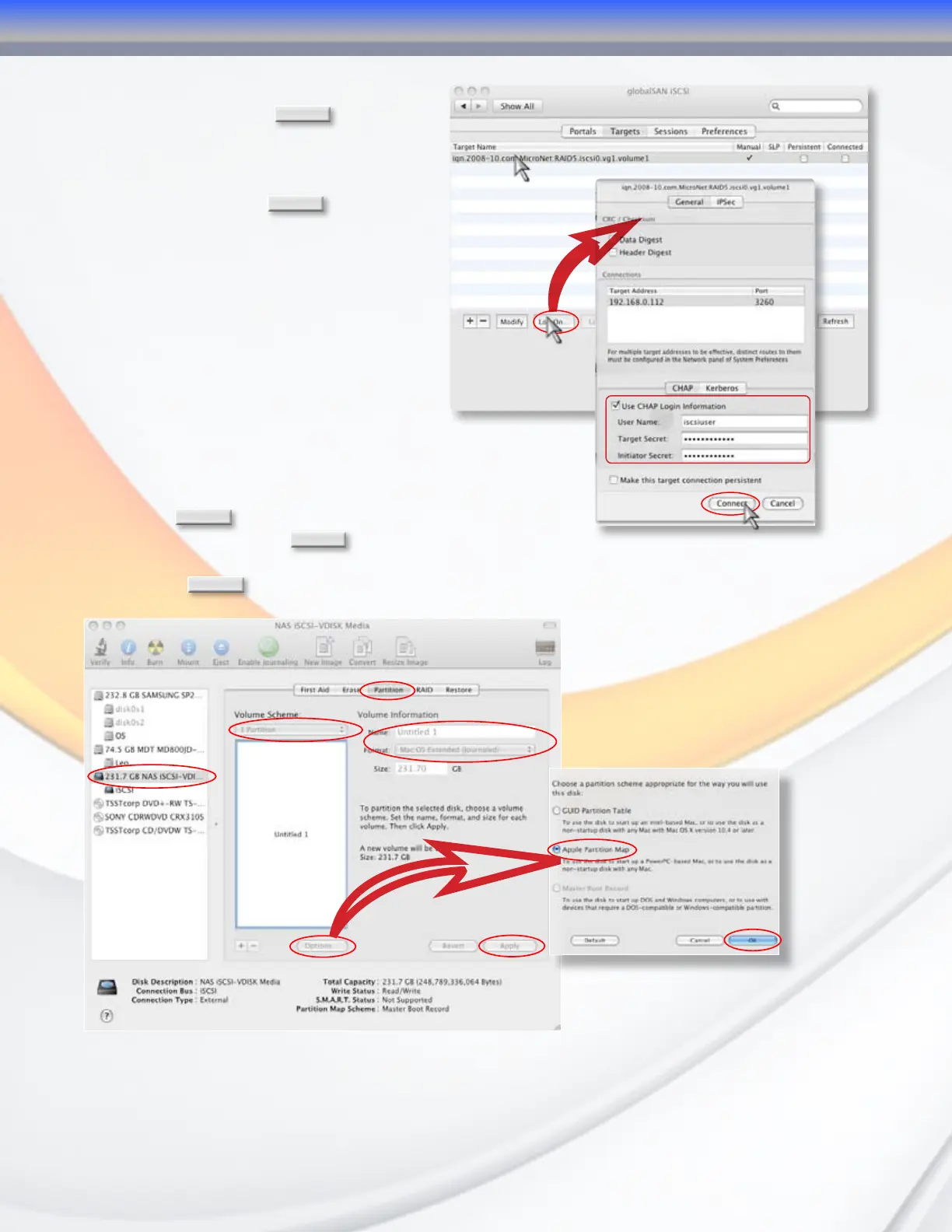
3.2.4 Select the MaxNAS IQN from the
target list and click
Log On
. The iSCSI
connection screen will appear. If you
enabled CHAP, enter your CHAP username
and password in the CHAP security area
(ss illustrated). Click
Connect
to complete
the operation.
3.2.5 Launch the “Disk Utility” application
located under Applications/Utilities folder.
3.2.6 Highlight your new drive and select
the “Partition” tab
3.2.7 Select the new partition map type.
3.2.8 Select the desired file system format and volume name
for each partition in the volume scheme (optional.)
3.2.9 Click
Options
. Select “Apple Partition Map” or “GUID” in
the dialog box and click
OK
.
3.2.10 Click
Apply
. Your MaxNAS iSCSI volume is ready to use!
3.2.6
3.2.6
3.2.7
3.2.8
3.2.9
3.2.10
4-Connecting Users



 To Next Page