Home
MicroNet
Wireless Access Point
SP918GK
Page 14 (Status and Information)
MicroNet SP918GK - Status and Information
46 pages
Manual
Save Page as PDF
To Next Page
To Next Page
To Previous Page
To Previous Page
Loading...
Wireless LAN Access Point Configuration
3.2.1
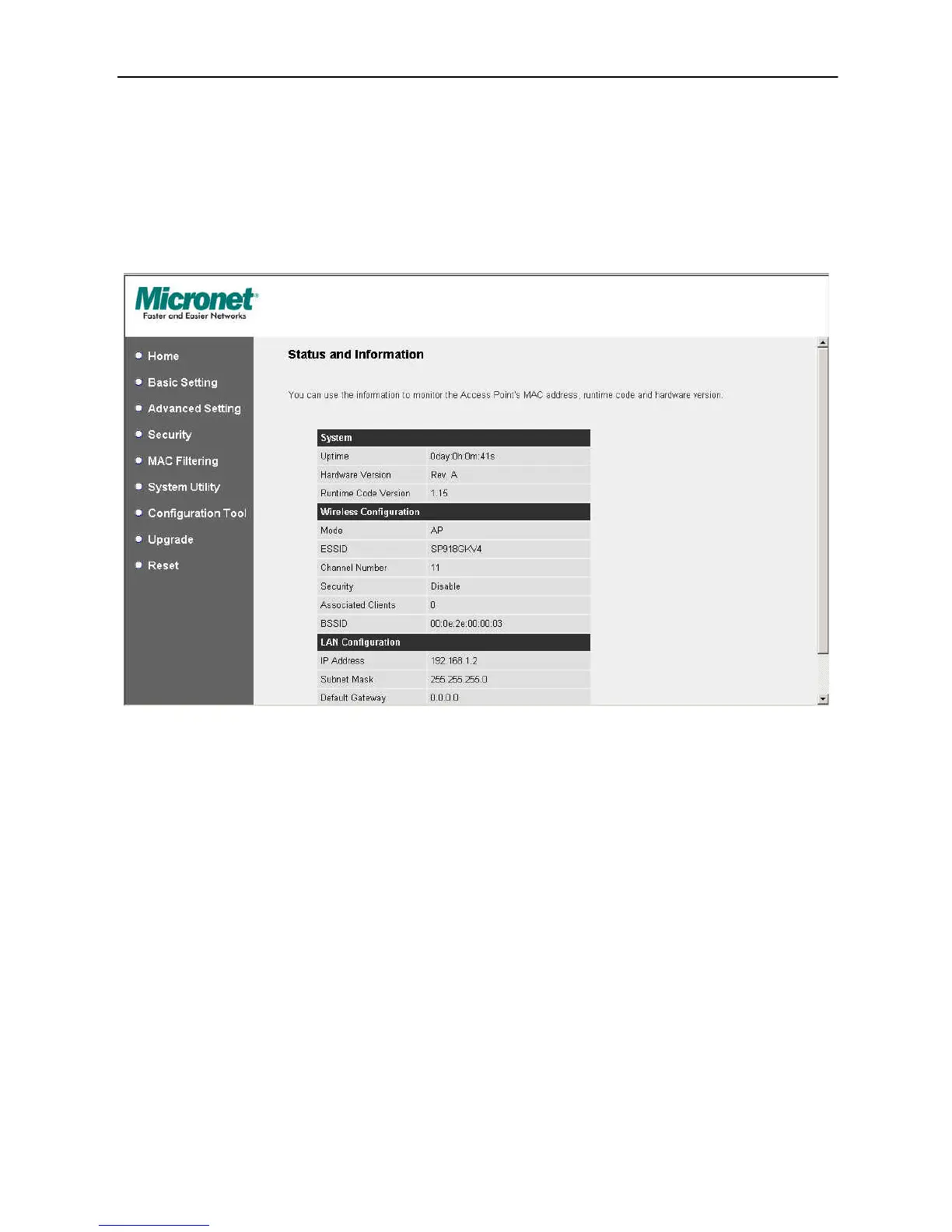
Status and Information
On this screen, you can see the general
information of the Access Point including
Alias Name, Firmware Version, ESSID, Ch
annel Number, Status, IP Address, MAC
Address, etc.
12
13
15
Table of Contents
Main Page
Default Chapter
2
Table of Contents
2
Chapter 1 Introduction
3
Package Contents
4
Features
4
Specifications
4
Physical Description
5
Chapter 2 Wireless LAN Access Point Connection
7
Chapter 3 Wireless LAN Access Point Configuration
8
Getting Started
8
Configuring the Access Point
13
Status and Information
14
Wireless Setting
15
Mac Address
26
Wireless Site Survey
27
Advanced Setting
28
Security
30
X Wep Static Key
33
Wpa Radius
35
MAC Address Filtering
37
System Utility
39
Dhcp Server Setting
40
Configuration Tool
42
Firmware Upgrade
43
Reset
43
Chapter 4 Troubleshooting
45



 To Next Page