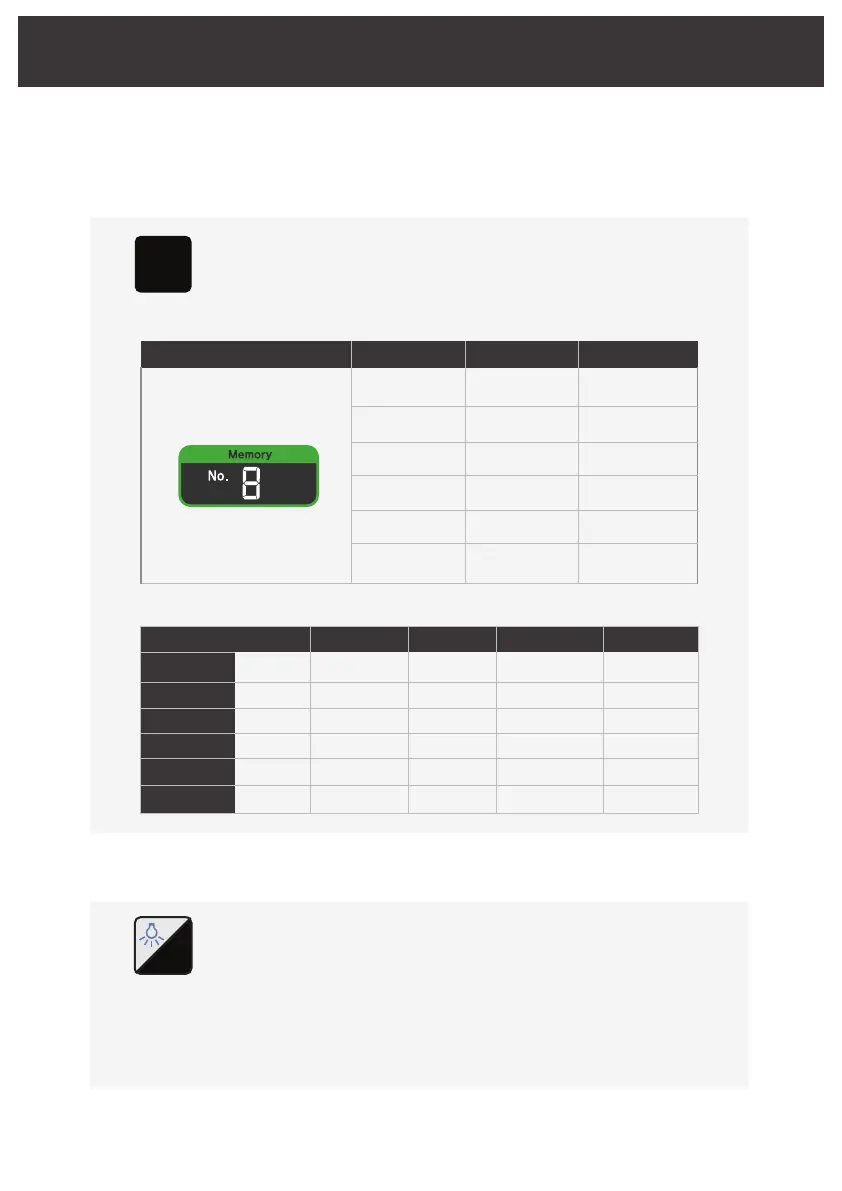
5.3 Memory function
It loads memory address where detailed figures (Gear ratio, Torque,
Speed, For/Rev, Coolant) of each function in program are saved.
Memory address alters in turn from number 1 to 9 upon pressing
Memory button each time.
Memory
Button
Chapter 5. Operation
5.3.1 Memory number
M
It saves detailed figures in memory which are currently set
(Gear ratio, Torque, Speed, For/Rev, Coolant) for each function in program.
Press and hold the memory button for 2 seconds and the border with the
memory number flashes along with a beep.
Press the memory button to select a memory address to store the number,
and press the system button for 2 seconds, the frame with the memory
number will flash alternately, and the frame will be off with a beep sound,
then the saving is complete.
5.3.2 Saving data
Program
Drilling
Tapping
Remove tap
Implant
Remove
Lock screw
Gear ratio
20:1
20:1
20:1
20:1
20:1
20:1
Torque[Ncm]
55
40
40
40
55
10
Speed[rpm]
1,500
50
50
50
50
50
Motor diriection
Foward
Foward
Reverse
Foward
Reverse
Foward
Coolant level
4
3
3
3
0
0
LCD DIsplay Memory1
① Drilling
set value
② Tapping
set value
③ Remove tap
set value
④ Implant
set value
⑤ Remove
set value
⑥ Lock screw
set value
① Drilling
set value
② Tapping
set value
③ Remove tap
set value
④ Implant
set value
⑤ Remove
set value
⑥ Lock screw
set value
① Drilling
set value
② Tapping
set value
③ Remove tap
set value
④ Implant
set value
⑤ Remove
set value
⑥ Lock screw
set value
Memory2 Memory3
※ Initial setting (Factory settings) : Memory
15/24
System
Button
S



 To Next Page